Prevent Restore logo

Prevent Restore 2026 v122

  • User Rating:
    ★★★★★
    ★★★★★
    0.0 0Votes
  • Requirements:
    Windows
  • Version: 2026 v122
  • Latest updated: 1 week ago
  • License: Freeware  
  • Publisher: Clean Space LTD
  • Size: 0.3 MB
× app stores

Prevent Restore is a specialized security utility designed to permanently erase traces of previously deleted files and prevent them from being recovered using data recovery software. While deleting files or emptying the Recycle Bin may seem sufficient, much of that data can often remain recoverable until it is overwritten. The software focuses on securely overwriting deleted data using recognized wiping methods, helping users protect sensitive information from unauthorized recovery attempts.

Features of Prevent Restore

  • Prevents recovery of previously deleted files and folders
  • Securely overwrites deleted data on storage devices
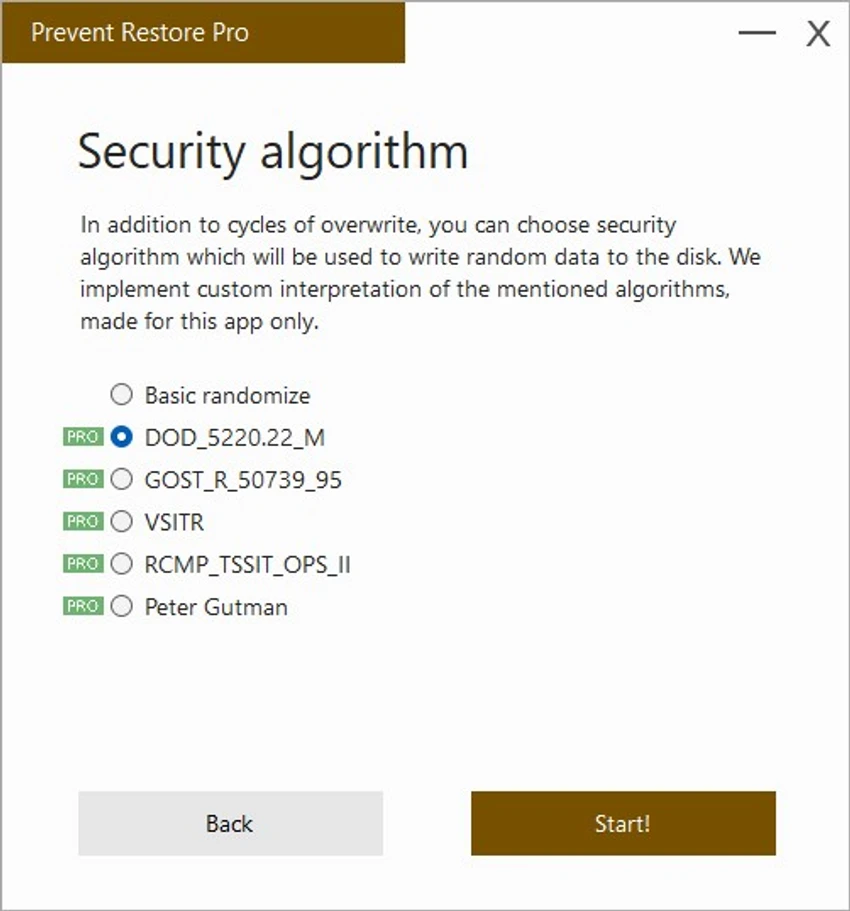
  • Supports multiple data wiping algorithms, including DoD 5220.22 and Gutmann methods
  • Fills unused disk space to eliminate recoverable file remnants
  • Works with internal and external storage devices
  • Supports USB flash drives, SSDs, memory sticks, and other removable media
  • Helps erase traces of deleted data across storage volumes
  • Can wipe the Windows paging file (virtual memory cache)
  • Removes cached personal information that may contain usernames and passwords
  • Designed for Windows 10 and Windows 11 (64-bit)

User Experience

Using Prevent Restore is relatively straightforward. The software is designed around a single core objective: making previously deleted files unrecoverable. Rather than functioning as a traditional file manager or cleanup tool, it focuses on securely overwriting free disk space where deleted data may still exist. For users concerned about privacy, the ability to wipe traces left behind after emptying the Recycle Bin adds an extra layer of protection. This can be particularly useful when preparing a computer for resale, sharing storage devices, or handling confidential information. The option to process removable storage devices extends the software's usefulness beyond internal drives. Additionally, the capability to erase the Windows paging file helps reduce the risk of sensitive information remaining in temporary system storage.

Who Should Use Prevent Restore?

  • Privacy-conscious home users
  • Professionals handling sensitive documents
  • Small businesses protecting confidential information
  • Users preparing PCs for resale or disposal
  • Anyone concerned about file recovery software retrieving deleted data
  • Users who regularly work with removable storage devices

Conclusion

Prevent Restore is a practical security utility for anyone who wants deleted files to stay deleted. By securely overwriting recoverable data and supporting established wiping algorithms, it helps reduce the risk of sensitive information being restored by recovery tools.

Pros & Cons

Pros

  • Effectively prevents recovery of deleted files
  • Supports recognized secure wiping algorithms
  • Works with internal and removable storage devices
  • Can wipe Windows paging files
  • Useful for privacy-conscious users
  • Simple, focused functionality
  • Supports modern Windows versions

Cons

  • Specialized tool with a limited scope
  • Cannot be used on CD or DVD media
  • Secure wiping operations may take time depending on drive size and selected algorithm

Frequently Asked Questions

What is Prevent Restore?

Prevent Restore is a Windows utility that securely overwrites deleted data to prevent files and folders from being recovered with recovery software.

How does Prevent Restore work?

The software fills unused disk space with overwrite data, replacing remnants of previously deleted files and making recovery significantly more difficult.

Does Prevent Restore support SSDs and USB drives?

Yes. The software can wipe deleted file traces on SSDs, USB flash drives, memory sticks, and other removable storage devices.

What wiping methods are available?

Prevent Restore supports several secure overwrite algorithms, including DoD 5220.22 and Gutmann methods.

Can it erase the Windows paging file?

Yes. The software can erase the Windows paging file, which may contain cached personal information and system data.

Can Prevent Restore be used on CDs or DVDs?

No. The software cannot securely wipe data from CD or DVD media. Physical destruction is recommended when data security is required.

What operating systems are supported?

Prevent Restore supports 64-bit versions of Windows 10 and Windows 11.

Recommended apps [Freeware]:
  • Clean Space 2026 v721 Clean Space logo a Windows utility for removing system junk files, cache, logs, and improving online privacy protection.
  • HeidiSQL 12.20 HeidiSQL logo manage MySQL, MSSQL, and databases, run queries, edit tables, and export data on Windows
  • 1Click Uninstaller 4.0 1Click Uninstaller logo simple Windows uninstaller tool with context menu removal, leftover cleanup, and process termination features
  • Evernote 11.22.4.22484 Evernote logo Capture, organize, sync, and access notes, tasks, web content, and research across all your devices
  • R-Photo 2.0.180048 R-Photo logo Restore media from HDDs, SSDs, SD cards, USB drives, RAID, and more
  • ProgDVB 7.72.0 ProgDVB logo a multimedia player for watching digital TV, IPTV, satellite broadcasts, and online radio on Windows
Recommended apps [Shareware]:
  • Adobe After Effects 2026 Adobe After Effects logo advanced motion graphics, visual effects, compositing, and animation tools for creators.
  • EF Commander 26.06 EF Commander logo a feature-rich Windows file manager with FTP, media tools, archiving, and advanced file control
  • Robin YouTube Video Downloader Pro 7.5.3 Robin YouTube Video Downloader Pro logo Download videos, audio, and 4K content from popular sites with fast acceleration and built-in conversion tools
  • DivX 11.15.0 DivX logo powerful video player and converter that supports 4K playback, HD video conversion, and DLNA media streaming
  • Pdf995 26.1 Pdf995 logo Create high-quality PDF files from any application with Pdf995 Printer Driver using a lightweight virtual printer
  • XnView MP 1.11.5 XnView MP logo a powerful image viewer, editor, and batch converter supporting 500+ image formats on Windows