FotoSketcher logo

FotoSketcher 4.40

  • User Rating:
    ★★★★★
    ★★★★★
    0.0 ★ 0Votes
  • Requirements:
    Windows
  • Version: 4.40
  • Latest updated: 2 weeks ago
  • License: Freeware  
  • Publisher: David Thoiron
  • Size: 35 MB
× app stores

FotoSketcher is an image editing application designed to transform digital photos into artistic drawings and sketches with just a few simple steps. The software allows users to convert ordinary images into creative artwork using a variety of drawing styles, including pencil sketches and ink-based effects.

The application supports popular image formats such as JPG, BMP, and PNG, making it easy to work with common photo files. Beyond its main sketch conversion function, FotoSketcher includes basic photo enhancement tools that allow users to adjust contrast, sharpness, brightness, color intensity, and other image properties before creating the final artwork.

FotoSketcher provides more than 20 artistic styles and effects, giving users different ways to transform their photos. The software can also be used for creating personalized gifts, greeting cards, printed artwork, or decorative images. Additional editing tools include resizing, rotating, adding frames, and inserting text into finished creations.

With its simple interface, multilingual support, and batch processing capability, FotoSketcher is designed for both casual users and creative users who want to experiment with turning photos into digital artwork without requiring advanced design skills.

Features of FotoSketcher

  • Converts photos into sketches and artistic drawings
  • Supports JPG, BMP, and PNG image formats
  • Includes more than 20 drawing and artistic styles
  • Provides pencil and ink sketch effects
  • Allows basic photo editing and retouching
  • Adjusts contrast, brightness, sharpness, and color saturation
  • Includes image filters and creative effects
  • Supports resizing and image rotation
  • Allows adding frames and text to images
  • Supports batch processing for multiple images
  • Provides multiple interface skins
  • Available in more than 20 languages

Interface and Usability

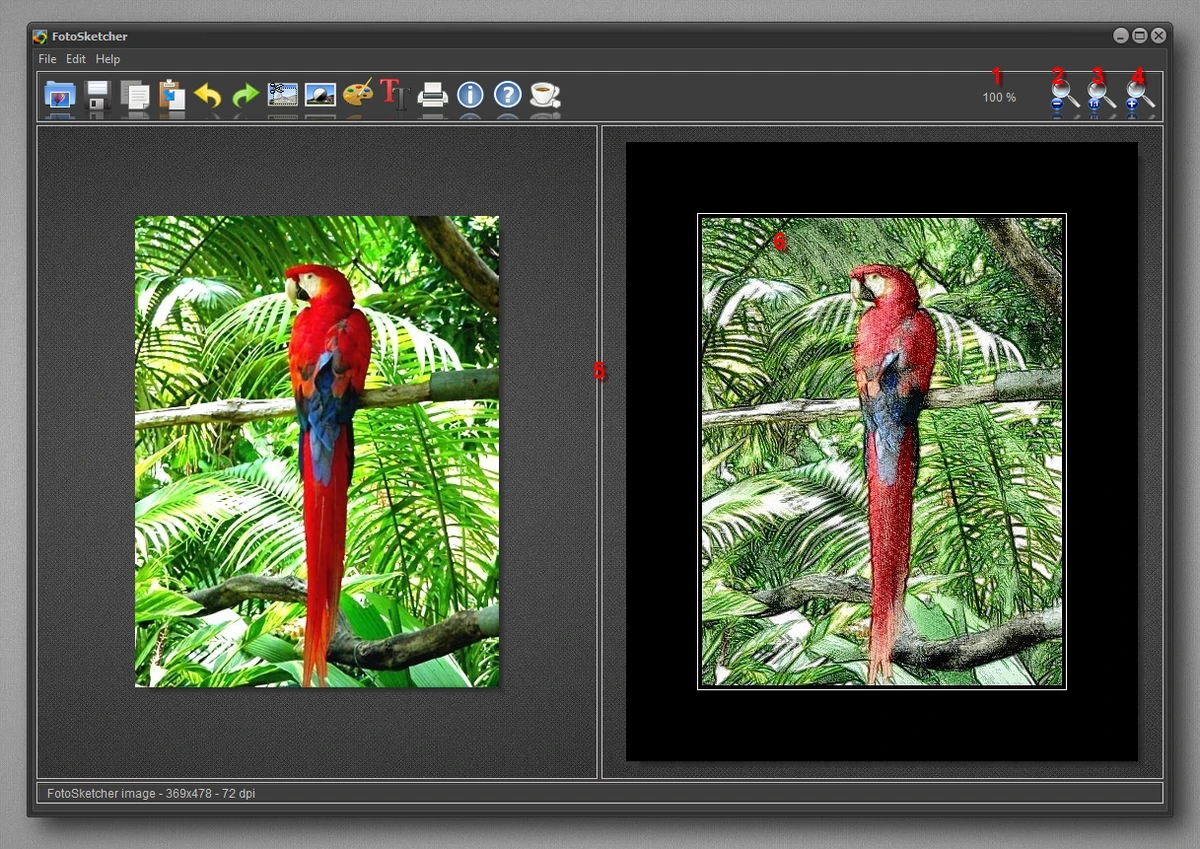
After using FotoSketcher, I found the application easy to navigate despite offering a wide range of creative tools. The interface is organized into clear sections, allowing users to quickly access sketch effects, editing options, and image adjustments.

The main workflow is simple: load an image, choose an artistic style, adjust settings, and create the final result. Users without professional photo editing experience can quickly experiment with different effects, while more advanced users can fine-tune image adjustments before applying transformations.

The batch processing feature is useful for users who want to convert multiple photos into artwork at the same time. Although FotoSketcher is not designed as a full professional image editor, its focused tools work well for creating artistic photo effects.

Who Should Use FotoSketcher?

  • Users who want to create sketch-style images
  • Beginners interested in digital art effects
  • People creating personalized gifts or greeting cards
  • Photography enthusiasts looking for creative filters
  • Users who need simple photo retouching tools
  • Anyone wanting to transform photos into artwork

Conclusion

FotoSketcher is a creative and accessible image editing tool that makes it easy to transform everyday photos into sketches and digital artwork. Its variety of artistic styles, simple controls, and basic enhancement features provide an enjoyable way to experiment with photo effects.

Pros & Cons

✓

Pros

  • Easy photo-to-sketch conversion
  • More than 20 artistic styles
  • Simple interface for beginners
  • Includes basic photo editing tools
  • Supports batch processing
  • Supports multiple image formats
  • Available in many languages
  • Lightweight alternative to complex design software
✕

Cons

  • Limited compared with professional image editing applications
  • Focused mainly on artistic effects rather than advanced editing

Frequently Asked Questions

What is FotoSketcher used for?

FotoSketcher is used to convert digital photos into sketches, drawings, and artistic images using various visual styles and effects.

Which image formats does FotoSketcher support?

FotoSketcher supports JPG, BMP, and PNG image formats.

Can FotoSketcher edit normal photos?

Yes. In addition to creating sketches, FotoSketcher includes basic editing tools for adjusting contrast, brightness, sharpness, color saturation, resizing, and rotation.

Does FotoSketcher include different drawing styles?

Yes. FotoSketcher provides more than 20 artistic styles, including pencil and ink-style effects.

Can FotoSketcher process multiple images at once?

Yes. The application includes batch processing features that allow users to modify multiple images simultaneously.

Who should use FotoSketcher?

FotoSketcher is suitable for beginners, photography enthusiasts, and anyone who wants an easy way to transform photos into creative artwork.

Recommended apps [Freeware]:
  • PortKiller 3.3.3 PortKiller logo a network utility for monitoring TCP ports, managing processes, and handling tunnels on Windows.
  • KMPlayer 2026.6.26.11 KMPlayer logo high-performance 4K/8K media player with ad-free UI, codec support, and YouTube playback tools
  • F-Secure Uninstallation Tool 19.3.15 F-Secure Uninstallation Tool logo completely removes F-Secure security products, including files, services, and registry entries from Windows
  • Avast Free Antivirus 26.6.11050 Avast Free Antivirus logo real-time malware protection, phishing defense, and scam detection with minimal impact on Windows performance
  • StaticDesktopRuler 1.04 StaticDesktopRuler logo Windows utility that adds customizable on-screen rulers to improve alignment, navigation, and productivity on large monitors
  • Intel Ethernet Adapter Complete Driver Pack 31.2.2 Intel Ethernet Adapter Complete Driver Pack logo Install and update Intel Ethernet drivers for supported network adapters with a complete collection for Windows, Linux, and FreeBSD.
Recommended apps [Shareware]:
  • Charles 5.2.0 Charles logo HTTP proxy tool for web debugging, allowing developers to inspect, modify, and analyze network traffic in real time
  • AVG Driver Updater 26.5.10990.0 AVG Driver Updater logo automatically scan and update outdated drivers to improve PC performance and stability on Windows.
  • 4DDiG File Repair 4.4.2.9 4DDiG File Repair logo a Windows tool for repairing damaged photos and videos in batch mode with a simple, automated workflow
  • XnView MP 1.11.5 XnView MP logo a powerful image viewer, editor, and batch converter supporting 500+ image formats on Windows
  • MixPad 14.19 MixPad logo Record, mix, and edit unlimited audio tracks with MixPad, an intuitive multitrack audio production software
  • Zoom Player STREAM 22.5 Zoom Player STREAM logo Stream live TV and VOD content with 4K HDR playback, EPG support, customizable controls, and advanced media engine options.