Actual Window Rollup logo

Actual Window Rollup 8.15.4

  • User Rating:
    ★★★★★
    ★★★★★
    0.0 0Votes
  • Requirements:
    Windows
  • Version: 8.15.4
  • Latest updated: 3 weeks ago
  • License: Free Trial  
  • Publisher: Actual Tools
  • Size: 9 MB
× app stores

Actual Window Rollup is a Windows utility designed to improve window management by introducing a “roll-up” feature similar to those found in Unix, Linux, and macOS-style window managers. Instead of minimizing a window to the taskbar, users can collapse it into its title bar, leaving only the header visible.

This approach helps reduce desktop clutter while keeping the window instantly accessible. With a single click or hotkey, users can roll windows up or restore them, making multitasking faster and more fluid. The software is particularly useful for users who prefer quick visual organization without fully hiding or minimizing applications.

Features of Actual Window Rollup

  • Roll up windows into the title bar like a “shade”
  • Restore rolled-up windows with a single click
  • Add a dedicated Roll Up button to every window title bar
  • Access roll-up function via system menu options
  • Optional hotkey support for faster control
  • Automatic roll-up behavior for selected applications
  • Quickly hide window content while keeping it accessible
  • Faster alternative to minimize and restore workflow
  • Reduces desktop and taskbar clutter
  • Works across most Windows applications
  • Lightweight background operation
  • Inspired by Unix/Linux window management systems

Interface and Usability

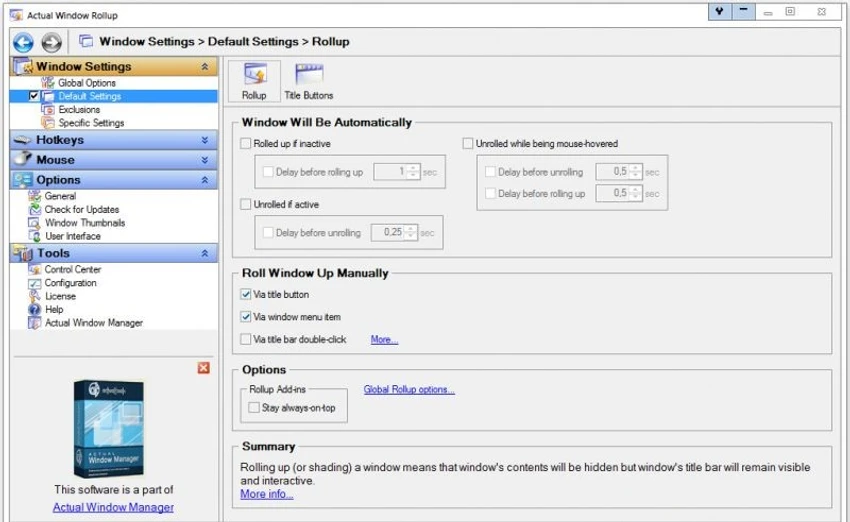
Actual Window Rollup integrates directly into the Windows interface by adding a roll-up button to each window’s title bar. Users can also access the feature through the system menu or assigned hotkeys. Once activated, a window collapses vertically into its title bar, freeing screen space without fully closing or minimizing the application. This makes it easy to switch focus between multiple windows while maintaining quick access to everything currently open. The tool is simple by design, requiring minimal setup. Its functionality is immediately visible after installation, making it easy for users to adopt into daily workflows.

Who Should Use Actual Window Rollup?

  • Users who work with many open windows simultaneously
  • Developers managing code, documentation, and tools
  • Office workers handling multiple documents or browsers
  • Users familiar with Linux or macOS window behavior
  • Multitaskers who want faster window switching
  • Anyone seeking a cleaner and more organized desktop

Conclusion

Actual Window Rollup is a simple yet effective tool for improving desktop organization and multitasking efficiency. By replacing full minimization with a fast roll-up mechanism, it helps users keep their workspace clean while maintaining instant access to active windows.

Pros & Cons

Pros

  • Fast roll-up window management
  • Reduces desktop and taskbar clutter
  • Simple one-click or hotkey control
  • Lightweight and easy to use
  • Keeps windows accessible without minimizing
  • Inspired by efficient Linux-style workflows
  • Works with most Windows applications

Cons

  • Limited feature set beyond roll-up functionality
  • Not essential for simple single-task workflows
  • Requires adjustment for users unfamiliar with roll-up behavior
  • No advanced workspace automation features

Frequently Asked Questions

What is Actual Window Rollup used for?

Actual Window Rollup is used to collapse application windows into their title bars, helping users save screen space while keeping windows accessible.

How does window roll-up work?

Instead of minimizing a window to the taskbar, the roll-up feature hides the content and leaves only the title bar visible.

Can I still use the window when it is rolled up?

Yes. You can quickly restore the full window with a click or hotkey.

Is this similar to Linux window shading?

Yes. The roll-up behavior is inspired by Linux and Unix-style window managers where windows can be “shaded.”

Does it support automatic roll-up?

Yes. You can configure certain windows to roll up automatically based on rules or settings.

Is it easy to use?

Yes. It integrates directly into the window title bar and requires minimal configuration.

Recommended apps [Freeware]:
  • WSCC - Windows System Control Center 10.0.4.0 WSCC - Windows System Control Center logo Windows utility manager that installs, organizes, and runs Sysinternals and system tools from one central interface
  • ExpanDrive 2026.06.11 ExpanDrive logo mounts cloud storage and remote servers as local drives for seamless file access in Windows Explorer
  • TeamViewer 15.79.4 TeamViewer logo a secure remote desktop tool for PC control, file transfer, and remote support worldwide
  • VovSoft VCF Editor 2.6 VovSoft VCF Editor logo offline vCard editor for managing, editing, and exporting contact information securely
  • Krita 6.0.2.1 Krita logo a free digital painting software for artists, offering advanced brushes, layers, and professional drawing tools
  • Doro PDF Writer 2.27 Doro PDF Writer logo Create PDF files from any printable Windows application with encryption, customization options, and a simple virtual printer.
Recommended apps [Shareware]:
  • Centurion Setup 51.0 Centurion Setup logo Windows installer builder that creates compressed, self-contained executables with multilingual support
  • CleverPrint 9.3.73976 CleverPrint logo virtual printing utility that optimizes print jobs, saves paper and ink, adds watermarks, and exports documents to PDF or images
  • Coolmuster Mobile Transfer 4.1.18 Coolmuster Mobile Transfer logo Transfer contacts, photos, messages, and more between Android and iOS devices with Coolmuster Mobile Transfer for Windows
  • Draftable Desktop 26.6.200 Draftable Desktop logo compares PDF, Word, Excel, and PowerPoint files side by side securely on your computer without uploading documents online
  • Chris-PC RAM Booster 7.26.0706 Chris-PC RAM Booster logo manages Windows memory usage, optimizes RAM performance, and helps improve application responsiveness
  • ChrisPC Anonymous Proxy Pro 9.26.0714 ChrisPC Anonymous Proxy Pro logo Browse anonymously, access geo-restricted websites, and protect your online privacy using proxy servers and flexible browsing modes.