Cyber Privacy Suite logo

Cyber Privacy Suite 4.5.5

  • User Rating:
    ★★★★★
    ★★★★★
    0.0 0Votes
  • Requirements:
    Windows
  • Version: 4.5.5
  • Latest updated: 3 weeks ago
  • License: Free Trial  
  • Publisher: ShieldApps Software
  • Size: 60 MB
× app stores

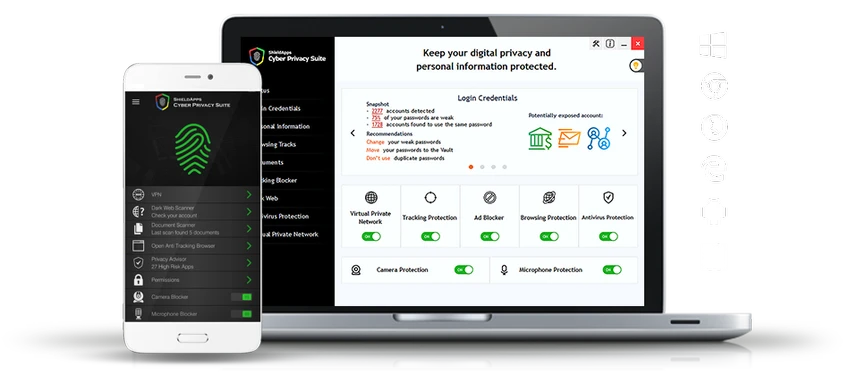
Cyber Privacy Suite is designed as an all-in-one privacy and security solution for Windows users who want stronger control over their personal data and online activity. Based on its feature set, the software focuses heavily on protecting sensitive information, securing browsing sessions, and reducing exposure to online tracking. The suite aims to address common digital threats such as identity tracking, phishing attempts, unsafe websites, and unauthorized access to devices like webcams and microphones. It also introduces tools for encrypting credentials and securing sensitive documents in a centralized protected environment.

Features of Cyber Privacy Suite

  • Protects webcams and microphones from unauthorized access attempts
  • Encrypts login credentials stored in a secure digital vault
  • Identifies exposed personal information on your device
  • Blocks tracking cookies and reduces online fingerprinting
  • Includes ad-blocking for smoother browsing experience
  • Secures internet traffic using VPN gateways (20+ global locations)
  • Detects sensitive documents stored locally on the device
  • Encrypts financial and medical files for added protection
  • Blocks access to dangerous or malicious websites
  • Provides real-time protection against phishing and privacy threats
  • Scans the dark web for potential data exposure
  • Helps secure documents containing sensitive personal information

Interface and Usability

The official description does not provide detailed information about the interface design or user experience layout. However, based on its positioning as a “suite,” Cyber Privacy Suite is expected to combine multiple security tools into a single dashboard for easier management. Users should anticipate a centralized control panel where privacy, VPN, and security features can be toggled or configured. No specific details about customization, UI responsiveness, or onboarding experience are available from the provided data.

Who Should Use Cyber Privacy Suite?

  • Users concerned about online tracking and identity fingerprinting
  • Individuals who frequently use public or unsecured networks
  • People who want basic VPN access integrated with security tools
  • Users looking to protect webcams, microphones, and sensitive documents
  • Those who prefer an all-in-one privacy-focused security suite

Conclusion

Cyber Privacy Suite positions itself as a comprehensive privacy protection tool combining VPN access, anti-tracking features, and sensitive data protection in one platform. While the feature list is broad and privacy-focused, the lack of available user feedback and technical transparency makes it harder to evaluate real-world performance.

Pros & Cons

Pros

  • Offers multiple privacy tools in one package
  • Includes VPN access with multiple global connection options
  • Protects against tracking, phishing, and unsafe websites
  • Provides webcam and microphone protection
  • Encrypts sensitive files and login credentials

Cons

  • No independent performance benchmarks available
  • Lacks transparent update history information
  • No verified user ratings included in the data

Frequently Asked Questions

What is Cyber Privacy Suite used for?

Cyber Privacy Suite is designed to enhance digital privacy by protecting users from tracking, securing sensitive data, and providing tools such as VPN access and phishing protection.

Does Cyber Privacy Suite include a VPN?

Yes, it includes a built-in VPN feature that offers more than 20 global connection options for safer and more private internet browsing.

Can Cyber Privacy Suite protect webcams and microphones?

Yes, the software is designed to help block unauthorized access attempts to webcams and microphones, improving device-level privacy.

Does Cyber Privacy Suite encrypt personal data?

It provides encryption for login credentials and allows users to secure sensitive files such as financial and medical documents in a protected environment.

Can it block ads and tracking cookies?

Yes, it includes features that block tracking cookies and help reduce unwanted advertisements for a smoother browsing experience.

Is Cyber Privacy Suite compatible with modern Windows systems?

Yes, it supports a wide range of Windows versions including Windows XP, Vista, 7, 8, 10, and 11.

Recommended apps [Freeware]:
  • Bulk Crap Uninstaller 6.2 Bulk Crap Uninstaller logo a free Windows tool that quickly removes multiple applications and cleans leftover files
  • Markdown Monster 4.4.4 Markdown Monster logo a powerful Windows Markdown editor with live preview, HTML/PDF export, Git integration, and blogging tools
  • Minimal Firewall 2.8.5 Minimal Firewall logo enhances Windows Firewall by blocking unknown connections and giving you full control over app network access
  • Kdenlive 26.04.3 Kdenlive logo Powerful open-source video editing solution with multi-track editing, advanced effects, broad format support, and flexible workflows.
  • HWiNFO 8.50 HWiNFO logo Analyze hardware components, monitor system sensors, generate detailed reports, and evaluate PC performance with a free diagnostic tool.
  • MultiPack .NET Windows Desktop Installer 2.2 MultiPack .NET Windows Desktop Installer logo Install multiple Microsoft .NET Windows Desktop Runtime versions in one package to improve application compatibility and performance.
Recommended apps [Shareware]:
  • All Video Downloader Pro 10.4.7 All Video Downloader Pro logo Download videos, playlists, subtitles, and audio from popular sites with built-in conversion and playback tools
  • Tomabo MP4 Downloader 6.4.9 Tomabo MP4 Downloader logo downloads videos, playlists, subtitles, and audio while offering format conversion tools.
  • Dup Scout 18.2.38 Dup Scout logo finds, analyzes, reports, and removes duplicate files across disks, networks, and NAS storage devices
  • WinCam 4.0 WinCam logo Record screens, applications, audio, and tutorials with a lightweight Windows recorder featuring real-time capture and editing tools.
  • Zoom Player STREAM 22.5 Zoom Player STREAM logo Stream live TV and VOD content with 4K HDR playback, EPG support, customizable controls, and advanced media engine options.
  • SecureCRT 9.7.3 Build 3916 SecureCRT logo Secure remote connections with SSH, Telnet, scripting, session management, and secure file transfer tools for professionals.