ImTranslator logo

ImTranslator 20.1

  • User Rating:
    ★★★★★
    ★★★★★
    0.0 ★ 0Votes
  • Requirements:
    Windows
  • Version: 20.1
  • Latest updated: 2 weeks ago
  • License: Freeware  
  • Publisher: ImTranslator
  • Size: 3 MB
× app stores

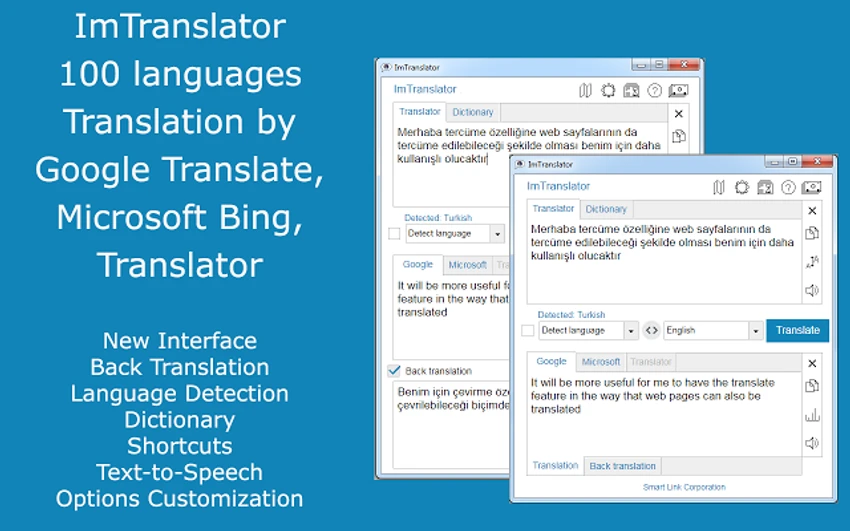
ImTranslator is a feature-rich browser extension designed to make translating text, phrases, and entire web pages quick and convenient across Chrome, Firefox, and Opera. Supporting translation between more than 90 languages through multiple translation providers, it offers flexibility for everyday browsing, research, and multilingual communication. While using it, I found that the combination of several translation modes, built-in dictionary support, translation history, and text-to-speech tools makes it much more versatile than a basic translation extension. Instead of switching between websites, everything is available directly inside the browser, helping streamline translation tasks during daily browsing.

Features of ImTranslator

  • Supports translation between more than 90 languages
  • Uses multiple translation providers, including Google and Microsoft
  • Standalone translator with Translator and Dictionary modes
  • Pop-up Bubble Translator for translating selected text
  • Inline Translator inserts translations directly into web pages
  • Webpage Translation for translating entire websites
  • Mouseover translation option during webpage translation
  • Built-in Text-to-Speech in multiple languages
  • Integrated dictionary in several translation modes
  • Automatic language detection
  • Back translation for verification
  • Translation history for quickly reusing previous translations
  • Customizable keyboard shortcuts
  • User interface available in 22 languages
  • Extensive customization options for each translation tool
  • Option to disable automatic language detection
  • Preset language preferences for faster translations

Interface and Usability

ImTranslator integrates naturally into supported browsers without interrupting the browsing experience. After installation, its different translation tools are easy to access depending on the task, whether translating selected text, a full webpage, or individual words.

During regular use, the translation history proved especially practical because frequently translated phrases could be reused without repeating the process. Language preferences can also be predefined, reducing the number of steps required for repeated translations. The interface remains organized despite offering multiple translation modes, and the available customization options allow users to tailor the extension to their workflow.

Who Should Use ImTranslator?

  • Students reading multilingual resources
  • Researchers translating foreign-language content
  • Professionals communicating across multiple languages
  • Travelers browsing international websites
  • Language learners who benefit from dictionary and text-to-speech features
  • Anyone who frequently translates webpages without leaving their browser

Conclusion & Recommendation

ImTranslator offers considerably more than basic text translation by combining multiple translation tools, dictionary functionality, text-to-speech, and webpage translation into a single browser extension. The translation history and customization options make it especially useful for users who work with multilingual content on a regular basis. If you need a flexible browser-based translation solution for Chrome, Firefox, or Opera, ImTranslator is worth considering for both everyday browsing and professional translation tasks.

Pros & Cons

✓

Pros

  • Supports more than 90 languages
  • Multiple translation providers
  • Several translation modes for different workflows
  • Built-in dictionary and text-to-speech
  • Translation history saves time
  • Customizable shortcuts and settings
  • Automatic language detection
  • Available for Chrome, Firefox, and Opera
✕

Cons

  • Browser extension only, not described as a standalone desktop application

Frequently Asked Questions

What browsers support ImTranslator?

ImTranslator is available for Google Chrome, Mozilla Firefox, and Opera. It integrates directly into these browsers, allowing you to translate text, phrases, and web pages without leaving your current tab.

How many languages does ImTranslator support?

ImTranslator supports translation between more than 90 languages through multiple translation providers, including Google and Microsoft, making it suitable for a wide range of multilingual tasks.

Can ImTranslator translate entire web pages?

Yes. ImTranslator includes a Webpage Translation feature that can translate complete websites. It also offers a mouseover translation option for viewing translations while browsing.

Does ImTranslator include text-to-speech?

Yes. ImTranslator features built-in text-to-speech in multiple languages within the ImTranslator and Pop-up Bubble Translator tools. This can help users listen to the pronunciation of translated text.

What is the purpose of the translation history feature?

The translation history feature saves your previous translations, making it easy to revisit frequently used words and phrases without translating them again. This can improve productivity for users who regularly work with similar content.

Can I customize the translation settings?

Yes. ImTranslator allows you to customize keyboard shortcuts, set preferred target languages, personalize each translation tool, and even disable automatic language detection if you prefer to select the source language manually.

Recommended apps [Freeware]:
  • WinScan2PDF 9.77 WinScan2PDF logo scan documents and save them as PDFs or JPEGs with minimal setup and low CPU usage.
  • Audacity 3.7.8 Audacity logo Free open-source audio editor and recorder with multi-track editing, effects, audio analysis, and format conversion
  • Dolphin Emulator 2606 Dolphin Emulator logo play Nintendo GameCube and Wii games on PC with improved graphics and performance options
  • Media Player Classic Black Edition 1.9.0 Media Player Classic Black Edition logo a free media player with a modern dark interface and YouTube playback
  • TinyWall 3.5.1 TinyWall logo a lightweight Windows firewall manager offering simple controls, blocking rules, and zero ads
  • Clipboard Remote 2.0.1 Clipboard Remote logo Transfer text, URLs, and images securely across your devices over LAN or Wi-Fi with fast clipboard synchronization.
Recommended apps [Shareware]:
  • Wondershare PDFelement Professional 12.1.24 Wondershare PDFelement Professional logo a PDF editor for editing, converting, signing, and managing documents easily.
  • Kettler World Tours 3.0.4.20 Kettler World Tours logo Train indoors with real-world routes, GPS integration, and online racing using Kettler World Tours
  • DP Animation Maker 3.5.51 DP Animation Maker logo a simple Windows tool for creating animated images, GIFs, and videos with effects, objects, and music.
  • Zoom Player MAX 22.5 Zoom Player MAX logo Play DVD, Blu-ray, HD videos, and music with a lightweight media player featuring fast startup, subtitle support, and advanced controls.
  • Muziza YouTube Downloader Converter 9.5.7 Muziza YouTube Downloader Converter logo Download online videos, convert media files, extract audio, manage playlists, and optimize videos for multiple devices.
  • 3delite Duplicate Picture Finder 1.0.112.122 3delite Duplicate Picture Finder logo Find duplicate and similar pictures on your PC with image comparison, previews, EXIF details, and multi-threaded scanning tools.