FileLegit Windows Security & Privacy Password Managers Elcomsoft Distributed Password Recovery
Elcomsoft Distributed Password Recovery logo

Elcomsoft Distributed Password Recovery 5.0.1788

  • User Rating:
    ★★★★★
    ★★★★★
    0.0 ★ 0Votes
  • Requirements:
    Windows
  • Version: 5.0.1788
  • Latest updated: 3 weeks ago
  • License: Free Trial  
  • Publisher: Elcomsoft
  • Size: 417 MB
× app stores

Elcomsoft Distributed Password Recovery is a high-performance password recovery solution designed for enterprise environments, forensic specialists, and organizations that require access to encrypted data. It focuses on recovering complex passwords and unlocking protected documents by distributing computational workloads across multiple networked machines.

The software is built around a distributed computing model, allowing multiple workstations connected via LAN or the internet to contribute processing power. This makes it suitable for large-scale recovery tasks where speed and efficiency are critical. It supports both CPU and GPU acceleration, leveraging NVIDIA, AMD, and Intel graphics hardware to significantly increase recovery performance.

With support for modern GPU architectures and asynchronous processing, the tool is optimized for maximum hardware utilization. It is commonly used in professional environments such as digital forensics, data recovery services, and corporate IT security operations where access to encrypted files or systems is required under authorized conditions.

Features of Elcomsoft Distributed Password Recovery

  • Distributed password recovery across multiple networked computers
  • GPU acceleration using NVIDIA, AMD, and Intel graphics hardware
  • CPU fallback mode for systems without supported GPUs
  • Linear scalability across connected workstations
  • Support for heterogeneous hardware combinations
  • Optimized performance using asynchronous processing technology
  • 64-bit architecture for improved performance and stability
  • Support for modern encryption formats and enterprise applications
  • Designed for forensic, corporate, and government use cases

Interface and Usability

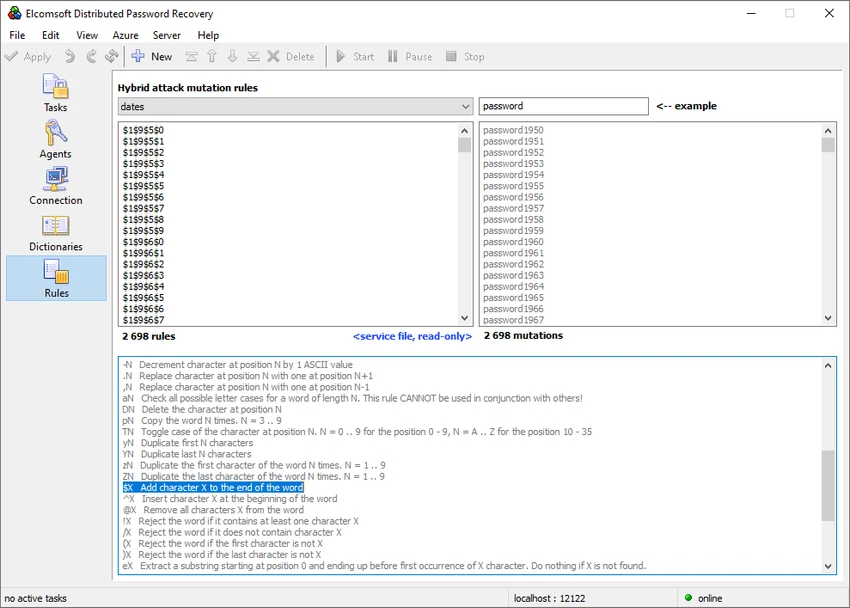
Elcomsoft Distributed Password Recovery is designed primarily for technical and enterprise users rather than general consumers. Its interface focuses on configuration of recovery tasks, hardware allocation, and distributed system management.

While it offers powerful control over recovery processes, it assumes familiarity with encryption concepts, hardware acceleration, and networked computing environments. This makes it more suitable for professional operators in forensic or IT security roles than casual users.

Who Should Use Elcomsoft Distributed Password Recovery?

This software is intended for forensic analysts, cybersecurity professionals, enterprise IT teams, and data recovery specialists who need to recover encrypted data or passwords in controlled and authorized environments. It is particularly useful in organizations with multiple high-performance workstations.

Conclusion

Elcomsoft Distributed Password Recovery is a highly specialized and powerful tool designed for large-scale password recovery operations. Its distributed architecture and GPU acceleration capabilities make it one of the most performance-oriented solutions in its category.

Pros & Cons

✓

Pros

  • Distributed computing for scalable performance
  • Strong GPU acceleration support (NVIDIA, AMD, Intel)
  • High-speed recovery for complex encryption
  • Supports modern 64-bit architecture
  • Suitable for enterprise and forensic workflows
✕

Cons

  • Requires advanced technical knowledge
  • Not designed for casual or home users
  • Complex setup and hardware configuration needed

Frequently Asked Questions

What is Elcomsoft Distributed Password Recovery used for?

It is used to recover lost or forgotten passwords and encryption keys from protected files and systems in professional environments.

Does it support GPU acceleration?

Yes. It supports GPU acceleration using NVIDIA, AMD, and Intel graphics hardware to improve recovery speed.

Can multiple computers be used together?

Yes. The software supports distributed recovery across multiple networked workstations for faster processing.

Who typically uses this software?

It is mainly used by forensic experts, cybersecurity professionals, government agencies, and enterprise IT teams.

Does it work on Windows Server systems?

Yes. It supports Windows Server versions including 2012, 2016, and 2019, as well as Windows desktop editions.

Is this software suitable for beginners?

No. It is a highly technical tool designed for professional and enterprise use, not for casual users.

Recommended apps [Freeware]:
  • FastCopy 5.11.3 FastCopy logo a lightweight Windows tool for ultra-fast file copying, syncing, and error-resilient data transfer
  • Tails 7.9.1 Tails logo a privacy-focused live operating system that enables anonymous browsing and secure communication
  • Disk Drill 6.3.1398.0 Disk Drill logo advanced data recovery software for Windows to restore deleted files from drives, USB, and partitions
  • F-Secure Uninstallation Tool 19.3.15 F-Secure Uninstallation Tool logo completely removes F-Secure security products, including files, services, and registry entries from Windows
  • LibreWolf 152.0.6-1 LibreWolf logo Browse privately with a Firefox-based browser focused on blocking tracking, removing telemetry, and improving online security.
  • Converseen 0.15.2.6-1 Converseen logo Convert, resize, compress, and edit multiple images at once with a free cross-platform batch image processing tool.
Recommended apps [Shareware]:
  • Total Commander 11.58 Total Commander logo a dual-pane Windows file manager with advanced search, FTP support, archive tools, and synchronization features
  • EF File Catalog 26.05 EF File Catalog logo Catalog disks, folders, archives, and media for fast offline browsing, searching, and file organization
  • Cutting Optimization Pro 5.18.27.3 Cutting Optimization Pro logo Optimize 1D and 2D cutting layouts for wood, metal, glass, and more with Cutting Optimization Pro software
  • MusConv 4.10.471 MusConv logo music transfer tool that helps users move playlists between Spotify, Apple Music, and other streaming services easily
  • System Mechanic Ultimate Defense 26.5.0.227 System Mechanic Ultimate Defense logo Optimize, repair, and secure your Windows PC with System Mechanic Ultimate Defense's all-in-one maintenance suite.
  • QILING Disk Master Server 8.8 QILING Disk Master Server logo a Windows server backup and recovery tool with system imaging, RAMDisk, and AES encryption