FileLegit Windows Utilities Disk Tools GiliSoft Private Disk
GiliSoft Private Disk logo

GiliSoft Private Disk 11.8

  • User Rating:
    ★★★★★
    ★★★★★
    0.0 0Votes
  • Requirements:
    Windows
  • Version: 11.8
  • Latest updated: 6 days ago
  • License: Free Trial  
  • Publisher: GiliSoft
  • Size: 14.8 MB
× app stores

GiliSoft Private Disk is a disk encryption solution designed to protect confidential files, folders, images, videos, and documents using AES 256-bit encryption. The software creates encrypted virtual disks where sensitive data can be stored securely, while also offering a unique disk image hiding mechanism for additional protection. Beyond local storage security, GiliSoft Private Disk supports portable encrypted disks on USB drives and encrypted volumes for cloud storage services such as Dropbox, making it a versatile tool for users who need privacy across multiple devices and storage locations.

Features of GiliSoft Private Disk

  • AES 256-bit encryption for secure data protection
  • Uses NIST-certified encryption standards
  • Hide private images, videos, and confidential files
  • Disk Image Hide technology for additional security
  • Create portable encrypted disks for USB storage
  • Work with encrypted files on other computers without local installation
  • Transparent encryption with no manual encrypt/decrypt process
  • Create encrypted volumes for Dropbox and other cloud storage services
  • Securely store and transfer encrypted *.gpd files
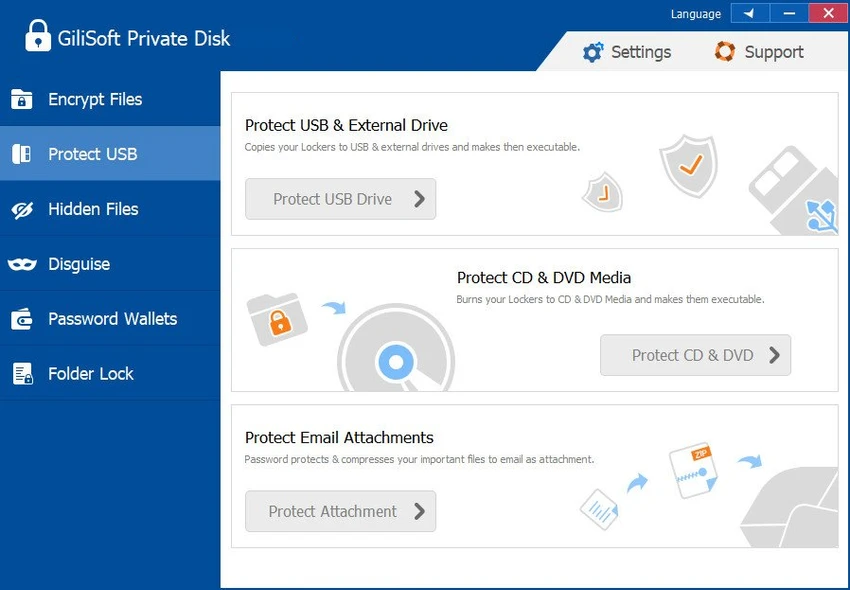
  • Protect files shared via USB drives, CDs/DVDs, and email
  • Hide encrypted disk images after unmounting
  • Mount multiple encrypted disks simultaneously
  • Free lifetime upgrades included

User Experience

After reviewing GiliSoft Private Disk, I found it focused on making encryption more accessible for everyday users. Instead of requiring users to encrypt and decrypt files manually, the software uses transparent encryption, allowing files to be accessed and managed within a virtual encrypted disk as if they were stored on a normal drive. The ability to hide the encrypted disk image after unmounting adds an extra layer of privacy beyond traditional encryption. This feature can make sensitive data less visible to other users who have access to the same computer.

USB portability is another practical advantage. Users can create portable encrypted disks and access protected files on other computers without installing the software locally, which is useful for professionals who frequently move data between devices. Cloud storage support is also a welcome addition. Creating encrypted volumes inside Dropbox or other cloud services helps ensure that sensitive files remain protected before they are uploaded and synchronized online.

The option to mount multiple encrypted disks simultaneously helps organize different categories of confidential information without mixing personal, work, or project-related files together.

Who Should Use GiliSoft Private Disk?

  • Professionals handling confidential business documents
  • Users storing sensitive personal files and media
  • Remote workers transferring data via USB drives
  • Individuals using cloud storage for private information
  • Anyone seeking stronger privacy than standard folder protection

Conclusion

GiliSoft Private Disk provides robust file and disk encryption backed by AES 256-bit technology and NIST-certified security standards. The combination of transparent encryption, portable encrypted storage, cloud compatibility, and hidden disk image protection makes it a practical choice for safeguarding sensitive information.

Pros & Cons

Pros

  • Strong AES 256-bit encryption
  • NIST-certified encryption standard
  • Unique disk image hiding technology
  • Supports portable encrypted USB disks
  • Transparent encryption simplifies daily use
  • Works with cloud storage services such as Dropbox
  • Multiple encrypted disks can be mounted at once
  • Additional protection for images, videos, and confidential documents

Cons

  • Focused primarily on disk-based encryption rather than broader security management
  • Some advanced security concepts may require initial learning for new users

Frequently Asked Questions

What is GiliSoft Private Disk used for?

GiliSoft Private Disk is used to create encrypted virtual disks that securely store confidential files, documents, images, and videos.

Which encryption standard does GiliSoft Private Disk use?

The software uses AES 256-bit encryption, one of the strongest and most widely adopted encryption standards available.

Can I use GiliSoft Private Disk with Dropbox?

Yes. The software allows users to create encrypted volumes inside Dropbox and other cloud storage services.

Does GiliSoft Private Disk support USB drives?

Yes. Users can create portable encrypted disks on USB storage devices and access protected files on other computers.

What is Disk Image Hide technology?

Disk Image Hide technology allows encrypted disk images to be hidden after the virtual disk is unmounted, providing an additional layer of privacy.

Can multiple encrypted disks be mounted at the same time?

Yes. GiliSoft Private Disk supports mounting multiple encrypted disks simultaneously for improved file organization.

Recommended apps [Freeware]:
  • WSCC - Windows System Control Center 10.0.3.8 WSCC - Windows System Control Center logo Windows utility manager that installs, organizes, and runs Sysinternals and system tools from one central interface
  • Universal USB Installer 2.0.3.7 Universal USB Installer logo create bootable Linux USB drives easily with ISO support and persistence options on Windows.
  • XRecode 3 v1.184 XRecode logo a powerful audio converter supporting many formats, CD ripping, and audio extraction from video files
  • Bulk Crap Uninstaller 6.2 Bulk Crap Uninstaller logo a free Windows tool that quickly removes multiple applications and cleans leftover files
  • XnConvert 1.112.0.0 XnConvert logo batch image converter supporting 500 formats with 80+ editing actions and cross-platform compatibility
  • BitDefender Antivirus Free Edition 27.0.60.339 BitDefender Antivirus Free Edition logo real-time protection against malware, phishing, and viruses for Windows users
Recommended apps [Shareware]:
  • Adobe Photoshop 2026 Adobe Photoshop logo powerful image editing and graphic design tool for creating, enhancing, and transforming photos, illustrations
  • COAA PlanePlotter 6.7.6.3 COAA PlanePlotter logo a Windows tool that decodes live aircraft data like ADS-B and ACARS and displays real-time radar-style tracking
  • Roboform 9.9.4.6 Roboform logo a secure password manager using AES-256 encryption, autofill, and cross-device sync for safer login management
  • Digimizer 6.5.4 Digimizer logo image analysis tool for precise measurements, object detection, and scientific image processing
  • Capture One 16.8.2.3615 Capture One logo professional RAW photo editor with advanced color accuracy, tethered shooting, and studio workflow tools for photographers
  • DivX 11.15.0 DivX logo powerful video player and converter that supports 4K playback, HD video conversion, and DLNA media streaming