Zoom Player STREAM logo

Zoom Player STREAM 22.5

  • User Rating:
    ★★★★★
    ★★★★★
    0.0 ★ 0Votes
  • Requirements:
    Windows
  • Version: 22.5
  • Latest updated: 2 weeks ago
  • License: Free Trial  
  • Publisher: inmatrix
  • Size: 93 MB
× app stores

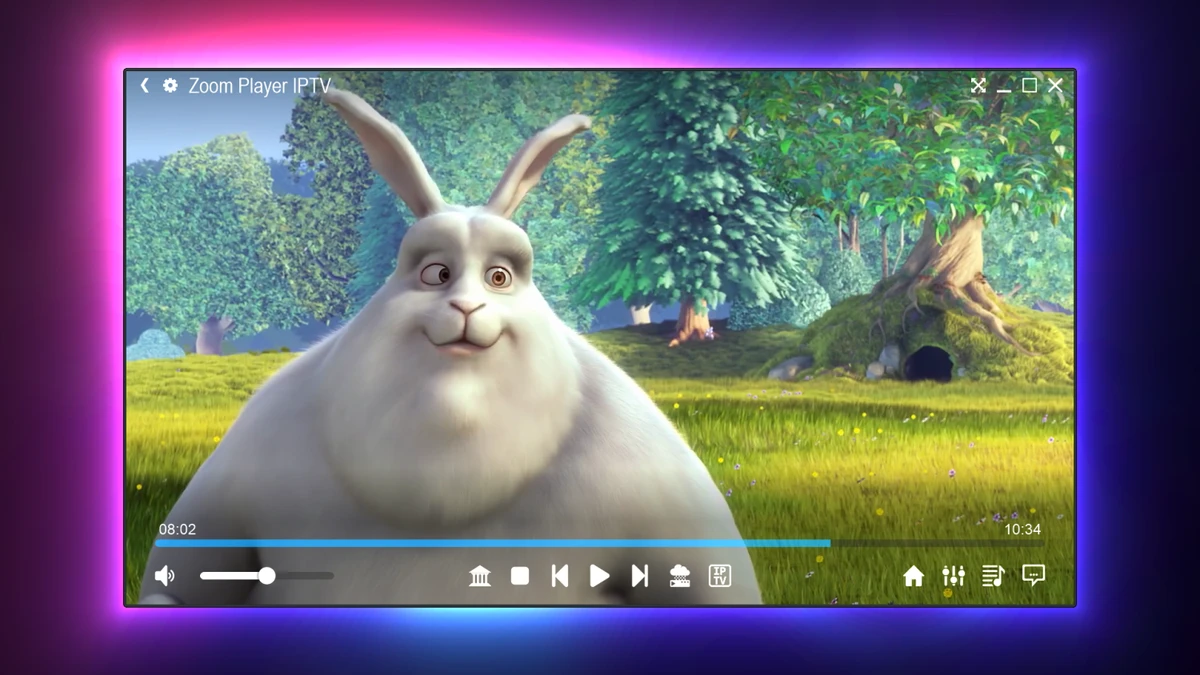
Zoom Player STREAM is a Windows-based media player designed for streaming live TV and video-on-demand (VOD) content through IPTV services. It provides a flexible platform for users who want to manage streaming channels, TV guides, and on-demand libraries through a customizable interface.

The software simplifies IPTV setup by supporting multiple connection methods, including username and password login, M3U playlist links, XML EPG links, and local files. Once configured, users can browse live channels through an Electronic Program Guide (EPG) with both list and grid views. The built-in time-shifting feature helps synchronize program schedules when TV listings do not match the user's local time zone.

Zoom Player STREAM also focuses on playback quality and customization. It supports hardware-accelerated 4K HDR video decoding and allows users to select different media engines, including DirectShow and libVLC, along with rendering components such as MadVR and MPC-VR. With support for VOD libraries, catch-up playback, customizable controls, favorites management, and advanced interface settings, the software provides a versatile streaming experience for users who want more control over their IPTV playback environment.

Features of Zoom Player STREAM

  • Live TV and IPTV streaming support
  • Video-on-demand (VOD) playback for movies and TV series
  • Hardware-accelerated 4K HDR video decoding
  • Easy setup through username/password, M3U playlists, XML EPG links, or local files
  • Full Electronic Program Guide (EPG) support
  • List and grid EPG viewing modes
  • Global and per-stream EPG time shifting
  • Catch-up archive playback support
  • Favorites management for groups and streams
  • Local and global content filtering
  • Metadata support for VOD content, including posters, descriptions, cast, and ratings
  • Windowed and Home Theater user interfaces
  • Customizable media engines and rendering options
  • Support for DirectShow and libVLC
  • Support for MadVR and MPC-VR rendering components
  • Wide audio and video format compatibility
  • Hardware-based image upscaling algorithms
  • Digital audio output through S/PDIF and HDMI bit-streaming
  • XBOX controller support
  • Custom keyboard, mouse, remote, and controller assignments
  • Command and Control API support
  • Video Wall support for multiple monitors

Interface and Usability

After using Zoom Player STREAM, I found the interface designed with flexibility in mind. The setup process is straightforward, allowing users to connect IPTV services through several supported methods without complicated configuration steps.

The EPG system is one of the strongest usability features, offering both list and grid layouts for easier channel navigation. Favorites management and filtering tools make it simpler to organize large channel collections and quickly find preferred content.

The software also provides two interface modes: a standard windowed view and a Home Theater-style interface designed for larger displays. While the extensive customization options provide excellent control, users who prefer a simple plug-and-play streaming experience may need some time to explore the available settings.

Who Should Use Zoom Player STREAM?

  • IPTV users managing live TV streams
  • Users watching VOD movies and TV series
  • Home theater enthusiasts
  • Users with 4K HDR displays and capable hardware
  • People who want advanced playback customization
  • Users who prefer a configurable IPTV player over basic streaming apps

Conclusion

Zoom Player STREAM is a powerful IPTV and VOD playback solution for Windows users who want extensive control over their streaming experience. With 4K HDR support, flexible IPTV setup options, detailed EPG management, and deep customization features, it offers much more control than basic streaming applications.

Pros & Cons

✓

Pros

  • Supports live TV and VOD streaming
  • 4K HDR hardware-accelerated playback
  • Comprehensive EPG features
  • Multiple IPTV setup options
  • Highly customizable interface
  • Supports multiple media engines and renderers
  • Advanced remote and controller support
  • Powerful favorites and filtering tools
  • Supports high-quality audio output options
✕

Cons

  • Requires an IPTV provider subscription for commercial channels and EPG access
  • Large number of settings may be overwhelming for beginners
  • Advanced features are mainly beneficial for experienced users

Frequently Asked Questions

What is Zoom Player STREAM used for?

Zoom Player STREAM is used for watching IPTV live channels and video-on-demand content on Windows computers. It supports playlists, EPG guides, and streaming service connections.

Does Zoom Player STREAM support 4K HDR playback?

Yes. Zoom Player STREAM supports hardware-accelerated 4K HDR video decoding for compatible systems.

Can I use my own IPTV playlist with Zoom Player STREAM?

Yes. The software supports IPTV setup through M3U playlist links, XML EPG links, username/password login, and local files.

Does Zoom Player STREAM include an Electronic Program Guide?

Yes. It includes EPG support with list and grid views, along with time-shifting features to help match program schedules with local time.

Can Zoom Player STREAM play movies and TV series?

Yes. The software supports VOD content, including TV series and movies, with metadata such as posters, descriptions, cast information, and ratings when available.

Who should use Zoom Player STREAM?

Zoom Player STREAM is best suited for IPTV users, home theater enthusiasts, and advanced media users who want a customizable player with extensive streaming and playback controls.

Recommended apps [Freeware]:
  • Smart Defrag 11.4.0.508 Smart Defrag logo a fast Windows disk defragmenter that optimizes hard drives, improves speed, and system stability.
  • WinBin2Iso 6.77 WinBin2Iso logo a free, portable utility that quickly converts BIN CD and DVD image files to ISO format on Windows.
  • Pale Moon 34.3.1 Pale Moon logo fast, open-source web browser based on Firefox technology, offering customization, stability, and efficient performance
  • Endless Sky 0.11.2 Endless Sky logo a free, open-source space simulation game featuring exploration, trading, fleet management, and tactical combat
  • Resolume Arena 7.27.0 rev 14395 Resolume Arena logo Professional software for live video mixing, projection mapping, edge blending, and synchronized audiovisual performances.
  • Fire Toolbox 45.1 Fire Toolbox logo Customize Amazon Fire tablets with tools for app management, interface changes, backups, troubleshooting, and Android feature support.
Recommended apps [Shareware]:
  • GetFLV 32.2606.25 GetFLV logo combines video downloading, conversion, audio extraction, and basic editing tools in one Windows application
  • Royal TS 7.4.50622 Royal TS logo centralizes remote connections, credential management, automation, and secure team collaboration.
  • Pazu StreamGet 3.1.5 Pazu StreamGet logo Download movies and TV shows from major streaming platforms to MP4 or MKV
  • NovaBench 6.1.2 NovaBench logo Benchmark your CPU, GPU, RAM, and storage with NovaBench to measure PC performance and compare results online
  • Abelssoft YouTube Song Downloader 2026 v26.13 Abelssoft YouTube Song Downloader logo Download YouTube music and videos in multiple formats with Abelssoft YouTube Song Downloader for Windows
  • GiliSoft AI Toolkit 10.9 GiliSoft AI Toolkit logo combines chatbot, OCR, TTS, ASR, and image tools to streamline AI-powered workflow automation.