


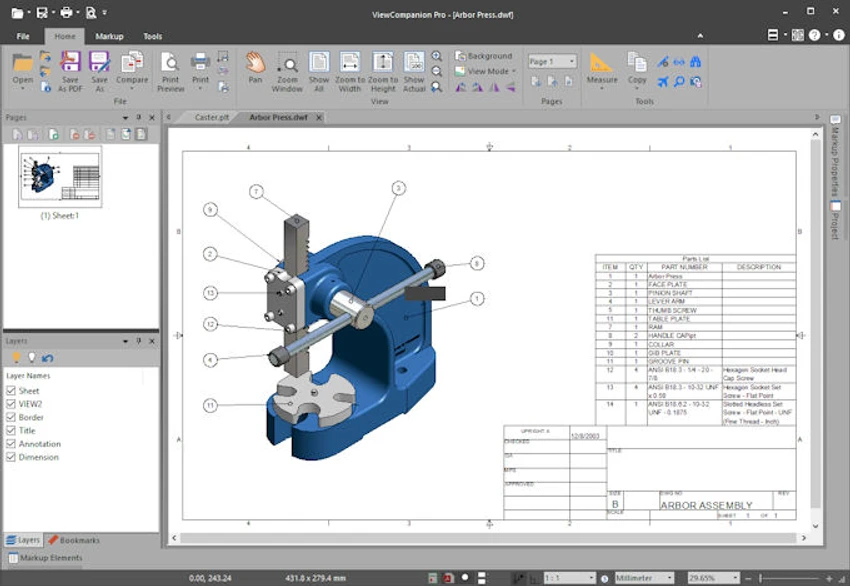

ViewCompanion Pro is a powerful document viewing and conversion tool designed for users who work with technical drawings, CAD files, and advanced document formats. It supports a wide range of formats including PDF, PDF/A, Autodesk DWF, PLT, CGM, TIFF, CALS, and EDMICS, making it a versatile solution for engineering, architecture, and technical documentation workflows. Beyond simple file viewing, ViewCompanion Pro provides conversion, annotation, batch processing, file comparison, and measurement tools, making it a complete solution for managing complex technical documents.
Features of ViewCompanion Pro
- View and print PDF, PDF/A, DWF, PLT, CGM, TIFF, CALS, and EDMICS files
- Convert technical formats to DXF for use in CAD applications like Autodesk AutoCAD
- Convert PDF files to editable DXF, Gerber, CGM, or SVG formats
- Batch convert multiple files across supported formats
- Batch printing with automated folder monitoring
- Merge multiple file formats into a single multi-page PDF, DWF, or TIFF
- Split large PDF, TIFF, or DWF files into smaller files
- Compare file revisions and highlight differences across versions
- Page-by-page comparison for multi-page PDFs
- Advanced measurement tools for lengths and areas
- Calibration tools for accurate scaling in technical drawings
- Export measurement data to Excel (XLSX) or CSV formats
- Add annotations such as text, highlights, stamps, arrows, dimensions, and symbols
- Support for reusable symbol libraries and custom markup sets
- Store markup layers separately without modifying original files
- Include annotations during printing or conversion
- Monitor folders for automatic file processing and printing
- Supports Windows 7 through Windows Server 2025, including Citrix and Terminal Server environments
User Experience
After reviewing ViewCompanion Pro, it is clear that the software is designed for technical professionals who regularly work with engineering drawings and document-heavy workflows. The interface prioritizes functionality over simplicity, offering a wide range of tools for viewing, editing, and converting technical files. One of the strongest aspects is format support. Users can open and work with CAD-related formats such as PLT and DWF alongside standard PDF documents, which reduces the need for multiple specialized applications.
The annotation system is particularly robust. Users can add technical markup elements such as measurement lines, symbols, and stamps, all while keeping the original file unchanged. This is useful in collaborative environments where feedback must be layered onto drawings without altering source data. Measurement tools are another highlight. The ability to calibrate drawings and measure distances or areas with high precision is essential for engineering and architectural use cases. Exporting these results to Excel or CSV adds further flexibility for reporting and documentation.
Batch processing features significantly improve productivity. Users can convert, print, or process large volumes of files automatically, including folder monitoring that triggers actions when new files are added. The file comparison tool is especially useful for version control, allowing users to visually identify changes between revisions of technical documents.
Who Should Use ViewCompanion Pro?
- Engineers working with CAD drawings
- Architects reviewing technical plans
- Manufacturing and industrial designers
- Construction documentation teams
- Technical illustrators and designers
- Enterprise document control departments
Conclusion
ViewCompanion Pro delivers a comprehensive set of tools for managing technical and engineering documents. With strong CAD compatibility, advanced measurement features, batch processing, and annotation capabilities, it serves as a reliable solution for professional workflows.


