



4DDiG File Repair is a multimedia repair utility designed to help users fix damaged or low-quality photos and videos. It focuses on simplicity and batch processing, allowing users to restore multiple files with minimal manual input through an automated repair process.
Overview of 4DDiG File Repair
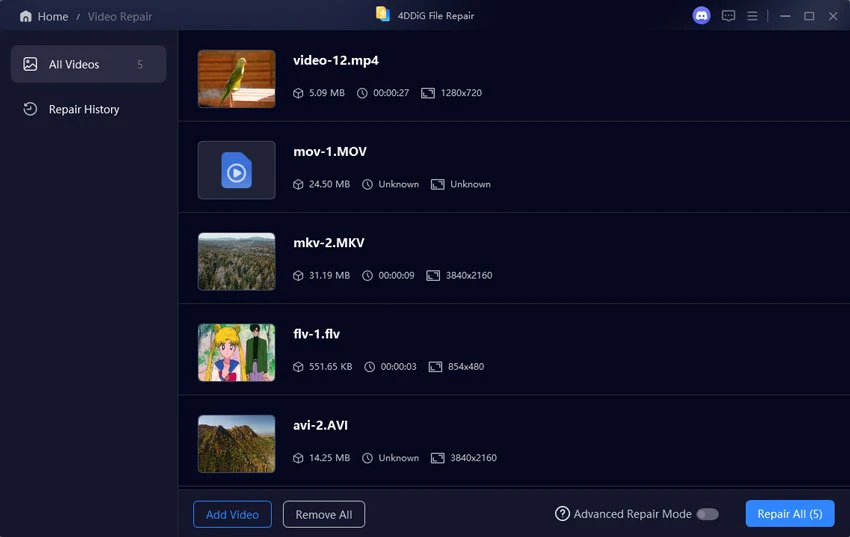
4DDiG File Repair provides two main modules: video repair and photo repair. The software is designed for users who need a quick way to attempt recovery or enhancement of corrupted or imperfect media files without requiring advanced editing skills. After installation, users are presented with a tab-based interface where they can import media files, preview file details, and start the repair process. The tool supports batch processing, making it suitable for handling multiple files at once. While it offers previews of repaired output before saving, it does not provide manual editing controls, meaning all corrections are handled automatically by the software.
Features of 4DDiG File Repair
- Video repair module for fixing corrupted or damaged video files
- Photo repair module for improving or restoring images
- Batch processing support for multiple files
- Simple drag-and-add workflow for importing media
- Displays file metadata such as size, format, codec, and resolution
- Preview repaired videos before saving
- Preview repaired images prior to export
- Automated repair process with minimal user input
- Separate interfaces for video and photo repair tasks
- Compatible with Windows 7, 8, 10, and 11
User Experience
4DDiG File Repair is designed with simplicity in mind. The interface is clean and easy to navigate, making it accessible even for users without technical editing experience. The workflow is straightforward: import files, start the repair process, and review the output. This automation is convenient but also limits user control, as there are no manual adjustment tools for fine-tuning results. For users dealing with corrupted files or quick fixes, the batch processing feature is particularly useful. However, for professional editing needs, the lack of granular control may feel restrictive.
Who Should Use 4DDiG File Repair?
- Users with corrupted or damaged video/photo files
- Casual photographers and videographers
- Users looking for quick, automated media repair
- People who need batch processing for multiple files
- Beginners who prefer simple one-click solutions
Conclusion
4DDiG File Repair is a simple and accessible tool for users who need quick fixes for damaged photos and videos. While it lacks advanced editing controls, its ease of use and batch processing capabilities make it a practical option for basic media recovery tasks.


