


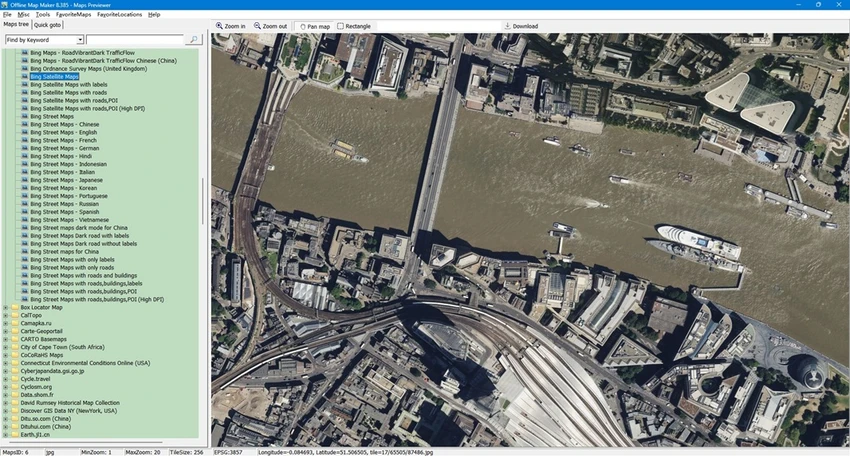

Offline Map Maker is a Windows-based mapping tool designed for users who want to download and customize offline maps from online services such as Google Maps and Bing Maps. It is especially useful for users who need more control over map areas, zoom levels, and downloaded data compared to standard map viewing tools. The software allows users to define specific geographic coordinates, adjust zoom levels, and manage downloaded image tiles. It also includes a built-in map viewer, making it easy to review downloaded content without relying on external applications.
Overall, Offline Map Maker focuses on giving users flexibility when creating offline map collections for personal exploration, planning, or reference use.
Features of Offline Map Maker
- Download maps from multiple sources including:
- Google Street Maps
- Bing Satellite Maps
- Bing Hybrid Maps
- Set custom coordinates (latitude and longitude) for precise map selection
- Adjust zoom levels for different map detail requirements
- Built-in offline map viewer for reviewing downloaded maps
- Ability to re-download failed or incomplete map tiles
- Combine downloaded maps into BMP image format for storage and sharing
- Simple workflow for managing multiple map projects
- Suitable for building personalized offline map collections
Interface and Usability
Offline Map Maker provides a functional interface focused on map creation and management rather than visual design. Users can start by selecting a map source, defining a geographic area, and adjusting zoom settings before beginning the download process. The inclusion of a built-in viewer improves usability, allowing users to check downloaded maps immediately. The workflow is relatively straightforward once users understand basic mapping concepts such as coordinates and zoom levels. While the interface may not feel modern compared to newer applications, it remains practical and efficient for users who regularly work with offline map data.
Who Should Use Offline Map Maker?
- Travelers preparing offline maps before trips
- Outdoor explorers needing custom map areas
- Students and researchers working with geographic data
- Users who want customizable map downloads
- Hobbyists interested in offline mapping projects
Conclusion
Offline Map Maker is a practical and flexible solution for users who want to build customized offline maps from Google and Bing services. Its ability to control coordinates, adjust zoom levels, and manage downloads efficiently makes it a useful tool for travelers, researchers, and mapping enthusiasts.


