FileLegit Windows Utilities System Tools Bulk Crap Uninstaller
Bulk Crap Uninstaller logo

Bulk Crap Uninstaller 6.2

  • User Rating:
    ★★★★★
    ★★★★★
    0.0 0Votes
  • Requirements:
    Windows
  • Version: 6.2
  • Latest updated: 1 week ago
  • License: Freeware  
  • Publisher: BCUninstaller
  • Size: 9 MB
× app stores

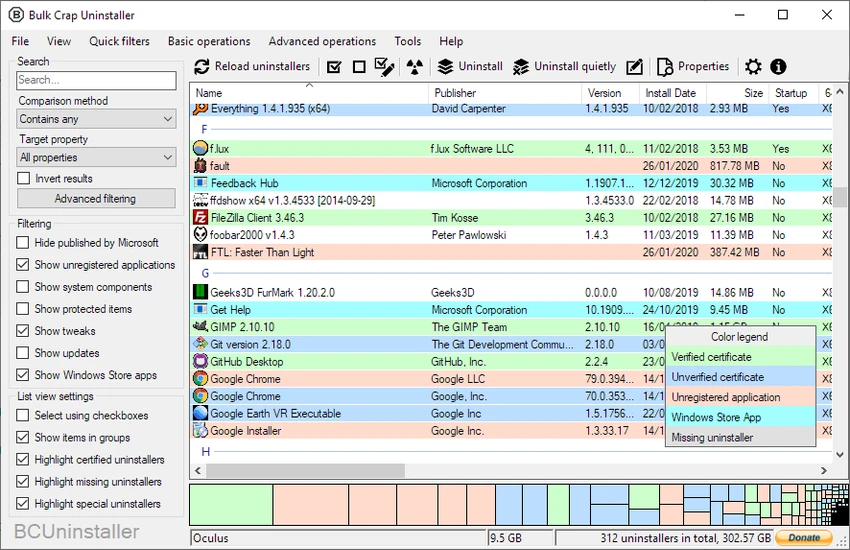
Bulk Crap Uninstaller (BCU) is a free and open software removal utility designed to help users uninstall multiple applications quickly and efficiently. Built with advanced users and IT professionals in mind, it still maintains a straightforward interface that makes everyday software removal easy for anyone. During my experience with it, I found it particularly useful for cleaning up unwanted programs and speeding up a process that would otherwise require a lot of manual work.

Features of Bulk Crap Uninstaller

  • Free software uninstaller for Windows
  • Batch uninstall multiple applications at once
  • Cleans up leftover files and traces after uninstalling
  • Detects orphaned applications
  • Supports predefined uninstall lists
  • Option to show protected items and system components
  • Ability to hide Microsoft-developed applications
  • Programs can be grouped or listed alphabetically
  • Checkbox-based selection helps prevent accidental removal
  • Supports Quiet Uninstall for compatible applications
  • Compatible with Windows 11, Windows 10, Windows 8, and Windows 7

User Experience

After launching Bulk Crap Uninstaller, I noticed that it takes a few moments to scan and display installed applications. Once the list is populated, managing software becomes straightforward. Programs can be sorted alphabetically or grouped, making it easier to locate unwanted applications. Selecting multiple entries with checkboxes feels intuitive and reduces the chance of removing something important. I appreciated the ability to reveal protected items and system components when necessary, while the option to hide Microsoft software helps keep the list cleaner.

The regular uninstall process still requires the usual confirmations from each application, but Bulk Crap Uninstaller significantly reduces the amount of repetitive work. For programs that support it, the Quiet Uninstall mode offers an even faster experience with minimal user interaction. Although the interface is simple and functional rather than modern-looking, everything is clearly organized, making the software approachable for beginners while still providing advanced options for experienced users.

Who Should Use Bulk Crap Uninstaller?

  • Users who need to remove several programs at once
  • IT professionals managing multiple applications
  • Users looking to clean leftover files after uninstalling software
  • People upgrading or refreshing their Windows systems
  • Anyone wanting a faster alternative to the default Windows uninstall process

Conclusion

Bulk Crap Uninstaller is an efficient and reliable software removal tool that makes uninstalling large numbers of applications much easier than using the default Windows options. Its combination of simplicity and advanced capabilities makes it suitable for both casual users and IT professionals. If you regularly clean your PC or need to remove multiple programs quickly, Bulk Crap Uninstaller is definitely worth trying.

Pros & Cons

Pros

  • Completely free to use
  • Batch uninstallation saves time
  • Cleans leftover files and traces
  • Easy-to-use interface
  • Advanced options available for experienced users
  • Supports Quiet Uninstall for compatible applications
  • Works with Windows 11, 10, 8, and 7

Cons

  • Interface appearance is fairly basic
  • Quiet Uninstall depends on application support
  • Initial scan may take a few moments

Frequently Asked Questions

What is Bulk Crap Uninstaller used for?

Bulk Crap Uninstaller is used to remove multiple programs from Windows systems quickly and efficiently while helping clean leftover files and detect orphaned applications.

Is Bulk Crap Uninstaller free?

Yes. Bulk Crap Uninstaller is free software and can be used without cost.

Can Bulk Crap Uninstaller uninstall several programs at once?

Yes. One of its main strengths is batch uninstallation, allowing users to remove multiple applications in a single session.

Does Bulk Crap Uninstaller clean leftover files?

Yes. It can help remove leftover files and detect orphaned applications after the standard uninstall process.

Which Windows versions are supported?

Bulk Crap Uninstaller supports Windows 11, Windows 10, Windows 8, and Windows 7.

Is Bulk Crap Uninstaller suitable for beginners?

Yes. Despite offering advanced features for experienced users, the interface is simple enough for beginners to use comfortably.

Recommended apps [Freeware]:
  • StaxRip 2.52.4 StaxRip logo powerful Windows GUI for video/audio encoding using FFmpeg, x265, AviSynth+, VapourSynth, and more.
  • K-Lite Codec Pack Full 19.8.2 K-Lite Codec Pack Full logo Play all audio and video formats on Windows with K-Lite Codec Pack Full, a lightweight and reliable codec package
  • AIMP 5.40.2721 AIMP logo a lightweight audio player with high-quality sound, playlist tools, equalizer, and audio conversion features
  • RapidRAW 1.5.8 RapidRAW logo a lightweight, GPU-accelerated RAW photo editor with advanced masking, non-destructive editing, and AI tools
  • PCSX2 2.6.3 PCSX2 logo Play PlayStation 2 games on your PC, explore its features, setup process, performance, and usability
  • GnuCash 5.16 GnuCash logo open-source accounting software for tracking personal and small business finances with double-entry bookkeeping
Recommended apps [Shareware]:
  • EF Commander 26.06 EF Commander logo a feature-rich Windows file manager with FTP, media tools, archiving, and advanced file control
  • ExamDiff Pro 17.0.1.4 ExamDiff Pro logo a Windows file comparison tool for code review, folder sync, and document diffing with merge support.
  • My Music Collection 3.4.16.178 My Music Collection logo organize CDs, vinyl, and MP3s with cataloging, tracking, and export features on Windows
  • Pazu StreamGet 3.1.5 Pazu StreamGet logo Download movies and TV shows from major streaming platforms to MP4 or MKV
  • Total Image Converter 8.5.0.320 Total Image Converter logo Windows tool for converting, resizing, and editing images in bulk with support for RAW, TIFF, PSD, and more
  • Password Depot 19.2.0 Password Depot logo a secure password manager with AES encryption, auto-fill, and cloud sync support for Windows users