MACAddressView logo

MACAddressView 1.55

  • User Rating:
    ★★★★★
    ★★★★★
    0.0 0Votes
  • Requirements:
    Windows
  • Version: 1.55
  • Latest updated: 2 weeks ago
  • License: Freeware  
  • Publisher: Nirsoft
  • Size: 2 MB
× app stores

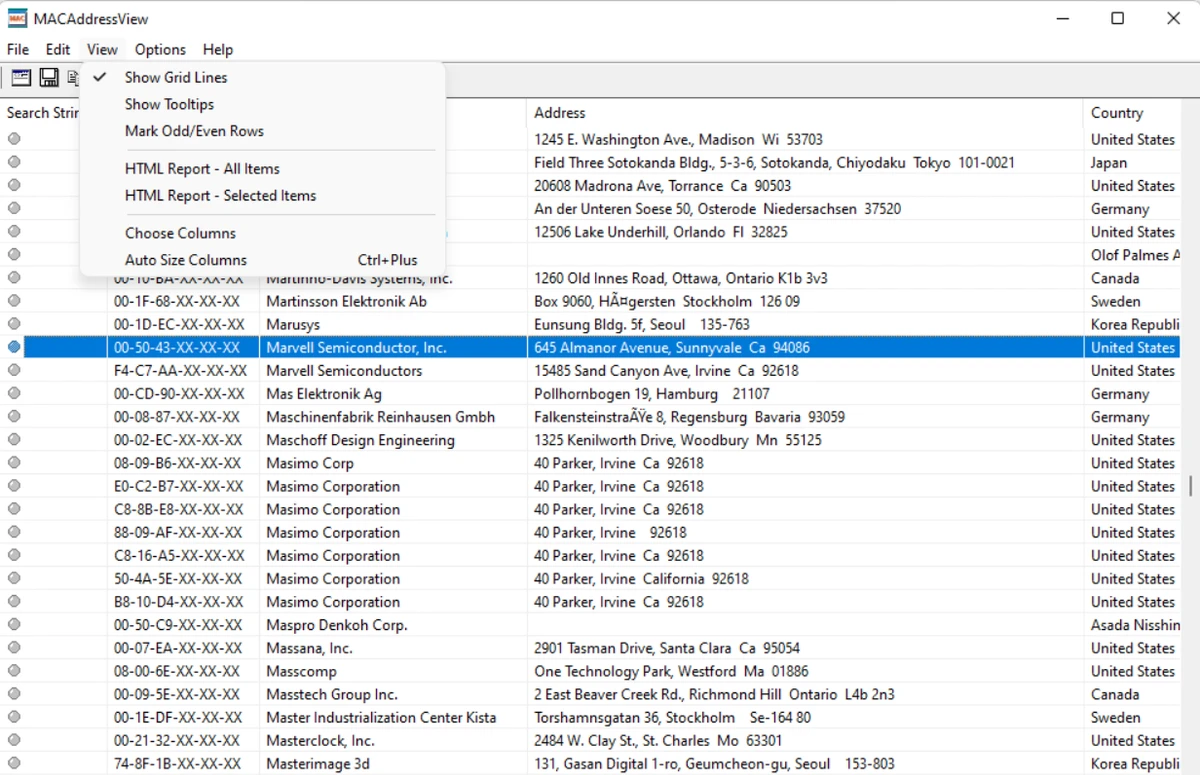
MACAddressView is a lightweight Windows utility designed to help users look up information associated with MAC addresses. The software allows users to identify company details linked to a MAC address, including the company name, address, and country. The tool is useful for users who need to identify the manufacturer or organization associated with a network device’s MAC address. Instead of requiring an online lookup service, MACAddressView uses an internal MAC address database stored directly inside the application’s executable file. This allows searches to be performed locally without sending requests to a remote server.

In addition to searching by MAC address, MACAddressView also provides options for finding records by company name, company address, or country. This makes it possible to explore MAC address information from different search directions, which can be helpful when investigating hardware vendors or organizing network-related information.

After locating the required records, users can export the results in several formats, including text, XML, HTML, and CSV files. The software also allows copying information to the clipboard for easy transfer into Excel or other applications. With its small file size and simple design, MACAddressView focuses on providing a quick and practical way to access MAC address information without unnecessary complexity.

Features of MACAddressView

  • Look up company information using a MAC address
  • Displays company name, address, and country details
  • Search MAC address records by company name
  • Search by company address or country name
  • Uses an internal MAC address database stored in the application
  • Does not send requests to remote servers during lookup
  • Export search results to TXT, XML, HTML, and CSV formats
  • Copy results to the clipboard for use in other applications
  • Lightweight application with a small installation size
  • Regularly updated internal MAC address database

Interface and Usability

MACAddressView offers a simple and practical interface focused on quick information lookup. The application is designed for users who need MAC address details without navigating through complicated settings or online databases. Searching is straightforward, with options to find records by MAC address, company information, or location details. Once results are displayed, users can save the information in different file formats or copy it for use in other software.

The offline database approach is also convenient for users who prefer local processing. Since the program uses its built-in database instead of communicating with external servers, MAC address lookups can be performed directly from the application.

Overall, MACAddressView is designed as a small utility that prioritizes speed, simplicity, and easy access to MAC vendor information.

Who Should Use MACAddressView?

  • Network administrators checking hardware manufacturers
  • IT professionals troubleshooting network devices
  • Users researching MAC address information
  • Technical users who need offline MAC lookup capabilities
  • Anyone who needs to export MAC address records for documentation

Conclusion

MACAddressView is a compact and useful Windows utility for anyone who needs quick access to MAC address information. Its offline database, simple search options, and export capabilities make it a practical tool for identifying hardware vendors and managing MAC-related data.

The application avoids unnecessary complexity while providing the essential features needed for MAC address research. If you need a lightweight utility for checking MAC address records and company information, MACAddressView is worth considering.

Pros & Cons

Pros

  • Lightweight and easy to use
  • Works with an internal offline MAC address database
  • Does not require remote server requests for lookups
  • Supports multiple export formats
  • Allows searching by MAC address, company, and country

Cons

  • Designed specifically for MAC address lookup rather than broader network management

Frequently Asked Questions

What is MACAddressView used for?

MACAddressView is used to look up company information associated with MAC addresses. It can display details such as company name, address, and country based on a MAC address record.

Does MACAddressView require an internet connection?

No. MACAddressView uses an internal MAC address database stored inside the application’s executable file. It does not send lookup requests to remote servers.

Can MACAddressView search without knowing a MAC address?

Yes. The software allows users to search MAC address records by company name, company address, or country name.

What export formats does MACAddressView support?

MACAddressView allows users to save found MAC address records as text, XML, HTML, or CSV files. Results can also be copied to the clipboard.

Is MACAddressView available for Windows?

Yes. MACAddressView is a Windows utility. The provided information lists support for Windows 7, Windows 8, and Windows 10.

How large is MACAddressView?

MACAddressView is a lightweight application with a listed size of approximately 2 MB, requiring minimal storage space.

Recommended apps [Freeware]:
  • Red Burner 19.7 Red Burner logo a portable disc burning tool for CD, DVD, and Blu-ray with fast ISO handling and a simple interface
  • Burp Suite 2026.4.3 Burp Suite logo Test, analyze, and secure web applications with Burp Suite’s advanced proxy, scanning, and penetration testing tools
  • Donemax Video Downloader 3.0 Donemax Video Downloader logo download videos and audio from 1,200+ websites for offline viewing and playback
  • Uninstalr 3.1 Uninstalr logo a free software uninstaller featuring batch uninstall, leftover cleanup, and portable support
  • BlueStacks 5.22.150.1014 / 10.42.232.1002 BlueStacks logo Android emulator for Windowsthat lets users run mobile apps and games on a PC with enhanced performance and controls
  • Driver Magician Lite 5.82 Driver Magician Lite logo Backup, restore, update, and manage Windows device drivers with a utility designed for hardware maintenance and system recovery.
Recommended apps [Shareware]:
  • Pazu StreamGet 3.1.5 Pazu StreamGet logo Download movies and TV shows from major streaming platforms to MP4 or MKV
  • pdfMachine merge 2.0.9628.25372 pdfMachine merge logo merge automates personalized PDF email campaigns using Word, Excel, PowerPoint, and HTML templates
  • Wise Care 365 8.0.4.732 Wise Care 365 logo Optimize Windows performance with system cleanup, registry tools, privacy protection, and hardware monitoring features.
  • Actual File Folders 1.15.5 Actual File Folders logo Speed up folder navigation and access frequently used locations faster with a Windows tool designed for file dialogs.
  • AnyMP4 Android Data Recovery 2.1.58 AnyMP4 Android Data Recovery logo Recover deleted Android contacts, messages, media files, and documents while safely backing up and restoring mobile data.
  • TrainController Gold 11.0 C1 TrainController Gold logo Control model railroads digitally with advanced automation, route management, and safety features for realistic train operations.