


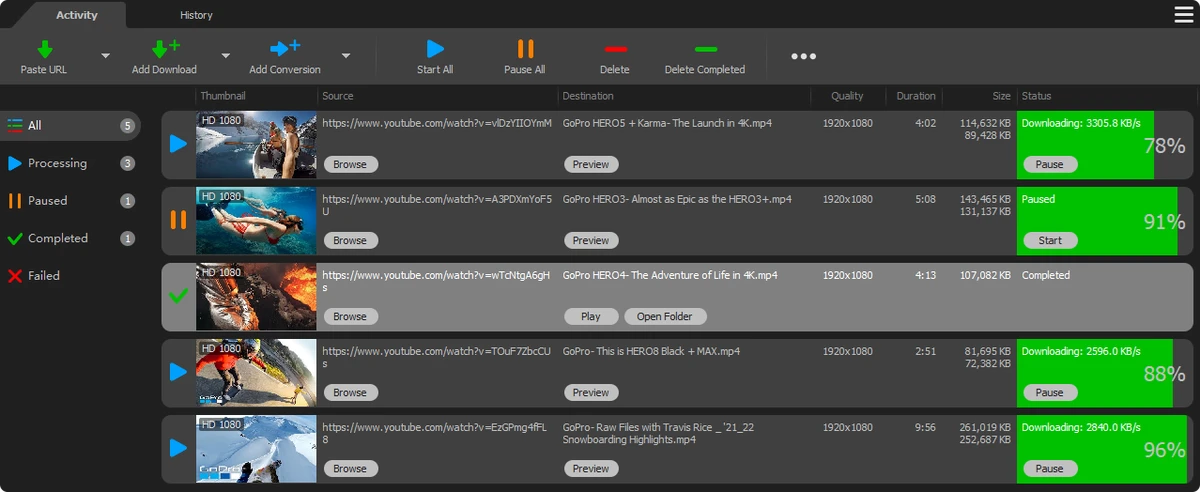

YT Downloader (formerly known as YTD YouTube Downloader) is a Windows-based application designed to download and convert online videos from YouTube and hundreds of other video platforms. It focuses on providing a simple workflow where users can quickly grab video or audio content and store it locally for offline access.
The software supports downloading videos from major platforms such as YouTube, Facebook, Dailymotion, Vimeo, and Metacafe. It also includes features for handling high-quality video formats, including HD 720p, Full HD 1080p, 2K, and 4K where available. In addition to video downloads, it offers audio extraction, allowing users to save YouTube content directly as MP3 or other audio formats without downloading full video files.
YT Downloader also includes a conversion module that lets users convert downloaded or local media into different formats for playback on various devices. With support for playlists, drag-and-drop URL handling, and simultaneous downloads, the software aims to simplify batch downloading and media management in one place.
Features of YT Downloader
- Download videos from YouTube and hundreds of video platforms
- Supports HD, Full HD 1080p, 2K, 4K, and 3D videos (when available)
- Download YouTube playlists using playlist ID
- Convert YouTube videos to MP3 and other audio formats
- Built-in video and audio converter for local files
- Supports multiple simultaneous downloads
- Pause, resume, and cancel download management
- Drag-and-drop link support from browser
- Preview videos while downloading
- Built-in media player for playback
Interface and Usability
YT Downloader is designed with simplicity in mind, offering a straightforward interface where users can paste or drag video links to start downloading immediately. The workflow is centered around quick access to download controls such as start, pause, and preview. Playlist handling and batch downloads are accessible without complex configuration, making it suitable for users who prefer direct, task-focused software. The built-in media player also helps users verify downloaded content without switching applications.
Who Should Use YT Downloader?
YT Downloader is suitable for users who frequently download online videos for offline viewing or audio extraction. It is especially useful for those who want a simple tool to save YouTube content, manage playlists, or convert media into portable formats for different devices.
Conclusion
YT Downloader offers a practical all-in-one solution for downloading, converting, and managing online videos. With support for multiple platforms, HD downloads, playlist handling, and audio extraction, it covers most basic media downloading needs in a single application.


