XMLBlueprint logo

XMLBlueprint 22.20260704

  • ユーザー評価:
    ★★★★★
    ★★★★★
    0.0 0Votes
  • 動作環境:
    Windows
  • バージョン: 22.20260704
  • 最終更新: 3週間前
  • ライセンス: 無料体験版  
  • 提供元: Monkfish XML Software
  • サイズ: 81 MB
× app stores

XMLBlueprint is a feature-rich XML editor designed for both professional developers and advanced home users who work with structured data formats. It provides extensive support for XML-related standards including DTD, Relax NG, Schematron, XSD, XPath (1.0–3.1), and XSLT (1.0–3.0), making it a comprehensive environment for XML development and validation.

One of its key strengths is the ability to handle extremely large XML files, including documents exceeding 1GB in size, without losing performance or editing capabilities. The software is built to support validation as you type, helping users detect errors early through integrated schema checking.

XMLBlueprint also includes tools for XML generation, refactoring, formatting, and schema conversion, allowing users to work efficiently across complex XML structures. Its support for remote editing via FTPS, SFTP, and WebDAV adds flexibility for developers working with distributed systems or server-based XML files.

Features of XMLBlueprint

  • Full support for DTD, XSD, Relax NG, Schematron, and XML Schema validation
  • XPath support (1.0, 2.0, 3.1) and XSLT support (1.0, 2.0, 3.0)
  • Real-time XML validation while typing
  • Handles extremely large XML files (1GB+)
  • XML refactoring tools for structural changes
  • XML formatting and indentation customization
  • XML generation from XSD, DTD, or Relax NG schemas
  • Convert CSV and Excel files to XML
  • XML tag completion with IntelliSense-style suggestions
  • Outline view and breadcrumb navigation for XML structure
  • Remote file editing via FTPS, SFTP, and WebDAV
  • Syntax highlighting for XML, HTML, CSS, Java, and JavaScript
  • XML catalogs for faster schema access

Interface and Usability

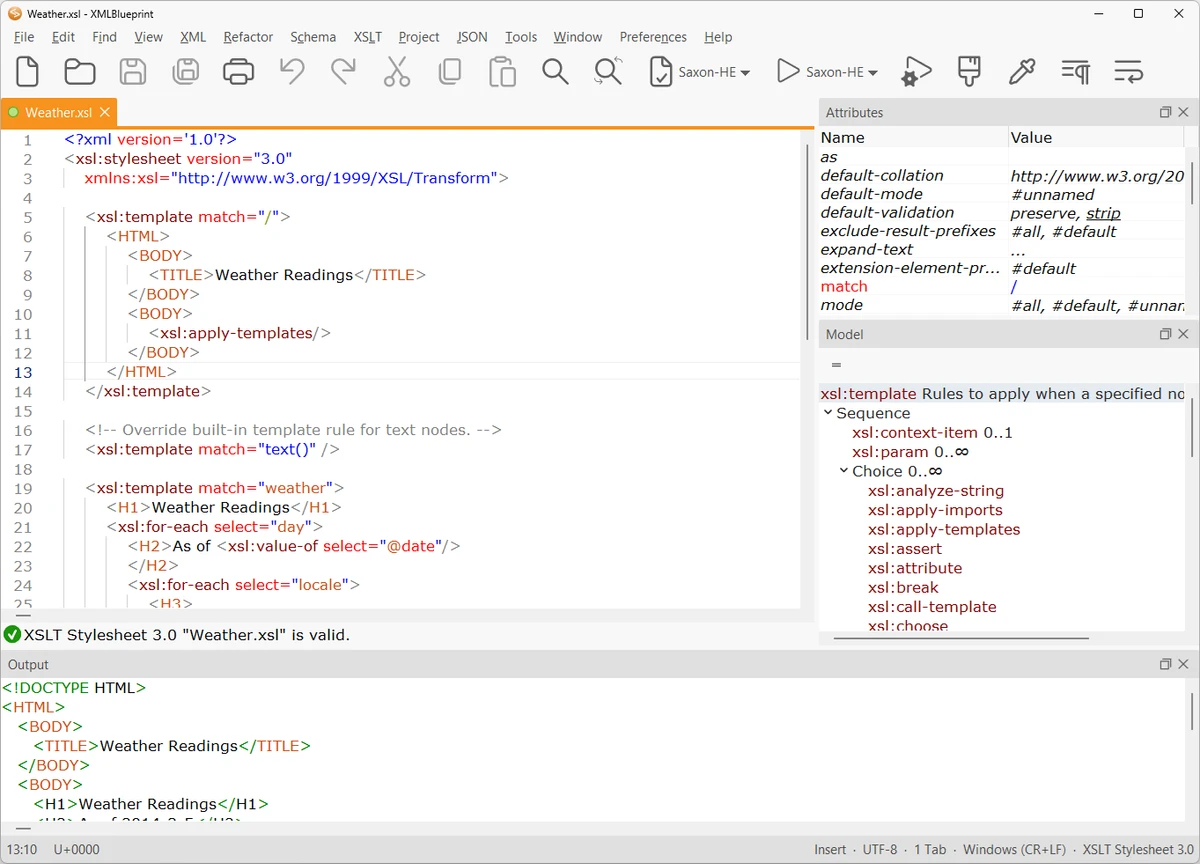
XMLBlueprint is designed with a structured, developer-focused interface that emphasizes productivity when working with complex XML documents. Features like outline view, breadcrumbs, and folding help users navigate large and deeply nested XML structures more efficiently.

The editor provides real-time validation and intelligent tag completion, reducing the likelihood of structural errors. While the tool is powerful and feature-rich, its interface remains organized, allowing users to access advanced XML functions without overwhelming navigation complexity.

Who Should Use XMLBlueprint?

This software is best suited for XML developers, data engineers, and technical professionals who frequently work with structured data formats such as XML, XSD, and XSLT. It is also useful for users who need to process large XML files or perform schema-driven data transformations.

Conclusion

XMLBlueprint stands out as a powerful XML development environment with deep support for modern XML standards and large-scale file handling. Its combination of validation tools, refactoring features, and schema-based assistance makes it highly effective for complex XML workflows.

メリット・デメリット

メリット

  • Extensive support for XML standards (XSD, XPath, XSLT, etc.)
  • Handles very large XML files (1GB+)
  • Real-time validation and IntelliSense-style editing
  • Powerful refactoring and formatting tools
  • Remote file editing (SFTP, FTPS, WebDAV)

デメリット

  • Complex feature set may be overwhelming for beginners
  • Focused exclusively on XML and related formats

よくある質問

What is XMLBlueprint used for?

XMLBlueprint is used for creating, editing, validating, and transforming XML documents using standards like XSD, XPath, and XSLT.

Does XMLBlueprint support large XML files?

Yes. It is optimized to handle very large XML files, including those over 1GB in size.

Can XMLBlueprint validate XML files automatically?

Yes. It supports real-time validation using DTD, XSD, Relax NG, and Schematron schemas.

Does XMLBlueprint support XSLT and XPath?

Yes. It supports XSLT (1.0, 2.0, 3.0) and XPath (1.0, 2.0, 3.1) for advanced XML transformations and queries.

Can I edit remote XML files with XMLBlueprint?

Yes. It supports remote editing via FTPS, SFTP, and WebDAV servers.

Is XMLBlueprint suitable for beginners?

It is primarily designed for professionals, but users familiar with XML concepts can still use it effectively thanks to its structured interface.

おすすめアプリ [無料]:
  • Digital Clock 5.2.2 Digital Clock logo スキン、アラーム、透明度コントロール、システムトレイ対応など、カスタマイズ可能なデスクトップ時計アプリ
  • RunAsTool 1.6 RunAsTool logo ポータブルな特権管理ユーティリティであるRunAsToolを使用して、パスワードなしで管理者権限でWindowsプログラムを実行します。
  • Minimal Image Viewer 2.0.3 Minimal Image Viewer logo 高速起動、幅広いフォーマット対応、GPUレンダリング、そしてプライバシーを重視したポータブル設計を備えた軽量Windows画像ビューア。
  • MuseScore 4.7.4 MuseScore logo 無料の楽譜作成ツール、MIDIサポート、クロスプラットフォーム互換性を活用して、プロ仕様の楽譜を作成、編集、印刷、共有できます。
  • NETworkManager 2026.7.7.0 NETworkManager logo このオープンソースユーティリティを使用すると、ネットワーク接続の管理、問題の診断、デバイスのスキャン、および重要なトラブルシューティングツールへのアクセスが可能になります。
  • HP Easy Start 17.5.11 HP Easy Start logo 自動デバイス検出、ネットワークサポート、および簡素化されたセットアップツールにより、HPプリンタードライバーを簡単にインストールおよび設定できます。
おすすめアプリ [シェアウェア]:
  • SkyDemon 4.3.1 SkyDemon logo SkyDemonを使用して、リアルタイムの航空データ、動的チャート、NOTAM、METAR、TAF、およびインテリジェントなルートプランニングでフライトを計画しましょう。
  • O&O SafeErase 21.3.26142 O&O SafeErase logo Windows上でデータ復旧を防止するため、認証された方法を使用してファイル、ドライブ、インターネットの痕跡を安全に削除します。
  • R-Studio 9.5 Build 191810 R-Studio logo 複数のファイルシステムにわたって削除、フォーマット、または破損したファイルを復元するための強力なデータ復元ソフトウェア
  • Asset Manager 2026 v4.10.3001 Asset Manager logo 資産の追跡、在庫管理、バーコードの使用、サービス履歴の効率的な維持
  • SmarterMail Build 9686 SmarterMail logo コラボレーションツール、スパム対策、ActiveSyncサポート、Webベースの管理機能を備えたビジネスメールのホスティングと管理。
  • TrainController Gold 11.0 C1 TrainController Gold logo 高度な自動化、ルート管理、安全機能を備え、リアルな列車運行を実現するデジタル制御で、鉄道模型を自在に操ることができます。