XMLBlueprint logo

XMLBlueprint 22.20260704

  • Évaluation des utilisateurs:
    ★★★★★
    ★★★★★
    0.0 0Votes
  • Exigences:
    Windows
  • Version: 22.20260704
  • Dernière mise à jour: il y a 3 semaines
  • Licence: Essai gratuit  
  • Éditeur: Monkfish XML Software
  • Taille: 81 MB
× app stores

XMLBlueprint is a feature-rich XML editor designed for both professional developers and advanced home users who work with structured data formats. It provides extensive support for XML-related standards including DTD, Relax NG, Schematron, XSD, XPath (1.0–3.1), and XSLT (1.0–3.0), making it a comprehensive environment for XML development and validation.

One of its key strengths is the ability to handle extremely large XML files, including documents exceeding 1GB in size, without losing performance or editing capabilities. The software is built to support validation as you type, helping users detect errors early through integrated schema checking.

XMLBlueprint also includes tools for XML generation, refactoring, formatting, and schema conversion, allowing users to work efficiently across complex XML structures. Its support for remote editing via FTPS, SFTP, and WebDAV adds flexibility for developers working with distributed systems or server-based XML files.

Features of XMLBlueprint

  • Full support for DTD, XSD, Relax NG, Schematron, and XML Schema validation
  • XPath support (1.0, 2.0, 3.1) and XSLT support (1.0, 2.0, 3.0)
  • Real-time XML validation while typing
  • Handles extremely large XML files (1GB+)
  • XML refactoring tools for structural changes
  • XML formatting and indentation customization
  • XML generation from XSD, DTD, or Relax NG schemas
  • Convert CSV and Excel files to XML
  • XML tag completion with IntelliSense-style suggestions
  • Outline view and breadcrumb navigation for XML structure
  • Remote file editing via FTPS, SFTP, and WebDAV
  • Syntax highlighting for XML, HTML, CSS, Java, and JavaScript
  • XML catalogs for faster schema access

Interface and Usability

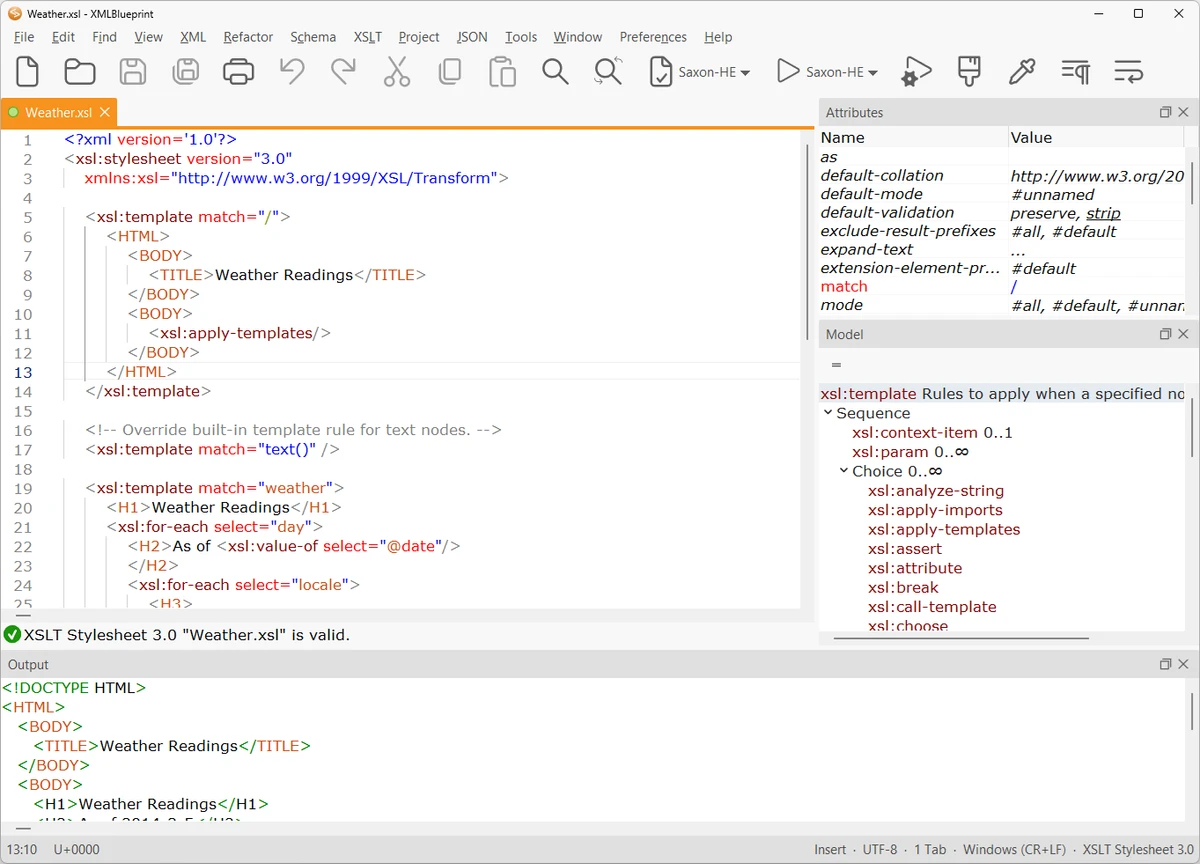
XMLBlueprint is designed with a structured, developer-focused interface that emphasizes productivity when working with complex XML documents. Features like outline view, breadcrumbs, and folding help users navigate large and deeply nested XML structures more efficiently.

The editor provides real-time validation and intelligent tag completion, reducing the likelihood of structural errors. While the tool is powerful and feature-rich, its interface remains organized, allowing users to access advanced XML functions without overwhelming navigation complexity.

Who Should Use XMLBlueprint?

This software is best suited for XML developers, data engineers, and technical professionals who frequently work with structured data formats such as XML, XSD, and XSLT. It is also useful for users who need to process large XML files or perform schema-driven data transformations.

Conclusion

XMLBlueprint stands out as a powerful XML development environment with deep support for modern XML standards and large-scale file handling. Its combination of validation tools, refactoring features, and schema-based assistance makes it highly effective for complex XML workflows.

Avantages & Inconvénients

Avantages

  • Extensive support for XML standards (XSD, XPath, XSLT, etc.)
  • Handles very large XML files (1GB+)
  • Real-time validation and IntelliSense-style editing
  • Powerful refactoring and formatting tools
  • Remote file editing (SFTP, FTPS, WebDAV)

Inconvénients

  • Complex feature set may be overwhelming for beginners
  • Focused exclusively on XML and related formats

Questions fréquentes

What is XMLBlueprint used for?

XMLBlueprint is used for creating, editing, validating, and transforming XML documents using standards like XSD, XPath, and XSLT.

Does XMLBlueprint support large XML files?

Yes. It is optimized to handle very large XML files, including those over 1GB in size.

Can XMLBlueprint validate XML files automatically?

Yes. It supports real-time validation using DTD, XSD, Relax NG, and Schematron schemas.

Does XMLBlueprint support XSLT and XPath?

Yes. It supports XSLT (1.0, 2.0, 3.0) and XPath (1.0, 2.0, 3.1) for advanced XML transformations and queries.

Can I edit remote XML files with XMLBlueprint?

Yes. It supports remote editing via FTPS, SFTP, and WebDAV servers.

Is XMLBlueprint suitable for beginners?

It is primarily designed for professionals, but users familiar with XML concepts can still use it effectively thanks to its structured interface.

Applications recommandées [Gratuites]:
  • Digital Clock 5.2.2 Digital Clock logo Application d'horloge de bureau personnalisable avec thèmes, alarmes, contrôle de l'opacité et prise en charge de la barre d'état système
  • RunAsTool 1.6 RunAsTool logo Exécutez des programmes Windows avec des droits d'administrateur sans mot de passe grâce à RunAsTool, un utilitaire portable de gestion des privilèges.
  • Minimal Image Viewer 2.0.3 Minimal Image Viewer logo Une visionneuse d'images Windows légère, avec un démarrage rapide, une prise en charge des formats larges, le rendu GPU et une conception portable axée sur la confidentialité.
  • MuseScore 4.7.4 MuseScore logo Créez, modifiez, imprimez et partagez des partitions professionnelles grâce à des outils de notation gratuits, la prise en charge MIDI et la compatibilité multiplateforme.
  • NETworkManager 2026.7.7.0 NETworkManager logo Gérez les connexions réseau, diagnostiquez les problèmes, analysez les périphériques et accédez aux outils de dépannage essentiels grâce à cet utilitaire open source.
  • HP Easy Start 17.5.11 HP Easy Start logo Installez et configurez facilement les pilotes d'imprimante HP grâce à la détection automatique des périphériques, la prise en charge du réseau et des outils d'installation simplifiés.
Applications recommandées [Shareware]:
  • SkyDemon 4.3.1 SkyDemon logo Planifiez vos vols en temps réel grâce aux données aéronautiques, aux cartes dynamiques, aux NOTAM, METAR, TAF et à la planification intelligente des itinéraires avec SkyDemon.
  • O&O SafeErase 21.3.26142 O&O SafeErase logo Supprime de manière sécurisée les fichiers, les disques et les traces Internet à l'aide de méthodes certifiées afin d'empêcher la récupération des données sous Windows.
  • R-Studio 9.5 Build 191810 R-Studio logo Logiciel puissant de récupération de données pour récupérer des fichiers supprimés, formatés ou endommagés sur plusieurs systèmes de fichiers
  • Asset Manager 2026 v4.10.3001 Asset Manager logo Suivre les actifs, gérer les stocks, utiliser les codes-barres et tenir à jour efficacement l'historique des interventions.
  • SmarterMail Build 9686 SmarterMail logo Hébergez et gérez votre messagerie professionnelle grâce à des outils de collaboration, une protection anti-spam, la prise en charge d'ActiveSync et une administration web.
  • TrainController Gold 11.0 C1 TrainController Gold logo Contrôlez vos réseaux ferroviaires miniatures numériquement grâce à des fonctions avancées d'automatisation, de gestion des itinéraires et de sécurité pour une exploitation réaliste des trains.