XMLBlueprint logo

XMLBlueprint 22.20260704

  • 사용자 평점:
    ★★★★★
    ★★★★★
    0.0 0Votes
  • 시스템 요구사항:
    Windows
  • 버전: 22.20260704
  • 최신 업데이트: 3주 전
  • 라이선스: 무료 체험  
  • 제공자: Monkfish XML Software
  • 크기: 81 MB
× app stores

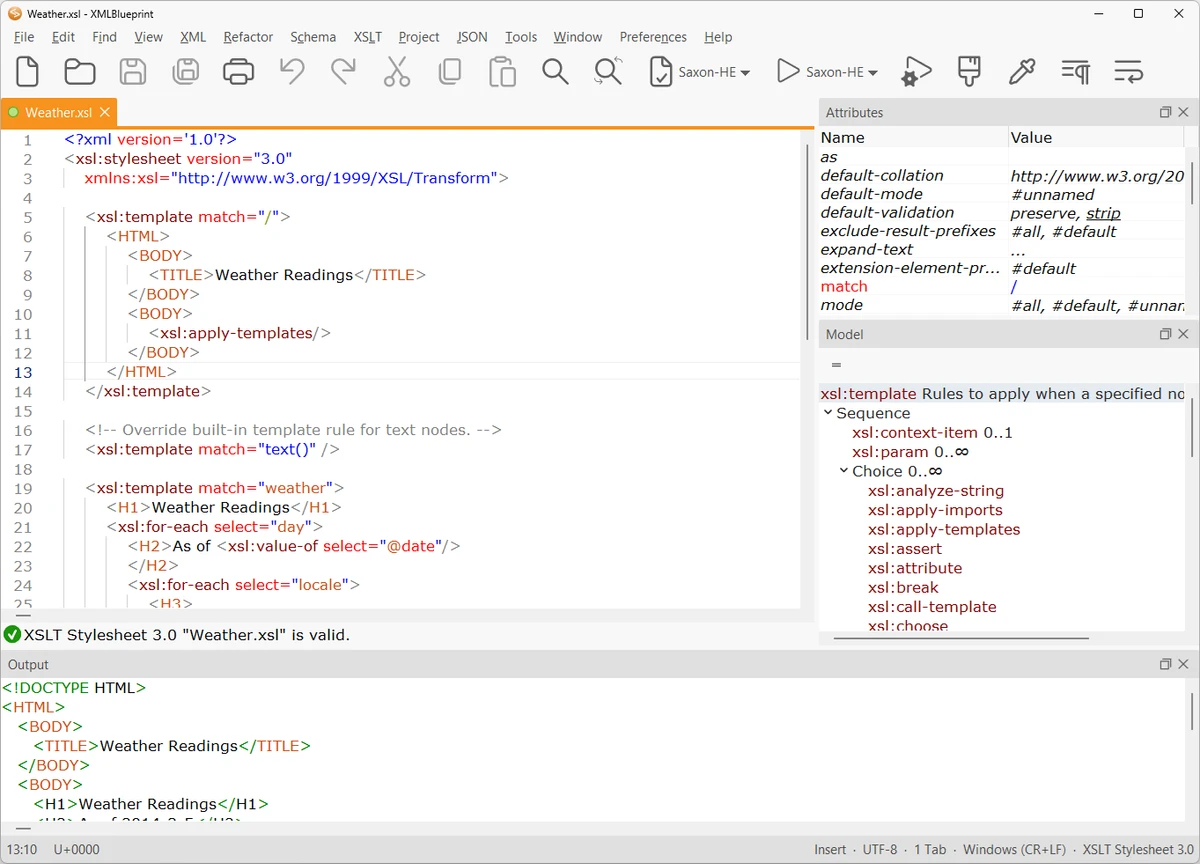
XMLBlueprint is a feature-rich XML editor designed for both professional developers and advanced home users who work with structured data formats. It provides extensive support for XML-related standards including DTD, Relax NG, Schematron, XSD, XPath (1.0–3.1), and XSLT (1.0–3.0), making it a comprehensive environment for XML development and validation.

One of its key strengths is the ability to handle extremely large XML files, including documents exceeding 1GB in size, without losing performance or editing capabilities. The software is built to support validation as you type, helping users detect errors early through integrated schema checking.

XMLBlueprint also includes tools for XML generation, refactoring, formatting, and schema conversion, allowing users to work efficiently across complex XML structures. Its support for remote editing via FTPS, SFTP, and WebDAV adds flexibility for developers working with distributed systems or server-based XML files.

Features of XMLBlueprint

  • Full support for DTD, XSD, Relax NG, Schematron, and XML Schema validation
  • XPath support (1.0, 2.0, 3.1) and XSLT support (1.0, 2.0, 3.0)
  • Real-time XML validation while typing
  • Handles extremely large XML files (1GB+)
  • XML refactoring tools for structural changes
  • XML formatting and indentation customization
  • XML generation from XSD, DTD, or Relax NG schemas
  • Convert CSV and Excel files to XML
  • XML tag completion with IntelliSense-style suggestions
  • Outline view and breadcrumb navigation for XML structure
  • Remote file editing via FTPS, SFTP, and WebDAV
  • Syntax highlighting for XML, HTML, CSS, Java, and JavaScript
  • XML catalogs for faster schema access

Interface and Usability

XMLBlueprint is designed with a structured, developer-focused interface that emphasizes productivity when working with complex XML documents. Features like outline view, breadcrumbs, and folding help users navigate large and deeply nested XML structures more efficiently.

The editor provides real-time validation and intelligent tag completion, reducing the likelihood of structural errors. While the tool is powerful and feature-rich, its interface remains organized, allowing users to access advanced XML functions without overwhelming navigation complexity.

Who Should Use XMLBlueprint?

This software is best suited for XML developers, data engineers, and technical professionals who frequently work with structured data formats such as XML, XSD, and XSLT. It is also useful for users who need to process large XML files or perform schema-driven data transformations.

Conclusion

XMLBlueprint stands out as a powerful XML development environment with deep support for modern XML standards and large-scale file handling. Its combination of validation tools, refactoring features, and schema-based assistance makes it highly effective for complex XML workflows.

장점 및 단점

장점

  • Extensive support for XML standards (XSD, XPath, XSLT, etc.)
  • Handles very large XML files (1GB+)
  • Real-time validation and IntelliSense-style editing
  • Powerful refactoring and formatting tools
  • Remote file editing (SFTP, FTPS, WebDAV)

단점

  • Complex feature set may be overwhelming for beginners
  • Focused exclusively on XML and related formats

자주 묻는 질문

What is XMLBlueprint used for?

XMLBlueprint is used for creating, editing, validating, and transforming XML documents using standards like XSD, XPath, and XSLT.

Does XMLBlueprint support large XML files?

Yes. It is optimized to handle very large XML files, including those over 1GB in size.

Can XMLBlueprint validate XML files automatically?

Yes. It supports real-time validation using DTD, XSD, Relax NG, and Schematron schemas.

Does XMLBlueprint support XSLT and XPath?

Yes. It supports XSLT (1.0, 2.0, 3.0) and XPath (1.0, 2.0, 3.1) for advanced XML transformations and queries.

Can I edit remote XML files with XMLBlueprint?

Yes. It supports remote editing via FTPS, SFTP, and WebDAV servers.

Is XMLBlueprint suitable for beginners?

It is primarily designed for professionals, but users familiar with XML concepts can still use it effectively thanks to its structured interface.

추천 앱 [무료]:
  • Digital Clock 5.2.2 Digital Clock logo 스킨, 알람, 투명도 조절 및 시스템 트레이 지원 기능을 갖춘 사용자 지정 가능한 데스크톱 시계 앱
  • RunAsTool 1.6 RunAsTool logo RunAsTool은 휴대용 권한 관리 유틸리티로, 암호 없이 관리자 권한으로 Windows 프로그램을 실행할 수 있습니다.
  • Minimal Image Viewer 2.0.3 Minimal Image Viewer logo 빠른 시작, 다양한 파일 형식 지원, GPU 렌더링, 휴대성과 개인 정보 보호에 중점을 둔 디자인을 갖춘 경량 Windows 이미지 뷰어입니다.
  • MuseScore 4.7.4 MuseScore logo 무료 악보 작성 도구, MIDI 지원 및 다양한 플랫폼 호환성을 통해 전문가 수준의 악보를 만들고, 편집하고, 인쇄하고, 공유하세요.
  • NETworkManager 2026.7.7.0 NETworkManager logo 이 오픈 소스 유틸리티를 사용하여 네트워크 연결을 관리하고, 문제를 진단하고, 장치를 스캔하고, 필수 문제 해결 도구에 액세스하십시오.
  • HP Easy Start 17.5.11 HP Easy Start logo 자동 장치 감지, 네트워크 지원 및 간소화된 설정 도구를 통해 HP 프린터 드라이버를 손쉽게 설치하고 구성하세요.
추천 앱 [쉐어웨어]:
  • SkyDemon 4.3.1 SkyDemon logo SkyDemon을 사용하여 실시간 항공 데이터, 동적 차트, NOTAM, METAR, TAF 및 지능형 경로 계획을 통해 항공편을 계획하세요.
  • O&O SafeErase 21.3.26142 O&O SafeErase logo 인증된 방법을 사용하여 파일, 드라이브 및 인터넷 흔적을 안전하게 삭제하여 Windows에서 데이터 복구를 방지합니다.
  • R-Studio 9.5 Build 191810 R-Studio logo 삭제, 포맷 또는 손상된 파일을 다양한 파일 시스템에서 복구할 수 있는 강력한 데이터 복구 소프트웨어입니다.
  • Asset Manager 2026 v4.10.3001 Asset Manager logo 자산 추적, 재고 관리, 바코드 사용 및 서비스 이력 관리를 효율적으로 수행합니다.
  • SmarterMail Build 9686 SmarterMail logo 협업 도구, 스팸 방지, ActiveSync 지원 및 웹 기반 관리 기능을 통해 비즈니스 이메일을 호스팅하고 관리하세요.
  • TrainController Gold 11.0 C1 TrainController Gold logo 첨단 자동화, 경로 관리 및 안전 기능을 통해 실제와 같은 열차 운행을 구현하는 디지털 방식으로 모형 철도를 제어하세요.