XMLBlueprint logo

XMLBlueprint 22.20260704

  • Avaliação dos usuários:
    ★★★★★
    ★★★★★
    0.0 0Votes
  • Requisitos:
    Windows
  • Versão: 22.20260704
  • Última atualização: há 3 semanas
  • Licença: Teste gratuito  
  • Editor: Monkfish XML Software
  • Tamanho: 81 MB
× app stores

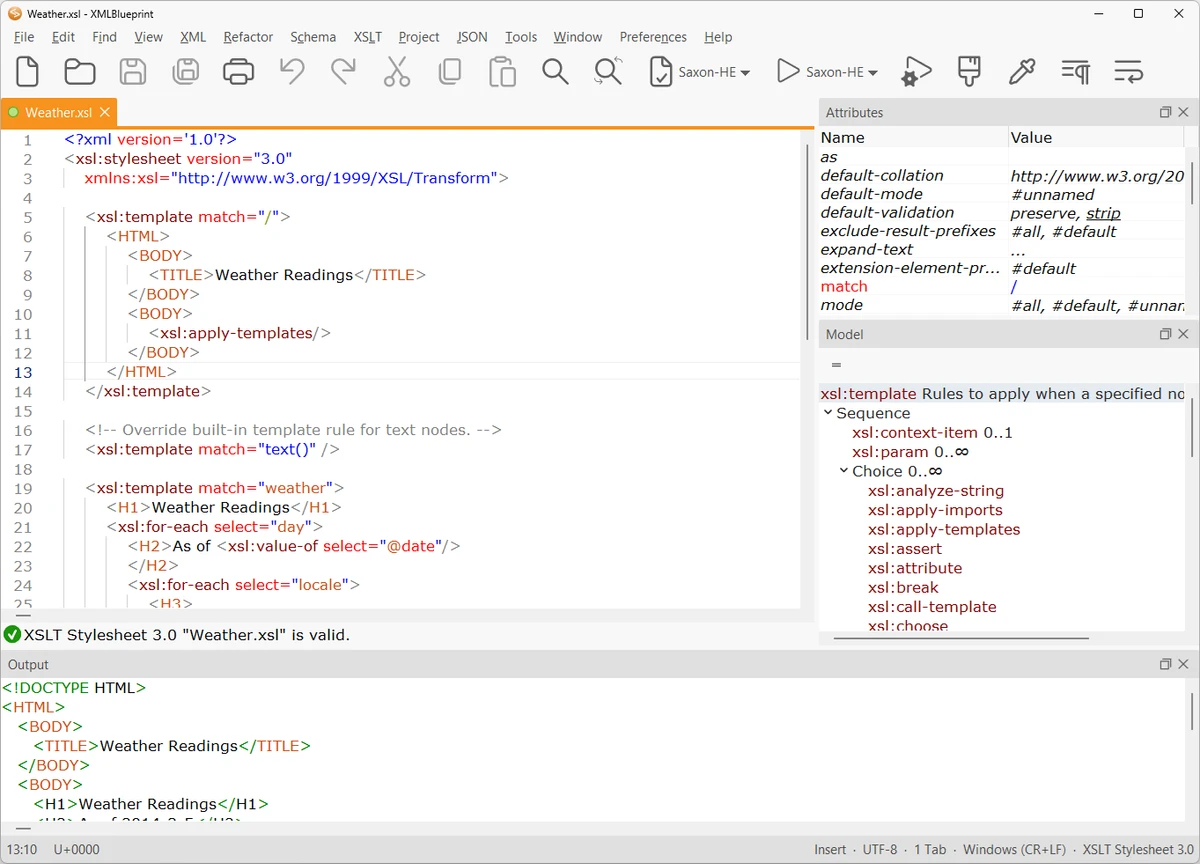
XMLBlueprint is a feature-rich XML editor designed for both professional developers and advanced home users who work with structured data formats. It provides extensive support for XML-related standards including DTD, Relax NG, Schematron, XSD, XPath (1.0–3.1), and XSLT (1.0–3.0), making it a comprehensive environment for XML development and validation.

One of its key strengths is the ability to handle extremely large XML files, including documents exceeding 1GB in size, without losing performance or editing capabilities. The software is built to support validation as you type, helping users detect errors early through integrated schema checking.

XMLBlueprint also includes tools for XML generation, refactoring, formatting, and schema conversion, allowing users to work efficiently across complex XML structures. Its support for remote editing via FTPS, SFTP, and WebDAV adds flexibility for developers working with distributed systems or server-based XML files.

Features of XMLBlueprint

  • Full support for DTD, XSD, Relax NG, Schematron, and XML Schema validation
  • XPath support (1.0, 2.0, 3.1) and XSLT support (1.0, 2.0, 3.0)
  • Real-time XML validation while typing
  • Handles extremely large XML files (1GB+)
  • XML refactoring tools for structural changes
  • XML formatting and indentation customization
  • XML generation from XSD, DTD, or Relax NG schemas
  • Convert CSV and Excel files to XML
  • XML tag completion with IntelliSense-style suggestions
  • Outline view and breadcrumb navigation for XML structure
  • Remote file editing via FTPS, SFTP, and WebDAV
  • Syntax highlighting for XML, HTML, CSS, Java, and JavaScript
  • XML catalogs for faster schema access

Interface and Usability

XMLBlueprint is designed with a structured, developer-focused interface that emphasizes productivity when working with complex XML documents. Features like outline view, breadcrumbs, and folding help users navigate large and deeply nested XML structures more efficiently.

The editor provides real-time validation and intelligent tag completion, reducing the likelihood of structural errors. While the tool is powerful and feature-rich, its interface remains organized, allowing users to access advanced XML functions without overwhelming navigation complexity.

Who Should Use XMLBlueprint?

This software is best suited for XML developers, data engineers, and technical professionals who frequently work with structured data formats such as XML, XSD, and XSLT. It is also useful for users who need to process large XML files or perform schema-driven data transformations.

Conclusion

XMLBlueprint stands out as a powerful XML development environment with deep support for modern XML standards and large-scale file handling. Its combination of validation tools, refactoring features, and schema-based assistance makes it highly effective for complex XML workflows.

Prós e Contras

Prós

  • Extensive support for XML standards (XSD, XPath, XSLT, etc.)
  • Handles very large XML files (1GB+)
  • Real-time validation and IntelliSense-style editing
  • Powerful refactoring and formatting tools
  • Remote file editing (SFTP, FTPS, WebDAV)

Contras

  • Complex feature set may be overwhelming for beginners
  • Focused exclusively on XML and related formats

Perguntas frequentes

What is XMLBlueprint used for?

XMLBlueprint is used for creating, editing, validating, and transforming XML documents using standards like XSD, XPath, and XSLT.

Does XMLBlueprint support large XML files?

Yes. It is optimized to handle very large XML files, including those over 1GB in size.

Can XMLBlueprint validate XML files automatically?

Yes. It supports real-time validation using DTD, XSD, Relax NG, and Schematron schemas.

Does XMLBlueprint support XSLT and XPath?

Yes. It supports XSLT (1.0, 2.0, 3.0) and XPath (1.0, 2.0, 3.1) for advanced XML transformations and queries.

Can I edit remote XML files with XMLBlueprint?

Yes. It supports remote editing via FTPS, SFTP, and WebDAV servers.

Is XMLBlueprint suitable for beginners?

It is primarily designed for professionals, but users familiar with XML concepts can still use it effectively thanks to its structured interface.

Aplicativos recomendados [Gratuitos]:
  • Digital Clock 5.2.2 Digital Clock logo Aplicativo de relógio de mesa personalizável com temas, alarmes, controle de opacidade e suporte para a bandeja do sistema.
  • RunAsTool 1.6 RunAsTool logo Execute programas do Windows com privilégios de administrador sem senhas usando o RunAsTool, um utilitário portátil de gerenciamento de privilégios.
  • Minimal Image Viewer 2.0.3 Minimal Image Viewer logo Um visualizador de imagens leve para Windows com inicialização rápida, suporte a uma ampla variedade de formatos, renderização por GPU e design portátil focado na privacidade.
  • MuseScore 4.7.4 MuseScore logo Crie, edite, imprima e compartilhe partituras profissionais com ferramentas de notação gratuitas, suporte a MIDI e compatibilidade multiplataforma.
  • NETworkManager 2026.7.7.0 NETworkManager logo Gerencie conexões de rede, diagnostique problemas, verifique dispositivos e acesse ferramentas essenciais de solução de problemas com este utilitário de código aberto.
  • HP Easy Start 17.5.11 HP Easy Start logo Instale e configure facilmente os drivers de impressora HP com detecção automática de dispositivos, suporte de rede e ferramentas de configuração simplificadas.
Aplicativos recomendados [Shareware]:
  • SkyDemon 4.3.1 SkyDemon logo Planeje voos com dados aeronáuticos em tempo real, cartas dinâmicas, NOTAMs, METAR, TAF e planejamento inteligente de rotas usando o SkyDemon.
  • O&O SafeErase 21.3.26142 O&O SafeErase logo Exclui arquivos, unidades e rastros da internet de forma segura, utilizando métodos certificados para impedir a recuperação de dados no Windows.
  • R-Studio 9.5 Build 191810 R-Studio logo Software poderoso de recuperação de dados para recuperar arquivos apagados, formatados ou danificados em diversos sistemas de arquivos.
  • Asset Manager 2026 v4.10.3001 Asset Manager logo Rastrear ativos, gerenciar inventário, usar códigos de barras e manter históricos de serviço de forma eficiente.
  • SmarterMail Build 9686 SmarterMail logo Hospede e gerencie e-mails comerciais com ferramentas de colaboração, proteção contra spam, suporte ao ActiveSync e administração baseada na web.
  • TrainController Gold 11.0 C1 TrainController Gold logo Controle ferrovias em miniatura digitalmente com automação avançada, gerenciamento de rotas e recursos de segurança para operações ferroviárias realistas.