XMLBlueprint logo

XMLBlueprint 22.20260704

  • Benutzerbewertung:
    ★★★★★
    ★★★★★
    0.0 0Votes
  • Anforderungen:
    Windows
  • Version: 22.20260704
  • Zuletzt aktualisiert: vor 3 Wochen
  • Lizenz: Testversion  
  • Herausgeber: Monkfish XML Software
  • Größe: 81 MB
× app stores

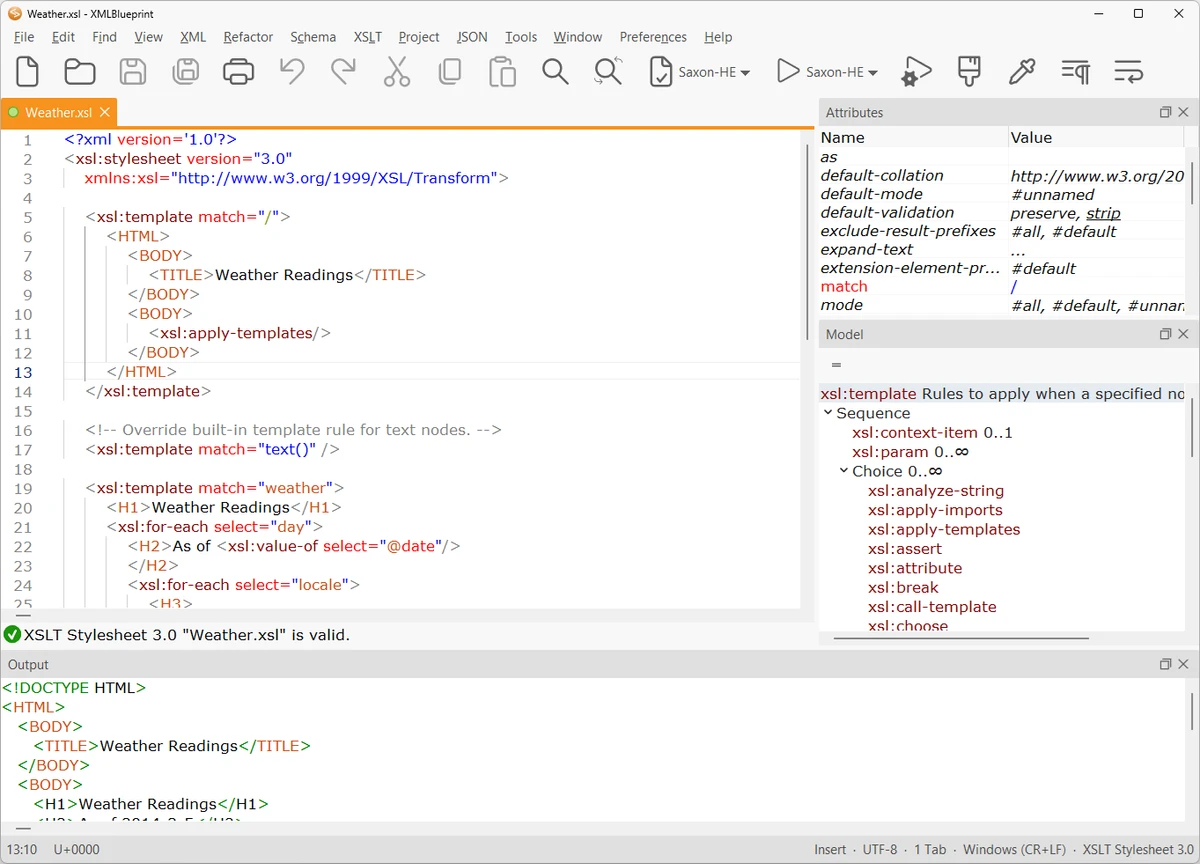
XMLBlueprint is a feature-rich XML editor designed for both professional developers and advanced home users who work with structured data formats. It provides extensive support for XML-related standards including DTD, Relax NG, Schematron, XSD, XPath (1.0–3.1), and XSLT (1.0–3.0), making it a comprehensive environment for XML development and validation.

One of its key strengths is the ability to handle extremely large XML files, including documents exceeding 1GB in size, without losing performance or editing capabilities. The software is built to support validation as you type, helping users detect errors early through integrated schema checking.

XMLBlueprint also includes tools for XML generation, refactoring, formatting, and schema conversion, allowing users to work efficiently across complex XML structures. Its support for remote editing via FTPS, SFTP, and WebDAV adds flexibility for developers working with distributed systems or server-based XML files.

Features of XMLBlueprint

  • Full support for DTD, XSD, Relax NG, Schematron, and XML Schema validation
  • XPath support (1.0, 2.0, 3.1) and XSLT support (1.0, 2.0, 3.0)
  • Real-time XML validation while typing
  • Handles extremely large XML files (1GB+)
  • XML refactoring tools for structural changes
  • XML formatting and indentation customization
  • XML generation from XSD, DTD, or Relax NG schemas
  • Convert CSV and Excel files to XML
  • XML tag completion with IntelliSense-style suggestions
  • Outline view and breadcrumb navigation for XML structure
  • Remote file editing via FTPS, SFTP, and WebDAV
  • Syntax highlighting for XML, HTML, CSS, Java, and JavaScript
  • XML catalogs for faster schema access

Interface and Usability

XMLBlueprint is designed with a structured, developer-focused interface that emphasizes productivity when working with complex XML documents. Features like outline view, breadcrumbs, and folding help users navigate large and deeply nested XML structures more efficiently.

The editor provides real-time validation and intelligent tag completion, reducing the likelihood of structural errors. While the tool is powerful and feature-rich, its interface remains organized, allowing users to access advanced XML functions without overwhelming navigation complexity.

Who Should Use XMLBlueprint?

This software is best suited for XML developers, data engineers, and technical professionals who frequently work with structured data formats such as XML, XSD, and XSLT. It is also useful for users who need to process large XML files or perform schema-driven data transformations.

Conclusion

XMLBlueprint stands out as a powerful XML development environment with deep support for modern XML standards and large-scale file handling. Its combination of validation tools, refactoring features, and schema-based assistance makes it highly effective for complex XML workflows.

Vorteile & Nachteile

Vorteile

  • Extensive support for XML standards (XSD, XPath, XSLT, etc.)
  • Handles very large XML files (1GB+)
  • Real-time validation and IntelliSense-style editing
  • Powerful refactoring and formatting tools
  • Remote file editing (SFTP, FTPS, WebDAV)

Nachteile

  • Complex feature set may be overwhelming for beginners
  • Focused exclusively on XML and related formats

Häufig gestellte Fragen

What is XMLBlueprint used for?

XMLBlueprint is used for creating, editing, validating, and transforming XML documents using standards like XSD, XPath, and XSLT.

Does XMLBlueprint support large XML files?

Yes. It is optimized to handle very large XML files, including those over 1GB in size.

Can XMLBlueprint validate XML files automatically?

Yes. It supports real-time validation using DTD, XSD, Relax NG, and Schematron schemas.

Does XMLBlueprint support XSLT and XPath?

Yes. It supports XSLT (1.0, 2.0, 3.0) and XPath (1.0, 2.0, 3.1) for advanced XML transformations and queries.

Can I edit remote XML files with XMLBlueprint?

Yes. It supports remote editing via FTPS, SFTP, and WebDAV servers.

Is XMLBlueprint suitable for beginners?

It is primarily designed for professionals, but users familiar with XML concepts can still use it effectively thanks to its structured interface.

Empfohlene Apps [Freeware]:
  • Digital Clock 5.2.2 Digital Clock logo Anpassbare Desktop-Uhr-App mit Designs, Weckern, Transparenzsteuerung und Unterstützung für die Systemleiste
  • RunAsTool 1.6 RunAsTool logo Führen Sie Windows-Programme mit Administratorrechten ohne Passwörter aus, indem Sie RunAsTool verwenden, ein portables Dienstprogramm zur Rechteverwaltung.
  • Minimal Image Viewer 2.0.3 Minimal Image Viewer logo Ein leichtgewichtiger Windows-Bildbetrachter mit schnellem Start, Unterstützung für viele Formate, GPU-Rendering und portablem, datenschutzorientiertem Design.
  • MuseScore 4.7.4 MuseScore logo Erstellen, bearbeiten, drucken und teilen Sie professionelle Noten mit kostenlosen Notationswerkzeugen, MIDI-Unterstützung und plattformübergreifender Kompatibilität.
  • NETworkManager 2026.7.7.0 NETworkManager logo Mit diesem Open-Source-Tool können Sie Netzwerkverbindungen verwalten, Probleme diagnostizieren, Geräte scannen und auf wichtige Tools zur Fehlerbehebung zugreifen.
  • HP Easy Start 17.5.11 HP Easy Start logo Installieren und konfigurieren Sie HP-Druckertreiber einfach mit automatischer Geräteerkennung, Netzwerkunterstützung und optimierten Einrichtungstools.
Empfohlene Apps [Shareware]:
  • SkyDemon 4.3.1 SkyDemon logo Planen Sie Flüge mit Echtzeit-Flugdaten, dynamischen Karten, NOTAMs, METAR, TAF und intelligenter Routenplanung mit SkyDemon.
  • O&O SafeErase 21.3.26142 O&O SafeErase logo Löscht Dateien, Laufwerke und Internetspuren sicher mithilfe zertifizierter Methoden, um die Datenwiederherstellung unter Windows zu verhindern.
  • R-Studio 9.5 Build 191810 R-Studio logo Leistungsstarke Datenwiederherstellungssoftware zur Wiederherstellung gelöschter, formatierter oder beschädigter Dateien über mehrere Dateisysteme hinweg.
  • Asset Manager 2026 v4.10.3001 Asset Manager logo Anlagen verfolgen, Lagerbestände verwalten, Barcodes verwenden und Servicehistorien effizient pflegen
  • SmarterMail Build 9686 SmarterMail logo Hosten und verwalten Sie geschäftliche E-Mails mit Kollaborationstools, Spamschutz, ActiveSync-Unterstützung und webbasierter Administration.
  • TrainController Gold 11.0 C1 TrainController Gold logo Steuern Sie Modelleisenbahnen digital mit fortschrittlichen Automatisierungs-, Streckenmanagement- und Sicherheitsfunktionen für einen realistischen Zugbetrieb.