QILING Disk Master Server logo

QILING Disk Master Server 8.8

  • Évaluation des utilisateurs:
    ★★★★★
    ★★★★★
    0.0 ★ 0Votes
  • Exigences:
    Windows
  • Version: 8.8
  • Dernière mise à jour: il y a 3 mois
  • Licence: Essai gratuit  
  • Éditeur: QILING Tech
  • Taille: 31 MB
× ❮ app stores ❯

QILING Disk Master Server is an enterprise-focused backup and recovery solution designed specifically for Windows Server environments. It extends the capabilities of the standard Disk Master edition by providing enhanced tools for server-level data protection, system imaging, and disaster recovery. The software is clearly built for IT administrators and businesses that require reliable backup strategies for critical server infrastructure. It supports full system backups, incremental and differential backups, and advanced recovery options to ensure business continuity in case of system failure.

In addition to backup and restore features, it also includes disk virtualization, RAMDisk functionality, and secure encrypted storage options, making it a multi-purpose server maintenance tool.

Features of QILING Disk Master Server

  • Full system and disk image backup for Windows Server.
  • File, folder, and application-level backup support.
  • Incremental, differential, and full backup modes.
  • One-click system backup and restore functionality.
  • Scheduled automated backups (daily, weekly, monthly).
  • AES 256-bit encryption for secure backup storage.
  • RAMDisk support for improved server performance.
  • Virtual disk (secure disk image) creation and management.
  • Anti-duplication compression to reduce backup size.
  • Disk image splitting and formatting tools.
  • Supports large virtual disks up to 4TB.
  • GPT and UEFI boot compatibility.
  • Fast data migration between server drives.
  • Disaster recovery for restoring systems to previous states.
  • Backup support for files, databases, emails, and applications.

Interface and Usability

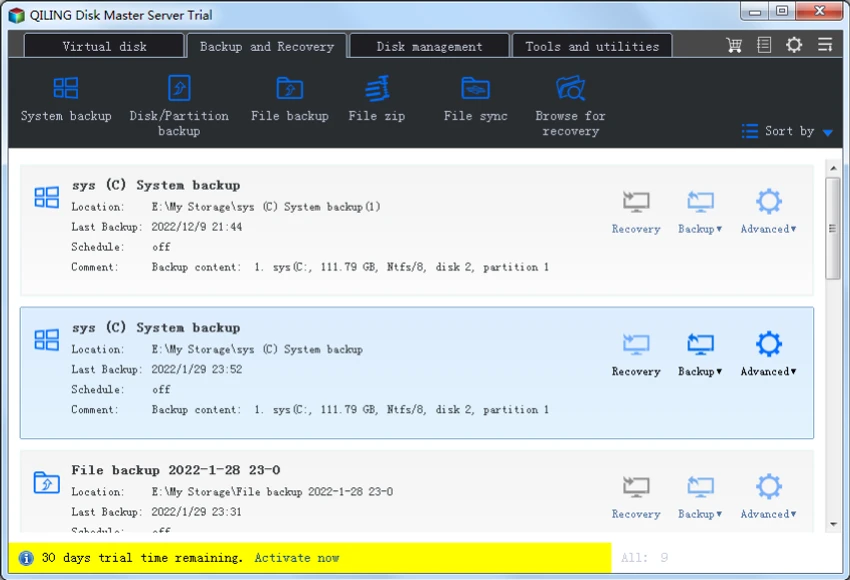
QILING Disk Master Server uses a structured, task-oriented interface tailored for IT administrators managing server environments. From my perspective, the layout prioritizes clarity in backup, restore, and disk management workflows.

The one-click backup option simplifies routine operations, while advanced settings allow administrators to configure encryption, scheduling, and backup strategies in detail. This balance makes it suitable for both basic server maintenance tasks and more complex enterprise backup strategies. Although feature-rich, the interface remains logically organized around core server protection workflows, reducing operational complexity for IT teams.

Who Should Use QILING Disk Master Server?

  • IT administrators managing Windows Server infrastructure.
  • Businesses requiring reliable disaster recovery systems.
  • Organizations needing automated backup scheduling.
  • Enterprises handling sensitive or critical data.
  • Data centers and managed service providers.
  • Users migrating or maintaining server environments.

System Requirements

  • Windows Server environments
  • GPT & UEFI-compatible systems
  • Enterprise-grade hardware recommended

Conclusion

QILING Disk Master Server is a robust and enterprise-ready backup and disaster recovery solution built specifically for Windows Server environments. It provides a comprehensive set of tools for system imaging, encrypted backups, and fast recovery, ensuring business continuity in case of system failure.

Avantages & Inconvénients

✓

Avantages

  • Comprehensive server backup and recovery system
  • Supports full, incremental, and differential backups
  • Strong AES 256-bit encryption
  • RAMDisk and virtual disk features included
  • Automated scheduling for backups
  • Fast system recovery and migration tools
  • Suitable for enterprise environments
✕

Inconvénients

  • Designed primarily for server environments (not ideal for home users)
  • Feature complexity may require IT knowledge
  • UI is functional but not modern or highly polished

Questions fréquentes

What is QILING Disk Master Server used for?

It is used for backing up, restoring, and protecting Windows Server systems and critical business data.

Does it support automated backups?

Yes. It supports scheduled backups including daily, weekly, and monthly automation.

Can it recover a failed server system?

Yes. It can restore full system images to recover failed or corrupted server environments.

Does it support encryption for backups?

Yes. It uses AES 256-bit encryption to secure backup data.

Is it suitable for businesses?

Yes. It is designed specifically for enterprise and Windows Server environments.

Does it include disk management tools?

Yes. It includes virtual disks, RAMDisk, and disk migration features for server optimization.

Applications recommandées [Gratuites]:
  • Far Manager 3.0 Build 6699 Far Manager logo Gérez efficacement vos fichiers grâce à l'interface texte rapide de Far Manager, ses plugins et sa prise en charge des archives.
  • Clean Space 2026 v724 Clean Space logo Un utilitaire Windows permettant de supprimer les fichiers inutiles du système, le cache, les journaux et d'améliorer la protection de la vie privée en ligne.
  • QR-Code Creator 7.6.8 QR-Code Creator logo Un outil gratuit pour Windows permettant de créer des codes QR personnalisables avec génération et exportation hors ligne.
  • Foxit Reader 2026.1.2.36540 Foxit Reader logo Lisez, annotez, remplissez des formulaires et imprimez des fichiers PDF avec Foxit Reader, un outil PDF léger et riche en fonctionnalités pour Windows.
  • Alternate Archiver 4.780 Alternate Archiver logo Organisez, renommez, archivez et gérez facilement plusieurs fichiers grâce à un utilitaire Windows léger conçu pour une gestion efficace des fichiers.
  • MultiPack Visual C++ Installer 4.2 MultiPack Visual C++ Installer logo Installez rapidement les environnements d'exécution Microsoft Visual C++ requis pour résoudre les problèmes de compatibilité des applications et des jeux sur les systèmes Windows.
Applications recommandées [Shareware]:
  • Copy Protect 3.0.2 Copy Protect logo Convertit les fichiers multimédias en exécutables sécurisés afin d'empêcher la copie, la duplication et la distribution non autorisée sous Windows.
  • CyberLink PhotoDirector 2026 v17.6.1826.0 CyberLink PhotoDirector logo Modifiez, retouchez et améliorez vos photos avec CyberLink PhotoDirector, qui propose des outils d'IA, l'édition de calques et des effets professionnels.
  • Cyber Privacy Suite 4.5.5 Cyber Privacy Suite logo Protégez votre vie privée grâce à un VPN, une protection contre le suivi, le chiffrement et des outils de sécurité en temps réel pour les utilisateurs Windows.
  • XMLBlueprint 22.20260704 XMLBlueprint logo a professional XML editor supporting XSD, XPath, XSLT, validation, and large XML file editing for Windows
  • Light Image Resizer 7.6.4.173 Light Image Resizer logo Redimensionnez, compressez, convertissez, organisez et ajoutez rapidement un filigrane à vos images grâce au traitement par lots, à l'optimisation de la qualité et à la prise en charge des formats.
  • Gammadyne Mailer 74.0 Gammadyne Mailer logo Automatisez vos campagnes d'emailing, gérez vos listes de diffusion, suivez l'engagement et traitez vos messages grâce à des outils marketing avancés.