QILING Disk Master Server logo

QILING Disk Master Server 8.8

  • Calificación de usuarios:
    ★★★★★
    ★★★★★
    0.0 0Votes
  • Requisitos:
    Windows
  • Versión: 8.8
  • Última actualización: hace 2 meses
  • Licencia: Prueba gratuita  
  • Editor: QILING Tech
  • Tamaño: 31 MB
× app stores

QILING Disk Master Server is an enterprise-focused backup and recovery solution designed specifically for Windows Server environments. It extends the capabilities of the standard Disk Master edition by providing enhanced tools for server-level data protection, system imaging, and disaster recovery. The software is clearly built for IT administrators and businesses that require reliable backup strategies for critical server infrastructure. It supports full system backups, incremental and differential backups, and advanced recovery options to ensure business continuity in case of system failure.

In addition to backup and restore features, it also includes disk virtualization, RAMDisk functionality, and secure encrypted storage options, making it a multi-purpose server maintenance tool.

Features of QILING Disk Master Server

  • Full system and disk image backup for Windows Server.
  • File, folder, and application-level backup support.
  • Incremental, differential, and full backup modes.
  • One-click system backup and restore functionality.
  • Scheduled automated backups (daily, weekly, monthly).
  • AES 256-bit encryption for secure backup storage.
  • RAMDisk support for improved server performance.
  • Virtual disk (secure disk image) creation and management.
  • Anti-duplication compression to reduce backup size.
  • Disk image splitting and formatting tools.
  • Supports large virtual disks up to 4TB.
  • GPT and UEFI boot compatibility.
  • Fast data migration between server drives.
  • Disaster recovery for restoring systems to previous states.
  • Backup support for files, databases, emails, and applications.

Interface and Usability

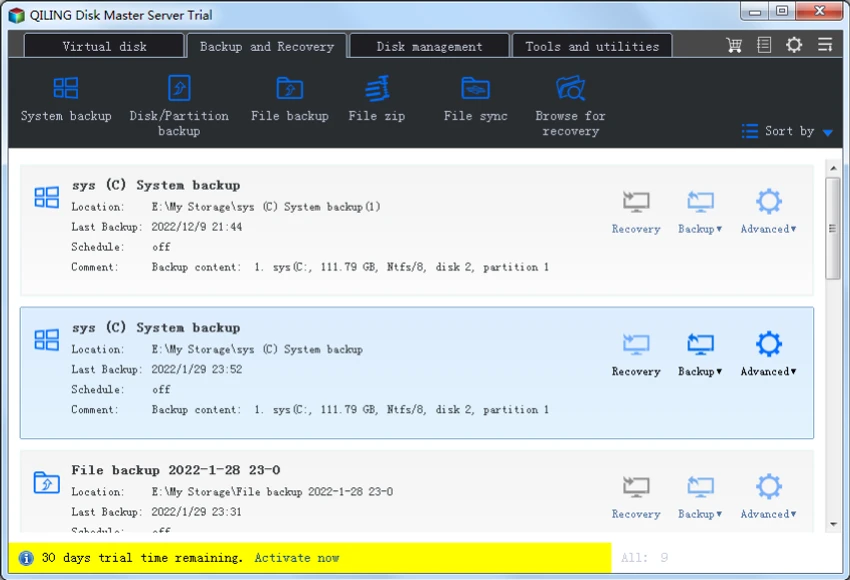
QILING Disk Master Server uses a structured, task-oriented interface tailored for IT administrators managing server environments. From my perspective, the layout prioritizes clarity in backup, restore, and disk management workflows.

The one-click backup option simplifies routine operations, while advanced settings allow administrators to configure encryption, scheduling, and backup strategies in detail. This balance makes it suitable for both basic server maintenance tasks and more complex enterprise backup strategies. Although feature-rich, the interface remains logically organized around core server protection workflows, reducing operational complexity for IT teams.

Who Should Use QILING Disk Master Server?

  • IT administrators managing Windows Server infrastructure.
  • Businesses requiring reliable disaster recovery systems.
  • Organizations needing automated backup scheduling.
  • Enterprises handling sensitive or critical data.
  • Data centers and managed service providers.
  • Users migrating or maintaining server environments.

System Requirements

  • Windows Server environments
  • GPT & UEFI-compatible systems
  • Enterprise-grade hardware recommended

Conclusion

QILING Disk Master Server is a robust and enterprise-ready backup and disaster recovery solution built specifically for Windows Server environments. It provides a comprehensive set of tools for system imaging, encrypted backups, and fast recovery, ensuring business continuity in case of system failure.

Pros y Contras

Pros

  • Comprehensive server backup and recovery system
  • Supports full, incremental, and differential backups
  • Strong AES 256-bit encryption
  • RAMDisk and virtual disk features included
  • Automated scheduling for backups
  • Fast system recovery and migration tools
  • Suitable for enterprise environments

Contras

  • Designed primarily for server environments (not ideal for home users)
  • Feature complexity may require IT knowledge
  • UI is functional but not modern or highly polished

Preguntas frecuentes

What is QILING Disk Master Server used for?

It is used for backing up, restoring, and protecting Windows Server systems and critical business data.

Does it support automated backups?

Yes. It supports scheduled backups including daily, weekly, and monthly automation.

Can it recover a failed server system?

Yes. It can restore full system images to recover failed or corrupted server environments.

Does it support encryption for backups?

Yes. It uses AES 256-bit encryption to secure backup data.

Is it suitable for businesses?

Yes. It is designed specifically for enterprise and Windows Server environments.

Does it include disk management tools?

Yes. It includes virtual disks, RAMDisk, and disk migration features for server optimization.

Aplicaciones recomendadas [Gratis]:
  • PCSX2 2.6.3 PCSX2 logo Juega a juegos de PlayStation 2 en tu PC, explora sus características, proceso de configuración, rendimiento y usabilidad.
  • LDPlayer 14.0.25.2 LDPlayer logo Emulador de Android 5.1 para Windows que te permite ejecutar aplicaciones y juegos móviles con control de teclado.
  • Avast Clear 26.6.11052 Avast Clear logo Elimine por completo el antivirus Avast con Avast Clear, la utilidad de desinstalación oficial que limpia los archivos y entradas de registro restantes.
  • Catalyst Browse 2026.1.1 Catalyst Browse logo Una herramienta de visualización y registro de contenido multimedia para formatos profesionales, que ofrece reproducción, edición de metadatos y gestión del flujo de trabajo.
  • LibreWolf 152.0.6-1 LibreWolf logo Navega de forma privada con un navegador basado en Firefox, centrado en bloquear el rastreo, eliminar la telemetría y mejorar la seguridad en línea.
  • Deskreen 3.2.16 Deskreen logo Utiliza cualquier dispositivo con navegador web como segunda pantalla inalámbrica, con opciones para compartir pantalla, compartir aplicaciones y visualizar contenido de forma flexible.
Aplicaciones recomendadas [Shareware]:
  • Adobe Illustrator 2026 Adobe Illustrator logo Editor gráfico vectorial profesional para crear logotipos, ilustraciones y diseños escalables.
  • Wondershare PDFelement Professional 12.1.24 Wondershare PDFelement Professional logo Un editor de PDF para editar, convertir, firmar y gestionar documentos fácilmente.
  • RadioCaster 3.7.2.0 RadioCaster logo Te permite transmitir cualquier audio analógico o de ordenador en línea utilizando Icecast, Shoutcast y muchos otros formatos.
  • Adobe Media Encoder 2026 Adobe Media Encoder logo Una potente herramienta de codificación de vídeo y gestión de medios para exportar y transcodificar.
  • ON1 Effects 2026.4 ON1 Effects logo Efectos fotográficos con IA, filtros creativos, preajustes, LUTs y herramientas de enmascaramiento para mejoras de imagen impresionantes.
  • UniFab 4.1.7.0 UniFab logo Mejora tus vídeos con IA usando UniFab. Escala tus grabaciones, reduce el ruido, aumenta la velocidad de fotogramas, convierte imágenes HDR y mejora la calidad del audio.