QILING Disk Master Server logo

QILING Disk Master Server 8.8

  • Avaliação dos usuários:
    ★★★★★
    ★★★★★
    0.0 0Votes
  • Requisitos:
    Windows
  • Versão: 8.8
  • Última atualização: há 3 semanas
  • Licença: Teste gratuito  
  • Editor: QILING Tech
  • Tamanho: 31 MB
× app stores

QILING Disk Master Server is an enterprise-focused backup and recovery solution designed specifically for Windows Server environments. It extends the capabilities of the standard Disk Master edition by providing enhanced tools for server-level data protection, system imaging, and disaster recovery. The software is clearly built for IT administrators and businesses that require reliable backup strategies for critical server infrastructure. It supports full system backups, incremental and differential backups, and advanced recovery options to ensure business continuity in case of system failure.

In addition to backup and restore features, it also includes disk virtualization, RAMDisk functionality, and secure encrypted storage options, making it a multi-purpose server maintenance tool.

Features of QILING Disk Master Server

  • Full system and disk image backup for Windows Server.
  • File, folder, and application-level backup support.
  • Incremental, differential, and full backup modes.
  • One-click system backup and restore functionality.
  • Scheduled automated backups (daily, weekly, monthly).
  • AES 256-bit encryption for secure backup storage.
  • RAMDisk support for improved server performance.
  • Virtual disk (secure disk image) creation and management.
  • Anti-duplication compression to reduce backup size.
  • Disk image splitting and formatting tools.
  • Supports large virtual disks up to 4TB.
  • GPT and UEFI boot compatibility.
  • Fast data migration between server drives.
  • Disaster recovery for restoring systems to previous states.
  • Backup support for files, databases, emails, and applications.

Interface and Usability

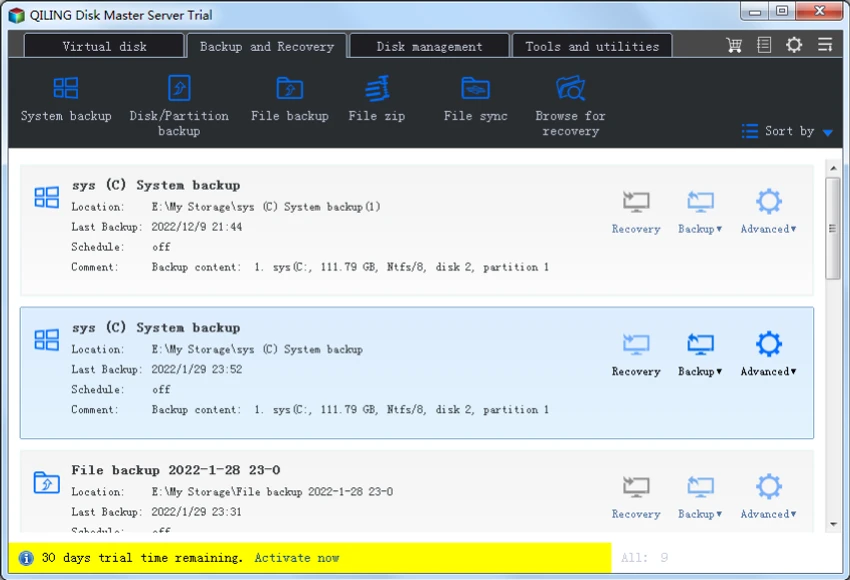
QILING Disk Master Server uses a structured, task-oriented interface tailored for IT administrators managing server environments. From my perspective, the layout prioritizes clarity in backup, restore, and disk management workflows.

The one-click backup option simplifies routine operations, while advanced settings allow administrators to configure encryption, scheduling, and backup strategies in detail. This balance makes it suitable for both basic server maintenance tasks and more complex enterprise backup strategies. Although feature-rich, the interface remains logically organized around core server protection workflows, reducing operational complexity for IT teams.

Who Should Use QILING Disk Master Server?

  • IT administrators managing Windows Server infrastructure.
  • Businesses requiring reliable disaster recovery systems.
  • Organizations needing automated backup scheduling.
  • Enterprises handling sensitive or critical data.
  • Data centers and managed service providers.
  • Users migrating or maintaining server environments.

System Requirements

  • Windows Server environments
  • GPT & UEFI-compatible systems
  • Enterprise-grade hardware recommended

Conclusion

QILING Disk Master Server is a robust and enterprise-ready backup and disaster recovery solution built specifically for Windows Server environments. It provides a comprehensive set of tools for system imaging, encrypted backups, and fast recovery, ensuring business continuity in case of system failure.

Prós e Contras

Prós

  • Comprehensive server backup and recovery system
  • Supports full, incremental, and differential backups
  • Strong AES 256-bit encryption
  • RAMDisk and virtual disk features included
  • Automated scheduling for backups
  • Fast system recovery and migration tools
  • Suitable for enterprise environments

Contras

  • Designed primarily for server environments (not ideal for home users)
  • Feature complexity may require IT knowledge
  • UI is functional but not modern or highly polished

Perguntas frequentes

What is QILING Disk Master Server used for?

It is used for backing up, restoring, and protecting Windows Server systems and critical business data.

Does it support automated backups?

Yes. It supports scheduled backups including daily, weekly, and monthly automation.

Can it recover a failed server system?

Yes. It can restore full system images to recover failed or corrupted server environments.

Does it support encryption for backups?

Yes. It uses AES 256-bit encryption to secure backup data.

Is it suitable for businesses?

Yes. It is designed specifically for enterprise and Windows Server environments.

Does it include disk management tools?

Yes. It includes virtual disks, RAMDisk, and disk migration features for server optimization.

Aplicativos recomendados [Gratuitos]:
  • Video Repair Tool 5.0.4.5 Video Repair Tool logo Repare arquivos de vídeo corrompidos, danificados ou que não podem ser reproduzidos no Windows e no Mac com fluxos de trabalho de recuperação simples.
  • SSD Booster .NET 19.7 SSD Booster .NET logo Uma ferramenta para Windows projetada para ajustar as configurações do sistema e otimizar o desempenho do SSD com controles simples de ativação/desativação.
  • Disk Benchmark 1.0 Disk Benchmark logo Mede o desempenho de SSDs, HDDs, NVMe e unidades USB com testes detalhados de velocidade, IOPS e latência.
  • GLview 7.4.6 GLview logo Exibe informações detalhadas sobre OpenGL, Vulkan, DirectX e GPU, ajudando os usuários a analisar os recursos do hardware gráfico e dos drivers.
  • Media Player Codec Pack Plus 5.1.2.625 Media Player Codec Pack Plus logo Pacote de codecs para Windows que aprimora a reprodução de vídeo e áudio com amplo suporte a formatos e filtros avançados.
  • MultiPack Visual C++ Installer 4.2 MultiPack Visual C++ Installer logo Instale rapidamente os runtimes do Microsoft Visual C++ necessários para corrigir problemas de compatibilidade de aplicativos e jogos em sistemas Windows.
Aplicativos recomendados [Shareware]:
  • WinRAR 7.23 WinRAR logo Ferramenta para Windows que permite compactar, descompactar e gerenciar arquivos RAR, ZIP e muitos outros formatos.
  • PowerDirector 2026 v24.6 PowerDirector logo Editor de vídeo com inteligência artificial que oferece modelos, efeitos e ferramentas para criação rápida de vídeos profissionais.
  • TweakNow WinSecret Plus 9.8.1 TweakNow WinSecret Plus logo Otimização do Windows, ajustes ocultos, ferramentas de PDF, conversão de imagens e utilitários de sistema.
  • Home Manager 2026 v4.10.1002 Home Manager logo Controle o inventário doméstico, armazene detalhes dos itens, gerencie reparos e gere relatórios para a seguradora.
  • WinTools.net Professional 26.7.1 WinTools.net Professional logo Otimize o desempenho do Windows com ferramentas para limpar arquivos, gerenciar itens de inicialização, ajustar configurações e melhorar a privacidade do sistema.
  • Cisdem Video Compressor 3.0.0 Cisdem Video Compressor logo Comprima arquivos de vídeo e áudio, preservando a qualidade, com configurações personalizáveis, processamento em lote e suporte para formatos de mídia populares.