QILING Disk Master Server logo

QILING Disk Master Server 8.8

  • Benutzerbewertung:
    ★★★★★
    ★★★★★
    0.0 0Votes
  • Anforderungen:
    Windows
  • Version: 8.8
  • Zuletzt aktualisiert: vor 3 Wochen
  • Lizenz: Testversion  
  • Herausgeber: QILING Tech
  • Größe: 31 MB
× app stores

QILING Disk Master Server is an enterprise-focused backup and recovery solution designed specifically for Windows Server environments. It extends the capabilities of the standard Disk Master edition by providing enhanced tools for server-level data protection, system imaging, and disaster recovery. The software is clearly built for IT administrators and businesses that require reliable backup strategies for critical server infrastructure. It supports full system backups, incremental and differential backups, and advanced recovery options to ensure business continuity in case of system failure.

In addition to backup and restore features, it also includes disk virtualization, RAMDisk functionality, and secure encrypted storage options, making it a multi-purpose server maintenance tool.

Features of QILING Disk Master Server

  • Full system and disk image backup for Windows Server.
  • File, folder, and application-level backup support.
  • Incremental, differential, and full backup modes.
  • One-click system backup and restore functionality.
  • Scheduled automated backups (daily, weekly, monthly).
  • AES 256-bit encryption for secure backup storage.
  • RAMDisk support for improved server performance.
  • Virtual disk (secure disk image) creation and management.
  • Anti-duplication compression to reduce backup size.
  • Disk image splitting and formatting tools.
  • Supports large virtual disks up to 4TB.
  • GPT and UEFI boot compatibility.
  • Fast data migration between server drives.
  • Disaster recovery for restoring systems to previous states.
  • Backup support for files, databases, emails, and applications.

Interface and Usability

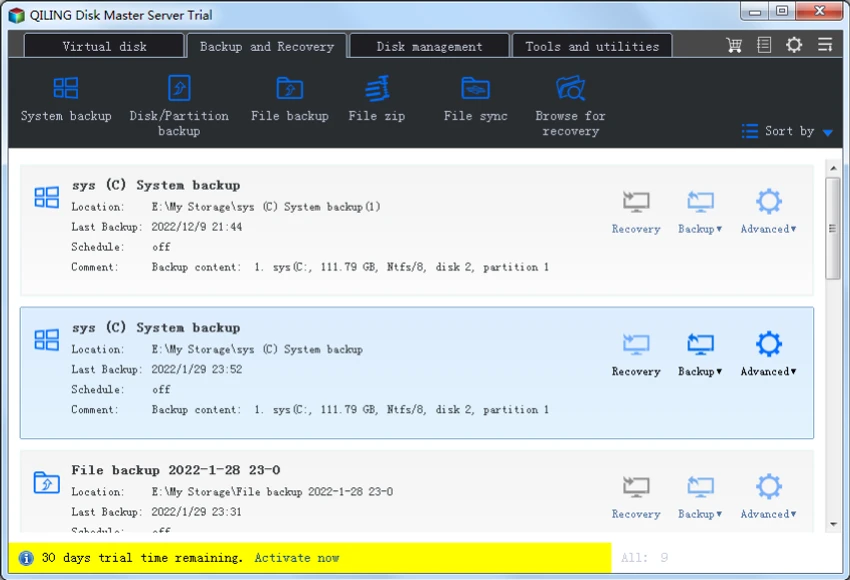
QILING Disk Master Server uses a structured, task-oriented interface tailored for IT administrators managing server environments. From my perspective, the layout prioritizes clarity in backup, restore, and disk management workflows.

The one-click backup option simplifies routine operations, while advanced settings allow administrators to configure encryption, scheduling, and backup strategies in detail. This balance makes it suitable for both basic server maintenance tasks and more complex enterprise backup strategies. Although feature-rich, the interface remains logically organized around core server protection workflows, reducing operational complexity for IT teams.

Who Should Use QILING Disk Master Server?

  • IT administrators managing Windows Server infrastructure.
  • Businesses requiring reliable disaster recovery systems.
  • Organizations needing automated backup scheduling.
  • Enterprises handling sensitive or critical data.
  • Data centers and managed service providers.
  • Users migrating or maintaining server environments.

System Requirements

  • Windows Server environments
  • GPT & UEFI-compatible systems
  • Enterprise-grade hardware recommended

Conclusion

QILING Disk Master Server is a robust and enterprise-ready backup and disaster recovery solution built specifically for Windows Server environments. It provides a comprehensive set of tools for system imaging, encrypted backups, and fast recovery, ensuring business continuity in case of system failure.

Vorteile & Nachteile

Vorteile

  • Comprehensive server backup and recovery system
  • Supports full, incremental, and differential backups
  • Strong AES 256-bit encryption
  • RAMDisk and virtual disk features included
  • Automated scheduling for backups
  • Fast system recovery and migration tools
  • Suitable for enterprise environments

Nachteile

  • Designed primarily for server environments (not ideal for home users)
  • Feature complexity may require IT knowledge
  • UI is functional but not modern or highly polished

Häufig gestellte Fragen

What is QILING Disk Master Server used for?

It is used for backing up, restoring, and protecting Windows Server systems and critical business data.

Does it support automated backups?

Yes. It supports scheduled backups including daily, weekly, and monthly automation.

Can it recover a failed server system?

Yes. It can restore full system images to recover failed or corrupted server environments.

Does it support encryption for backups?

Yes. It uses AES 256-bit encryption to secure backup data.

Is it suitable for businesses?

Yes. It is designed specifically for enterprise and Windows Server environments.

Does it include disk management tools?

Yes. It includes virtual disks, RAMDisk, and disk migration features for server optimization.

Empfohlene Apps [Freeware]:
  • Video Repair Tool 5.0.4.5 Video Repair Tool logo Reparieren Sie beschädigte, defekte oder nicht abspielbare Videodateien unter Windows und Mac mit einfachen Wiederherstellungsabläufen.
  • SSD Booster .NET 19.7 SSD Booster .NET logo Ein Windows-Tool zur Anpassung von Systemeinstellungen und zur Optimierung der SSD-Leistung mit einfachen Ein-/Ausschaltern.
  • Disk Benchmark 1.0 Disk Benchmark logo Misst die Leistung von SSDs, HDDs, NVMe- und USB-Laufwerken mit detaillierten Geschwindigkeits-, IOPS- und Latenztests.
  • GLview 7.4.6 GLview logo Zeigt detaillierte Informationen zu OpenGL, Vulkan, DirectX und GPU an und hilft Benutzern so bei der Analyse der Fähigkeiten von Grafikhardware und Treibern.
  • Media Player Codec Pack Plus 5.1.2.625 Media Player Codec Pack Plus logo Windows-Codec-Bundle, das die Video- und Audiowiedergabe durch breite Formatunterstützung und erweiterte Filter verbessert.
  • MultiPack Visual C++ Installer 4.2 MultiPack Visual C++ Installer logo Installieren Sie die erforderlichen Microsoft Visual C++-Laufzeitumgebungen schnell, um Anwendungs- und Spielkompatibilitätsprobleme auf Windows-Systemen zu beheben.
Empfohlene Apps [Shareware]:
  • WinRAR 7.23 WinRAR logo Windows-Tool zum Komprimieren, Dekomprimieren und Verwalten von RAR-, ZIP- und vielen anderen Archivformaten.
  • PowerDirector 2026 v24.6 PowerDirector logo KI-gestützter Video-Editor mit Vorlagen, Effekten und Werkzeugen für die schnelle, professionelle Videoerstellung
  • TweakNow WinSecret Plus 9.8.1 TweakNow WinSecret Plus logo Windows-Optimierung, versteckte Optimierungen, PDF-Tools, Bildkonvertierung und Systemdienstprogramme
  • Home Manager 2026 v4.10.1002 Home Manager logo Hausinventar verwalten, Artikeldetails speichern, Reparaturen abwickeln und Versicherungsberichte erstellen
  • WinTools.net Professional 26.7.1 WinTools.net Professional logo Optimieren Sie die Windows-Leistung mit Tools zum Bereinigen von Dateien, Verwalten von Autostart-Elementen, Anpassen von Einstellungen und Verbessern des Datenschutzes im System.
  • Cisdem Video Compressor 3.0.0 Cisdem Video Compressor logo Komprimieren Sie Video- und Audiodateien unter Beibehaltung der Qualität mit anpassbaren Einstellungen, Stapelverarbeitung und Unterstützung für gängige Medienformate.