Krita logo

Krita 6.0.2.1

  • Évaluation des utilisateurs:
    ★★★★★
    ★★★★★
    0.0 0Votes
  • Exigences:
    Windows
  • Version: 6.0.2.1
  • Dernière mise à jour: il y a 2 mois
  • Licence: Gratuit  
  • Éditeur: Flexense
  • Taille: 167 MB
× app stores

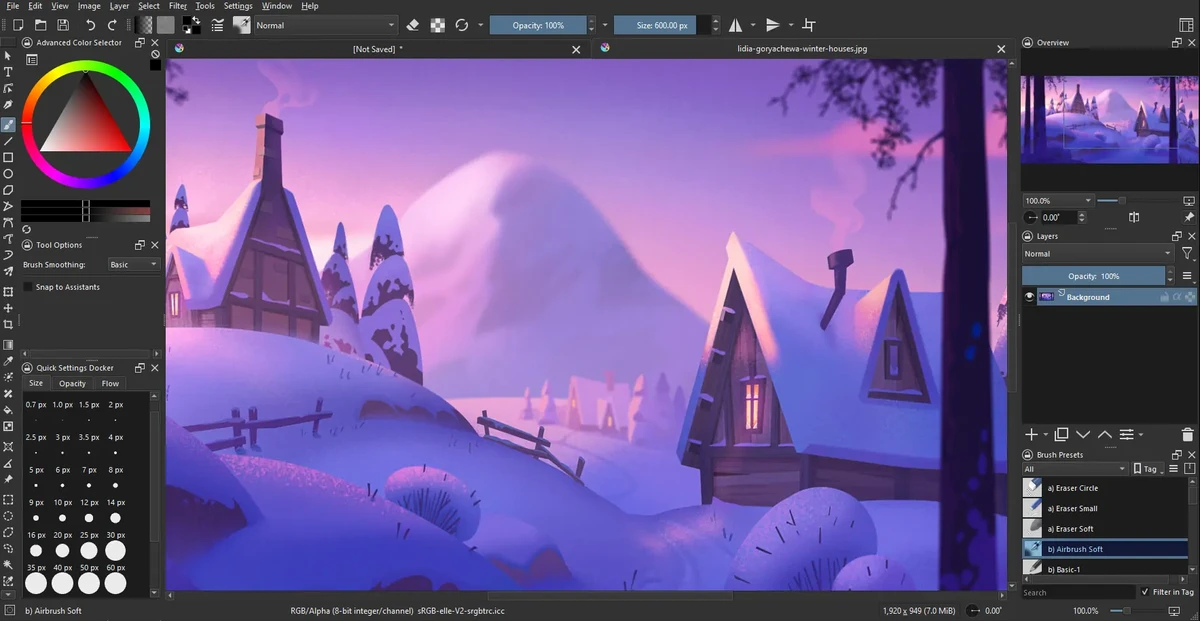
Krita is a professional open-source digital painting application designed for illustrators, concept artists, animators, and VFX creators. It provides a complete workflow for creating raster-based artwork, from sketching and inking to coloring and final rendering, all within a single platform.

The software is widely recognized as a powerful free alternative to commercial painting tools, offering advanced brush engines, customizable workspaces, and production-ready features. Its brush system includes multiple engines such as pixel, smudge, texture, particle, and sketch brushes, allowing artists to create both traditional and highly stylized digital effects.

Krita’s interface is highly flexible, enabling users to customize toolbars, shortcuts, and workspace layouts for different stages of their creative process. It also supports canvas rotation, mirroring, and distraction-free modes to improve drawing comfort.

Features of Krita

  • Advanced brush engines (pixel, smudge, particle, sketch, texture, etc.)
  • Highly customizable interface and workspace layouts
  • Full raster and vector layer support
  • Non-destructive editing with masks and filters
  • Advanced selection tools (shape, color, path-based selections)
  • Symmetry drawing with multiple axis control
  • Perspective grids and drawing assistance tools
  • Extensive blending modes for compositing
  • Real-time filter previews and adjustment layers
  • High bit-depth color support (8/16/32-bit)
  • Multiple color models (RGBA, CMYK, Lab, YCbCr, XYZ)
  • Canvas rotation, mirroring, and wrap-around mode
  • Brush preset management and sharing
  • Distraction-free full-screen painting mode

Interface and Usability

Krita’s interface is designed for professional artists but remains approachable once users become familiar with its layout. The workspace can be heavily customized, allowing artists to prioritize tools relevant to their workflow.

While beginners may initially find the number of tools overwhelming, the modular design helps users gradually adapt. The canvas performance is smooth, and features like rotation and wrap-around mode make it comfortable for long drawing sessions.

Who Should Use Krita?

  • Digital illustrators and concept artists
  • Game developers creating assets and concept art
  • Comic and manga artists
  • VFX and animation designers
  • Freelance artists and hobbyists
  • Studios needing a free painting solution

Conclusion

Krita is one of the most powerful free digital painting applications available today. It offers professional-level features without licensing costs, making it an excellent choice for artists who want full creative control over their work.

Avantages & Inconvénients

Avantages

  • Completely free and open-source
  • Extremely powerful brush system
  • Professional-grade layer and color management
  • Highly customizable interface
  • Supports industry-standard workflows
  • Excellent for illustration and concept art

Inconvénients

  • Learning curve for beginners
  • Can feel complex due to many tools
  • Not focused on photo editing (compared to Photoshop-type tools)

Questions fréquentes

What is Krita used for?

Krita is used for digital painting, illustration, concept art, comics, and animation. It is designed for creating raster-based artwork with professional-grade tools.

Is Krita free to use?

Yes. Krita is completely free and open-source software, with no required subscription or license fees.

Does Krita support animation?

Yes. Krita includes basic 2D animation tools, allowing users to create frame-by-frame animations directly within the software.

Can Krita replace Photoshop?

Krita can replace Photoshop for digital painting and illustration work, but it is not primarily designed for photo editing or heavy image manipulation workflows.

What file formats does Krita support?

Krita supports common image formats such as PNG, JPEG, TIFF, and PSD import/export, along with its own native project format for layered files.

Is Krita suitable for beginners?

Yes, but it has a learning curve. Beginners can start with basic brushes and gradually explore advanced tools like layers, masks, and brush engines.

Applications recommandées [Gratuites]:
  • InstallerClean 2.0.1 InstallerClean logo Supprime en toute sécurité les fichiers résiduels inutiles de l'installateur Windows afin de libérer de l'espace disque grâce à un processus de nettoyage simple.
  • SoundVolumeView 2.53 SoundVolumeView logo Affiche, gère, enregistre et restaure les paramètres audio de Windows grâce à une prise en charge avancée des profils et de la ligne de commande.
  • NetSpeedTray 2.1.0 NetSpeedTray logo Surveillez en temps réel les vitesses de téléchargement et d'envoi grâce à un moniteur de vitesse réseau léger, intégré à la barre d'état système de Windows.
  • Youtube Downloader HD 6.0.0.0 Youtube Downloader HD logo un outil Windows simple pour télécharger et convertir des vidéos YouTube en formats HD
  • VovSoft VCF Editor 3.1 VovSoft VCF Editor logo Éditeur de vCard hors ligne pour gérer, modifier et exporter les informations de contact en toute sécurité
  • MKVToolNix 100.0 MKVToolNix logo Kit d'outils MKV gratuit pour diviser, fusionner, éditer et extraire facilement les flux vidéo et audio.
Applications recommandées [Shareware]:
  • OkMap Desktop 19.6.6 OkMap Desktop logo un logiciel de cartographie GPS pour la planification d'itinéraires, la création de points de passage et la gestion de cartes hors ligne/en ligne
  • Home Manager 2026 v4.10.1002 Home Manager logo Suivre l'inventaire des biens, stocker les détails des articles, gérer les réparations et générer des rapports d'assurance
  • iToolab WatsGo 9.1.0 iToolab WatsGo logo Transférez, sauvegardez et restaurez facilement vos données WhatsApp entre appareils Android et iPhone.
  • DiskBoss 17.0.14 DiskBoss logo Outil puissant de gestion de fichiers Windows pour l'analyse de disque, le nettoyage des doublons, la synchronisation des fichiers et la migration des données
  • Google Maps Downloader 8.890 Google Maps Downloader logo Enregistre les tuiles de carte de Google Maps pour une consultation hors ligne, leur combinaison et leur exportation au format MBTiles.
  • Offline Map Maker 8.388 Offline Map Maker logo Téléchargez, personnalisez et consultez des cartes hors ligne de Google et Bing grâce à un contrôle flexible et une visionneuse intégrée.