Krita logo

Krita 6.0.2.1

  • ユーザー評価:
    ★★★★★
    ★★★★★
    0.0 0Votes
  • 動作環境:
    Windows
  • バージョン: 6.0.2.1
  • 最終更新: 3週間前
  • ライセンス: 無料ソフト  
  • 提供元: Flexense
  • サイズ: 167 MB
× app stores

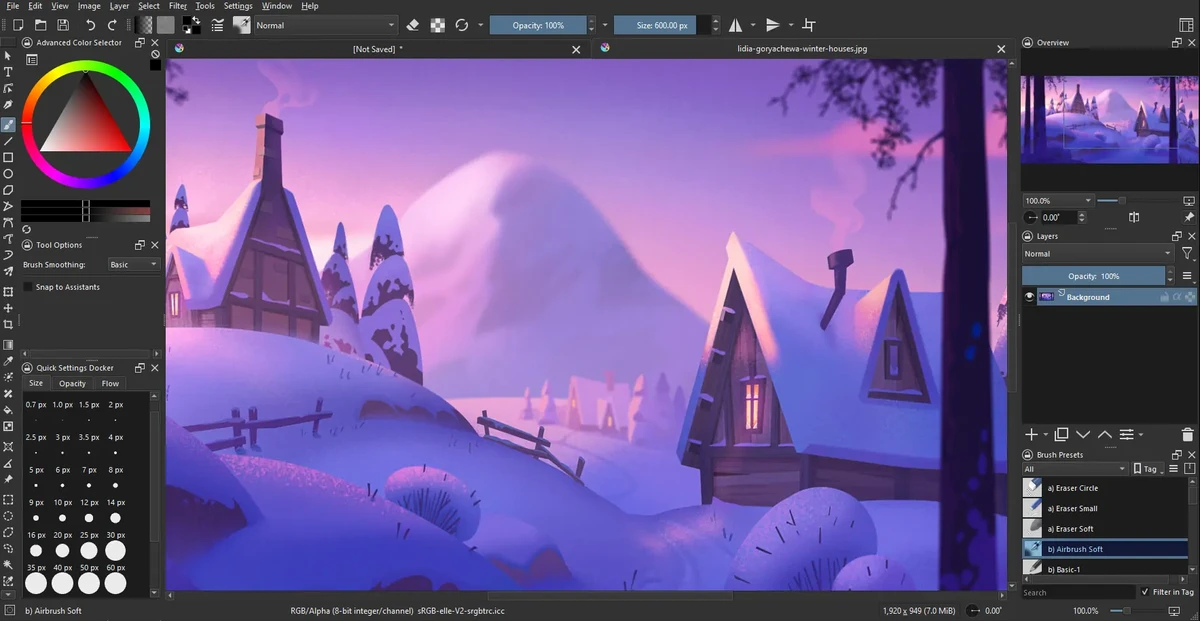
Krita is a professional open-source digital painting application designed for illustrators, concept artists, animators, and VFX creators. It provides a complete workflow for creating raster-based artwork, from sketching and inking to coloring and final rendering, all within a single platform.

The software is widely recognized as a powerful free alternative to commercial painting tools, offering advanced brush engines, customizable workspaces, and production-ready features. Its brush system includes multiple engines such as pixel, smudge, texture, particle, and sketch brushes, allowing artists to create both traditional and highly stylized digital effects.

Krita’s interface is highly flexible, enabling users to customize toolbars, shortcuts, and workspace layouts for different stages of their creative process. It also supports canvas rotation, mirroring, and distraction-free modes to improve drawing comfort.

Features of Krita

  • Advanced brush engines (pixel, smudge, particle, sketch, texture, etc.)
  • Highly customizable interface and workspace layouts
  • Full raster and vector layer support
  • Non-destructive editing with masks and filters
  • Advanced selection tools (shape, color, path-based selections)
  • Symmetry drawing with multiple axis control
  • Perspective grids and drawing assistance tools
  • Extensive blending modes for compositing
  • Real-time filter previews and adjustment layers
  • High bit-depth color support (8/16/32-bit)
  • Multiple color models (RGBA, CMYK, Lab, YCbCr, XYZ)
  • Canvas rotation, mirroring, and wrap-around mode
  • Brush preset management and sharing
  • Distraction-free full-screen painting mode

Interface and Usability

Krita’s interface is designed for professional artists but remains approachable once users become familiar with its layout. The workspace can be heavily customized, allowing artists to prioritize tools relevant to their workflow.

While beginners may initially find the number of tools overwhelming, the modular design helps users gradually adapt. The canvas performance is smooth, and features like rotation and wrap-around mode make it comfortable for long drawing sessions.

Who Should Use Krita?

  • Digital illustrators and concept artists
  • Game developers creating assets and concept art
  • Comic and manga artists
  • VFX and animation designers
  • Freelance artists and hobbyists
  • Studios needing a free painting solution

Conclusion

Krita is one of the most powerful free digital painting applications available today. It offers professional-level features without licensing costs, making it an excellent choice for artists who want full creative control over their work.

メリット・デメリット

メリット

  • Completely free and open-source
  • Extremely powerful brush system
  • Professional-grade layer and color management
  • Highly customizable interface
  • Supports industry-standard workflows
  • Excellent for illustration and concept art

デメリット

  • Learning curve for beginners
  • Can feel complex due to many tools
  • Not focused on photo editing (compared to Photoshop-type tools)

よくある質問

What is Krita used for?

Krita is used for digital painting, illustration, concept art, comics, and animation. It is designed for creating raster-based artwork with professional-grade tools.

Is Krita free to use?

Yes. Krita is completely free and open-source software, with no required subscription or license fees.

Does Krita support animation?

Yes. Krita includes basic 2D animation tools, allowing users to create frame-by-frame animations directly within the software.

Can Krita replace Photoshop?

Krita can replace Photoshop for digital painting and illustration work, but it is not primarily designed for photo editing or heavy image manipulation workflows.

What file formats does Krita support?

Krita supports common image formats such as PNG, JPEG, TIFF, and PSD import/export, along with its own native project format for layered files.

Is Krita suitable for beginners?

Yes, but it has a learning curve. Beginners can start with basic brushes and gradually explore advanced tools like layers, masks, and brush engines.

おすすめアプリ [無料]:
  • NirLauncher Package 1.30.24 NirLauncher Package logo システム、ネットワーク、リカバリタスク用の180以上のNirSoftツールを搭載したポータブルWindowsユーティリティスイート
  • Vektorrazor 2.2 Vektorrazor logo ロゴや画像ソースを、技術的なワークフローに適した、クリーンでCAD対応のベクター輪郭に変換します。
  • Q-Dir 12.71 Q-Dir logo Windows 用の軽量な 4 ペイン ファイル マネージャー。高速ナビゲーション、ドラッグ アンド ドロップ、ポータブル アクセスを提供します。
  • WindowTop 5.32.3 WindowTop logo WindowTop を使えば、ピクチャーインピクチャー、透明度、ダークモード、常時最前面表示などの機能を使ってデスクトップウィンドウを管理できます。
  • MiniTool Partition Wizard 13.9 MiniTool Partition Wizard logo ディスクパーティションのサイズ変更、クローン作成、リカバリ、OS移行、ストレージツールなどを使用してディスクパーティションを管理します。
  • Wireshark 4.6.7 Wireshark logo プロフェッショナル向けの強力なプロトコル分析ツールを使用して、ネットワークトラフィックを分析し、パケットを検査し、接続のトラブルシューティングを行います。
おすすめアプリ [シェアウェア]:
  • Photo Supreme 2026.3.1.9350 Photo Supreme logo Photo Supremeの強力なカタログ機能で、数千枚もの写真を整理、検索、管理しましょう。
  • Araxis Merge 2026.0 Araxis Merge logo 開発者、法務チーム、バージョン管理を担当する専門家向けの強力なファイル比較・マージツール
  • Pazu StreamGet 3.1.5 Pazu StreamGet logo 主要なストリーミングプラットフォームから映画やテレビ番組をMP4またはMKV形式でダウンロードする
  • DaVinci Resolve 21.0.2 DaVinci Resolve logo 高度なカラーグレーディング、AIツール、そしてハイエンドなポストプロダクション機能を備えたプロ仕様のビデオ編集ソフト。
  • Image for Windows 4.12 Image for Windows logo 暗号化、圧縮、起動可能なレスキューメディアを備えた、システム全体のバックアップ、復元、リカバリのためのディスクイメージングツール
  • O&O Defrag Professional 31.3.26064 O&O Defrag Professional logo インテリジェントなデフラグ、自動メンテナンス、起動管理、ディスククリーンアップツールでHDDとSSDを最適化します。