Krita logo

Krita 6.0.2.1

  • Calificación de usuarios:
    ★★★★★
    ★★★★★
    0.0 0Votes
  • Requisitos:
    Windows
  • Versión: 6.0.2.1
  • Última actualización: hace 3 semanas
  • Licencia: Gratis  
  • Editor: Flexense
  • Tamaño: 167 MB
× app stores

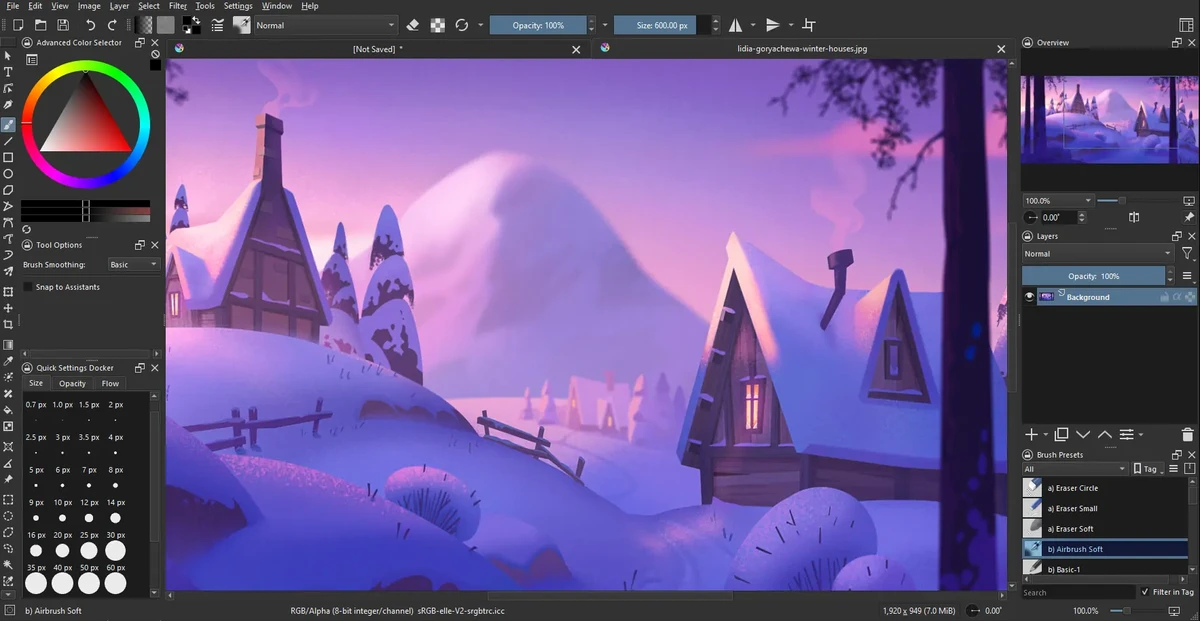
Krita is a professional open-source digital painting application designed for illustrators, concept artists, animators, and VFX creators. It provides a complete workflow for creating raster-based artwork, from sketching and inking to coloring and final rendering, all within a single platform.

The software is widely recognized as a powerful free alternative to commercial painting tools, offering advanced brush engines, customizable workspaces, and production-ready features. Its brush system includes multiple engines such as pixel, smudge, texture, particle, and sketch brushes, allowing artists to create both traditional and highly stylized digital effects.

Krita’s interface is highly flexible, enabling users to customize toolbars, shortcuts, and workspace layouts for different stages of their creative process. It also supports canvas rotation, mirroring, and distraction-free modes to improve drawing comfort.

Features of Krita

  • Advanced brush engines (pixel, smudge, particle, sketch, texture, etc.)
  • Highly customizable interface and workspace layouts
  • Full raster and vector layer support
  • Non-destructive editing with masks and filters
  • Advanced selection tools (shape, color, path-based selections)
  • Symmetry drawing with multiple axis control
  • Perspective grids and drawing assistance tools
  • Extensive blending modes for compositing
  • Real-time filter previews and adjustment layers
  • High bit-depth color support (8/16/32-bit)
  • Multiple color models (RGBA, CMYK, Lab, YCbCr, XYZ)
  • Canvas rotation, mirroring, and wrap-around mode
  • Brush preset management and sharing
  • Distraction-free full-screen painting mode

Interface and Usability

Krita’s interface is designed for professional artists but remains approachable once users become familiar with its layout. The workspace can be heavily customized, allowing artists to prioritize tools relevant to their workflow.

While beginners may initially find the number of tools overwhelming, the modular design helps users gradually adapt. The canvas performance is smooth, and features like rotation and wrap-around mode make it comfortable for long drawing sessions.

Who Should Use Krita?

  • Digital illustrators and concept artists
  • Game developers creating assets and concept art
  • Comic and manga artists
  • VFX and animation designers
  • Freelance artists and hobbyists
  • Studios needing a free painting solution

Conclusion

Krita is one of the most powerful free digital painting applications available today. It offers professional-level features without licensing costs, making it an excellent choice for artists who want full creative control over their work.

Pros y Contras

Pros

  • Completely free and open-source
  • Extremely powerful brush system
  • Professional-grade layer and color management
  • Highly customizable interface
  • Supports industry-standard workflows
  • Excellent for illustration and concept art

Contras

  • Learning curve for beginners
  • Can feel complex due to many tools
  • Not focused on photo editing (compared to Photoshop-type tools)

Preguntas frecuentes

What is Krita used for?

Krita is used for digital painting, illustration, concept art, comics, and animation. It is designed for creating raster-based artwork with professional-grade tools.

Is Krita free to use?

Yes. Krita is completely free and open-source software, with no required subscription or license fees.

Does Krita support animation?

Yes. Krita includes basic 2D animation tools, allowing users to create frame-by-frame animations directly within the software.

Can Krita replace Photoshop?

Krita can replace Photoshop for digital painting and illustration work, but it is not primarily designed for photo editing or heavy image manipulation workflows.

What file formats does Krita support?

Krita supports common image formats such as PNG, JPEG, TIFF, and PSD import/export, along with its own native project format for layered files.

Is Krita suitable for beginners?

Yes, but it has a learning curve. Beginners can start with basic brushes and gradually explore advanced tools like layers, masks, and brush engines.

Aplicaciones recomendadas [Gratis]:
  • NirLauncher Package 1.30.24 NirLauncher Package logo Un conjunto de utilidades portátiles para Windows con más de 180 herramientas de NirSoft para tareas de sistema, red y recuperación.
  • Vektorrazor 2.2 Vektorrazor logo Convierte logotipos y fuentes de imagen en contornos vectoriales limpios y compatibles con CAD para flujos de trabajo técnicos.
  • Q-Dir 12.71 Q-Dir logo Un gestor de archivos ligero de cuatro paneles para Windows, que ofrece navegación rápida, arrastrar y soltar, y acceso portátil.
  • WindowTop 5.32.3 WindowTop logo Administre las ventanas del escritorio con WindowTop utilizando las funciones de imagen en imagen, transparencia, modo oscuro y siempre visible.
  • MiniTool Partition Wizard 13.9 MiniTool Partition Wizard logo Administra particiones de disco con herramientas de redimensionamiento, clonación, recuperación, migración de sistema operativo y almacenamiento.
  • Wireshark 4.6.7 Wireshark logo Analice el tráfico de red, inspeccione los paquetes y solucione problemas de conexión con una potente herramienta de análisis de protocolos para profesionales.
Aplicaciones recomendadas [Shareware]:
  • Photo Supreme 2026.3.1.9350 Photo Supreme logo Organiza, busca y gestiona miles de fotos con las potentes funciones de catalogación de Photo Supreme.
  • Araxis Merge 2026.0 Araxis Merge logo Una potente herramienta de comparación y fusión de archivos para desarrolladores, equipos legales y profesionales que gestionan el control de versiones.
  • Pazu StreamGet 3.1.5 Pazu StreamGet logo Descarga películas y series de televisión de las principales plataformas de streaming en formato MP4 o MKV.
  • DaVinci Resolve 21.0.2 DaVinci Resolve logo Un editor de vídeo profesional con herramientas avanzadas de corrección de color, inteligencia artificial y funciones de postproducción de alta gama.
  • Image for Windows 4.12 Image for Windows logo Herramienta de creación de imágenes de disco para realizar copias de seguridad, restaurar y recuperar sistemas completos con cifrado, compresión y medios de rescate de arranque.
  • O&O Defrag Professional 31.3.26064 O&O Defrag Professional logo Optimiza discos duros y SSD con desfragmentación inteligente, mantenimiento automático, gestión de inicio y herramientas de limpieza de disco.