Krita logo

Krita 6.0.2.1

  • 사용자 평점:
    ★★★★★
    ★★★★★
    0.0 0Votes
  • 시스템 요구사항:
    Windows
  • 버전: 6.0.2.1
  • 최신 업데이트: 3주 전
  • 라이선스: 무료  
  • 제공자: Flexense
  • 크기: 167 MB
× app stores

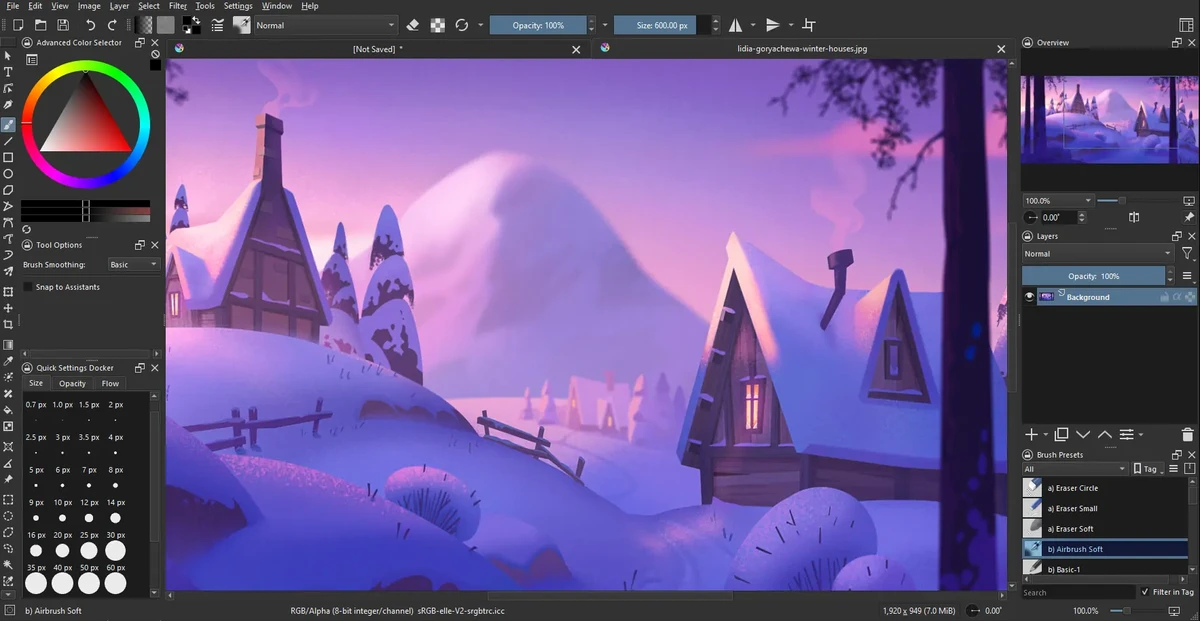
Krita is a professional open-source digital painting application designed for illustrators, concept artists, animators, and VFX creators. It provides a complete workflow for creating raster-based artwork, from sketching and inking to coloring and final rendering, all within a single platform.

The software is widely recognized as a powerful free alternative to commercial painting tools, offering advanced brush engines, customizable workspaces, and production-ready features. Its brush system includes multiple engines such as pixel, smudge, texture, particle, and sketch brushes, allowing artists to create both traditional and highly stylized digital effects.

Krita’s interface is highly flexible, enabling users to customize toolbars, shortcuts, and workspace layouts for different stages of their creative process. It also supports canvas rotation, mirroring, and distraction-free modes to improve drawing comfort.

Features of Krita

  • Advanced brush engines (pixel, smudge, particle, sketch, texture, etc.)
  • Highly customizable interface and workspace layouts
  • Full raster and vector layer support
  • Non-destructive editing with masks and filters
  • Advanced selection tools (shape, color, path-based selections)
  • Symmetry drawing with multiple axis control
  • Perspective grids and drawing assistance tools
  • Extensive blending modes for compositing
  • Real-time filter previews and adjustment layers
  • High bit-depth color support (8/16/32-bit)
  • Multiple color models (RGBA, CMYK, Lab, YCbCr, XYZ)
  • Canvas rotation, mirroring, and wrap-around mode
  • Brush preset management and sharing
  • Distraction-free full-screen painting mode

Interface and Usability

Krita’s interface is designed for professional artists but remains approachable once users become familiar with its layout. The workspace can be heavily customized, allowing artists to prioritize tools relevant to their workflow.

While beginners may initially find the number of tools overwhelming, the modular design helps users gradually adapt. The canvas performance is smooth, and features like rotation and wrap-around mode make it comfortable for long drawing sessions.

Who Should Use Krita?

  • Digital illustrators and concept artists
  • Game developers creating assets and concept art
  • Comic and manga artists
  • VFX and animation designers
  • Freelance artists and hobbyists
  • Studios needing a free painting solution

Conclusion

Krita is one of the most powerful free digital painting applications available today. It offers professional-level features without licensing costs, making it an excellent choice for artists who want full creative control over their work.

장점 및 단점

장점

  • Completely free and open-source
  • Extremely powerful brush system
  • Professional-grade layer and color management
  • Highly customizable interface
  • Supports industry-standard workflows
  • Excellent for illustration and concept art

단점

  • Learning curve for beginners
  • Can feel complex due to many tools
  • Not focused on photo editing (compared to Photoshop-type tools)

자주 묻는 질문

What is Krita used for?

Krita is used for digital painting, illustration, concept art, comics, and animation. It is designed for creating raster-based artwork with professional-grade tools.

Is Krita free to use?

Yes. Krita is completely free and open-source software, with no required subscription or license fees.

Does Krita support animation?

Yes. Krita includes basic 2D animation tools, allowing users to create frame-by-frame animations directly within the software.

Can Krita replace Photoshop?

Krita can replace Photoshop for digital painting and illustration work, but it is not primarily designed for photo editing or heavy image manipulation workflows.

What file formats does Krita support?

Krita supports common image formats such as PNG, JPEG, TIFF, and PSD import/export, along with its own native project format for layered files.

Is Krita suitable for beginners?

Yes, but it has a learning curve. Beginners can start with basic brushes and gradually explore advanced tools like layers, masks, and brush engines.

추천 앱 [무료]:
  • NirLauncher Package 1.30.24 NirLauncher Package logo 시스템, 네트워크 및 복구 작업을 위한 180개 이상의 NirSoft 도구가 포함된 휴대용 Windows 유틸리티 제품군입니다.
  • Vektorrazor 2.2 Vektorrazor logo 로고 및 이미지 소스를 기술 워크플로에 적합한 깔끔하고 CAD 친화적인 벡터 윤곽선으로 변환합니다.
  • Q-Dir 12.71 Q-Dir logo 빠른 탐색, 드래그 앤 드롭 및 휴대성을 제공하는 Windows용 경량 4분할 파일 관리자입니다.
  • WindowTop 5.32.3 WindowTop logo WindowTop을 사용하여 화면 속 화면, 투명도, 다크 모드 및 항상 맨 위에 표시 기능을 활용해 데스크톱 창을 관리하세요.
  • MiniTool Partition Wizard 13.9 MiniTool Partition Wizard logo 디스크 파티션 크기 조정, 복제, 복구, 운영 체제 마이그레이션 및 스토리지 도구를 사용하여 디스크 파티션을 관리합니다.
  • Wireshark 4.6.7 Wireshark logo 전문가를 위한 강력한 프로토콜 분석 도구를 사용하여 네트워크 트래픽을 분석하고, 패킷을 검사하고, 연결 문제를 해결하세요.
추천 앱 [쉐어웨어]:
  • Photo Supreme 2026.3.1.9350 Photo Supreme logo Photo Supreme의 강력한 카탈로그 기능을 사용하여 수천 장의 사진을 정리하고 검색하고 관리하세요.
  • Araxis Merge 2026.0 Araxis Merge logo 개발자, 법무팀 및 버전 관리 전문가를 위한 강력한 파일 비교 및 ​​병합 도구
  • Pazu StreamGet 3.1.5 Pazu StreamGet logo 주요 스트리밍 플랫폼에서 영화와 TV 프로그램을 MP4 또는 MKV 형식으로 다운로드하세요.
  • DaVinci Resolve 21.0.2 DaVinci Resolve logo 고급 색 보정, AI 도구 및 최고급 후반 제작 기능을 갖춘 전문 비디오 편집 프로그램입니다.
  • Image for Windows 4.12 Image for Windows logo 암호화, 압축 및 부팅 가능한 복구 미디어를 사용하여 전체 시스템 백업, 복원 및 복구를 위한 디스크 이미지 도구입니다.
  • O&O Defrag Professional 31.3.26064 O&O Defrag Professional logo 지능형 조각 모음, 자동 유지 관리, 시작 관리 및 디스크 정리 도구를 통해 HDD와 SSD를 최적화합니다.