AD FastReporter logo

AD FastReporter 26.7.1

  • Calificación de usuarios:
    ★★★★★
    ★★★★★
    0.0 0Votes
  • Requisitos:
    Windows
  • Versión: 26.7.1
  • Última actualización: hace 3 semanas
  • Licencia: Freemium  
  • Editor: Albus Bit SIA
  • Tamaño: 16 MB
× app stores

AD FastReporter is a Windows-based reporting tool designed to simplify the process of generating, managing, and sharing Active Directory (AD) reports. It focuses on helping IT administrators quickly access and analyze directory data without requiring advanced technical expertise.

The software provides a structured interface where users can create both built-in and custom reports using a wide range of Active Directory fields and LDAP attributes. With over 250 pre-built report templates, it allows administrators to quickly generate reports for users, groups, permissions, and other AD objects.

In addition to report creation, the tool supports scheduling, exporting, and sharing reports, making it suitable for ongoing IT management tasks. It also supports multiple AD connections, enabling users to work across different domains without needing repeated logins.

Features of AD FastReporter

  • Over 250 built-in Active Directory report templates
  • Custom report creation and editing tools
  • Intuitive UI designed for non-expert users
  • Support for multiple Active Directory connections
  • LDAP attribute-based reporting fields with descriptions
  • Built-in filter manager for advanced data filtering
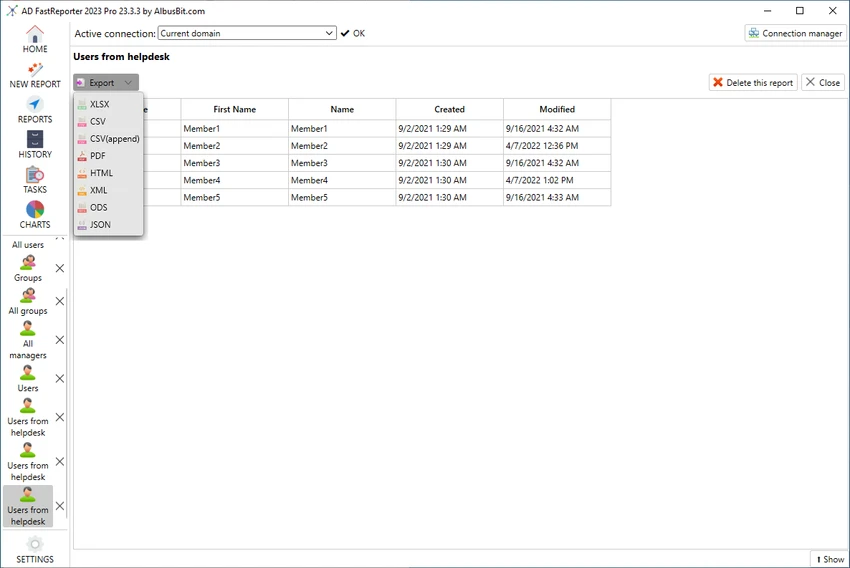
  • Report preview in grid view before exporting or sharing
  • Ability to schedule, store, and distribute reports
  • Automatic conversion of field values into readable formats

Interface and Usability

AD FastReporter is designed with usability in mind, offering a clean and structured interface that reduces the complexity often associated with Active Directory reporting tools. Users can navigate through report templates or build custom reports without needing deep technical knowledge.

The filter manager simplifies data selection by guiding users through available operations for each field, while the grid preview ensures reports can be checked before distribution. The ability to manage multiple AD connections further improves workflow efficiency in enterprise environments.

Who Should Use AD FastReporter?

This software is best suited for IT administrators, system engineers, and enterprise IT teams who manage Active Directory environments. It is particularly useful for organizations that need frequent reporting on users, permissions, and directory structures across multiple domains.

Conclusion

AD FastReporter is a practical and efficient solution for Active Directory reporting, offering a balance between simplicity and advanced reporting capabilities. With its large library of templates, flexible filtering tools, and support for multiple domains, it helps streamline routine IT administrative tasks.

Pros y Contras

Pros

  • 250+ built-in AD report templates
  • Easy-to-use interface suitable for non-experts
  • Supports multiple Active Directory connections
  • Powerful custom report and filter tools
  • Report preview before export or sharing

Contras

  • Limited to Windows 10 and above
  • Focused only on reporting, not full AD management

Preguntas frecuentes

What is AD FastReporter used for?

AD FastReporter is used to generate, manage, and share detailed Active Directory reports for users, groups, and other directory objects.

Does AD FastReporter support custom reports?

Yes. Users can create custom report forms or modify existing templates to suit specific reporting needs.

How many built-in reports are included?

The software includes over 250 pre-built report templates covering various Active Directory attributes and objects.

Can AD FastReporter work with multiple domains?

Yes. It supports multiple Active Directory connections, allowing users to switch between domains easily.

Is AD FastReporter suitable for beginners?

Yes. Its intuitive interface and guided filter system make it accessible even for users without advanced IT expertise.

What operating systems does AD FastReporter support?

It supports Windows 10 and newer versions of Windows.

Aplicaciones recomendadas [Gratis]:
  • Cyberduck 9.5.2.45323 Cyberduck logo Gestiona servicios FTP, SFTP y de almacenamiento en la nube como Google Drive, Dropbox y Amazon S3 con Cyberduck para Windows.
  • K-Lite Codec Pack Full 19.8.2 K-Lite Codec Pack Full logo Reproduce todos los formatos de audio y vídeo en Windows con K-Lite Codec Pack Full, un paquete de códecs ligero y fiable.
  • MSI Center 2.0.71.0 MSI Center logo una utilidad del sistema para dispositivos MSI que gestiona el rendimiento, los modos de juego, la monitorización, la iluminación RGB y las herramientas de optimización de hardware.
  • VirtualBox 7.2.12 VirtualBox logo Ejecuta varios sistemas operativos en un mismo PC con VirtualBox, una plataforma de virtualización gratuita de código abierto para Windows.
  • MKVToolNix 100.0 MKVToolNix logo Kit de herramientas MKV gratuito para dividir, fusionar, editar y extraer fácilmente flujos de vídeo y audio.
  • SciTE (SCIntilla) 5.6.4 SciTE (SCIntilla) logo Un editor de texto ligero con resaltado de sintaxis, herramientas de búsqueda y soporte de programación para desarrolladores que trabajan con varios lenguajes.
Aplicaciones recomendadas [Shareware]:
  • Adobe Acrobat Pro DC 2026 Adobe Acrobat Pro DC logo Crea, edita y protege tus archivos PDF fácilmente. Solución profesional para PDF, tanto para particulares como para empresas.
  • FileCenter 12.5.36 FileCenter logo Organiza documentos, escanea archivos, gestiona archivos PDF y crea un sistema de archivo digital eficiente.
  • Royal TS 7.4.50622 Royal TS logo Centraliza las conexiones remotas, la gestión de credenciales, la automatización y la colaboración segura en equipo.
  • Password Depot 19.2.0 Password Depot logo Un gestor de contraseñas seguro con cifrado AES, autocompletado y compatibilidad con sincronización en la nube para usuarios de Windows.
  • MathType 7.11.1.462 MathType logo Un potente editor de ecuaciones para crear fórmulas matemáticas en Word, LaTeX y más.
  • Ultimate Power Assistant 1.1.28.0 Ultimate Power Assistant logo Administra la configuración de energía de Windows, programa tareas y automatiza las opciones de apagado.