AD FastReporter logo

AD FastReporter 26.7.1

  • ユーザー評価:
    ★★★★★
    ★★★★★
    0.0 0Votes
  • 動作環境:
    Windows
  • バージョン: 26.7.1
  • 最終更新: 3週間前
  • ライセンス: フリーミアム  
  • 提供元: Albus Bit SIA
  • サイズ: 16 MB
× app stores

AD FastReporter is a Windows-based reporting tool designed to simplify the process of generating, managing, and sharing Active Directory (AD) reports. It focuses on helping IT administrators quickly access and analyze directory data without requiring advanced technical expertise.

The software provides a structured interface where users can create both built-in and custom reports using a wide range of Active Directory fields and LDAP attributes. With over 250 pre-built report templates, it allows administrators to quickly generate reports for users, groups, permissions, and other AD objects.

In addition to report creation, the tool supports scheduling, exporting, and sharing reports, making it suitable for ongoing IT management tasks. It also supports multiple AD connections, enabling users to work across different domains without needing repeated logins.

Features of AD FastReporter

  • Over 250 built-in Active Directory report templates
  • Custom report creation and editing tools
  • Intuitive UI designed for non-expert users
  • Support for multiple Active Directory connections
  • LDAP attribute-based reporting fields with descriptions
  • Built-in filter manager for advanced data filtering
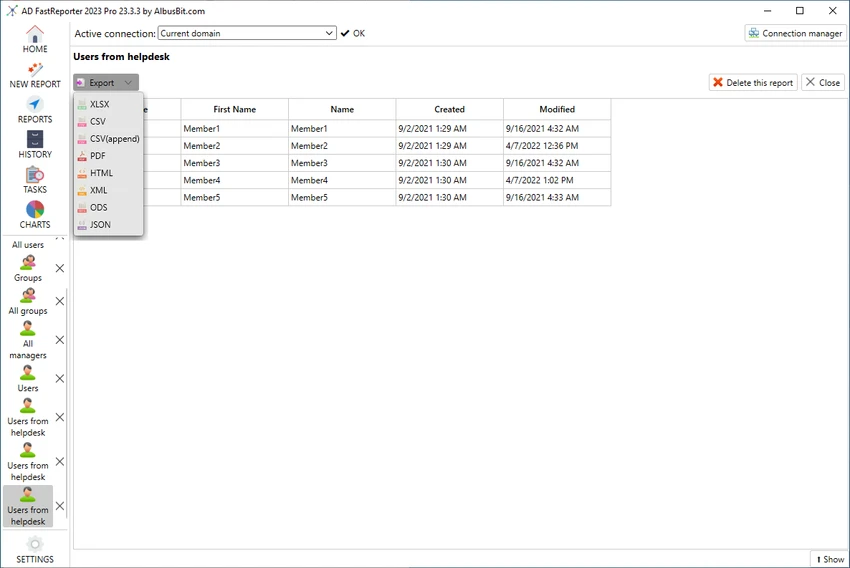
  • Report preview in grid view before exporting or sharing
  • Ability to schedule, store, and distribute reports
  • Automatic conversion of field values into readable formats

Interface and Usability

AD FastReporter is designed with usability in mind, offering a clean and structured interface that reduces the complexity often associated with Active Directory reporting tools. Users can navigate through report templates or build custom reports without needing deep technical knowledge.

The filter manager simplifies data selection by guiding users through available operations for each field, while the grid preview ensures reports can be checked before distribution. The ability to manage multiple AD connections further improves workflow efficiency in enterprise environments.

Who Should Use AD FastReporter?

This software is best suited for IT administrators, system engineers, and enterprise IT teams who manage Active Directory environments. It is particularly useful for organizations that need frequent reporting on users, permissions, and directory structures across multiple domains.

Conclusion

AD FastReporter is a practical and efficient solution for Active Directory reporting, offering a balance between simplicity and advanced reporting capabilities. With its large library of templates, flexible filtering tools, and support for multiple domains, it helps streamline routine IT administrative tasks.

メリット・デメリット

メリット

  • 250+ built-in AD report templates
  • Easy-to-use interface suitable for non-experts
  • Supports multiple Active Directory connections
  • Powerful custom report and filter tools
  • Report preview before export or sharing

デメリット

  • Limited to Windows 10 and above
  • Focused only on reporting, not full AD management

よくある質問

What is AD FastReporter used for?

AD FastReporter is used to generate, manage, and share detailed Active Directory reports for users, groups, and other directory objects.

Does AD FastReporter support custom reports?

Yes. Users can create custom report forms or modify existing templates to suit specific reporting needs.

How many built-in reports are included?

The software includes over 250 pre-built report templates covering various Active Directory attributes and objects.

Can AD FastReporter work with multiple domains?

Yes. It supports multiple Active Directory connections, allowing users to switch between domains easily.

Is AD FastReporter suitable for beginners?

Yes. Its intuitive interface and guided filter system make it accessible even for users without advanced IT expertise.

What operating systems does AD FastReporter support?

It supports Windows 10 and newer versions of Windows.

おすすめアプリ [無料]:
  • Cyberduck 9.5.2.45323 Cyberduck logo Cyber​​duck for Windows を使用すると、FTP、SFTP、および Google Drive、Dropbox、Amazon S3 などのクラウドストレージサービスを管理できます。
  • K-Lite Codec Pack Full 19.8.2 K-Lite Codec Pack Full logo 軽量で信頼性の高いコーデックパッケージであるK-Lite Codec Pack Fullを使用すれば、Windows上であらゆるオーディオおよびビデオフォーマットを再生できます。
  • MSI Center 2.0.71.0 MSI Center logo MSIデバイス向けのシステムユーティリティで、パフォーマンス、ゲームモード、モニタリング、RGB、ハードウェア最適化ツールを管理します。
  • VirtualBox 7.2.12 VirtualBox logo VirtualBoxはWindows向けの無料オープンソース仮想化プラットフォームで、1台のPCで複数のオペレーティングシステムを実行できます。
  • MKVToolNix 100.0 MKVToolNix logo 動画や音声ストリームの分割、結合、編集、抽出を簡単に行える無料のMKVツールキット
  • SciTE (SCIntilla) 5.6.4 SciTE (SCIntilla) logo 構文ハイライト機能、検索ツール、そして複数のプログラミング言語を扱う開発者向けのプログラミングサポート機能を備えた軽量テキストエディタ。
おすすめアプリ [シェアウェア]:
  • Adobe Acrobat Pro DC 2026 Adobe Acrobat Pro DC logo PDFの作成、編集、セキュリティ保護が簡単に行えます。個人および企業向けのプロフェッショナルなPDFソリューションです。
  • FileCenter 12.5.36 FileCenter logo 文書の整理、ファイルのスキャン、PDFの管理、効率的なデジタルファイリングシステムの構築
  • Royal TS 7.4.50622 Royal TS logo リモート接続、認証情報管理、自動化、および安全なチームコラボレーションを一元管理します。
  • Password Depot 19.2.0 Password Depot logo Windowsユーザー向けの、AES暗号化、自動入力、クラウド同期機能を備えた安全なパスワードマネージャー
  • MathType 7.11.1.462 MathType logo Word、LaTeXなどで数式を作成するための強力な数式エディタ
  • Ultimate Power Assistant 1.1.28.0 Ultimate Power Assistant logo Windowsの電源設定を管理し、タスクをスケジュールし、シャットダウンオプションを自動化します。