AD FastReporter logo

AD FastReporter 26.7.1

  • Avaliação dos usuários:
    ★★★★★
    ★★★★★
    0.0 ★ 0Votes
  • Requisitos:
    Windows
  • Versão: 26.7.1
  • Última atualização: há 3 meses
  • Licença: Freemium  
  • Editor: Albus Bit SIA
  • Tamanho: 16 MB
× ❮ app stores ❯

AD FastReporter is a Windows-based reporting tool designed to simplify the process of generating, managing, and sharing Active Directory (AD) reports. It focuses on helping IT administrators quickly access and analyze directory data without requiring advanced technical expertise.

The software provides a structured interface where users can create both built-in and custom reports using a wide range of Active Directory fields and LDAP attributes. With over 250 pre-built report templates, it allows administrators to quickly generate reports for users, groups, permissions, and other AD objects.

In addition to report creation, the tool supports scheduling, exporting, and sharing reports, making it suitable for ongoing IT management tasks. It also supports multiple AD connections, enabling users to work across different domains without needing repeated logins.

Features of AD FastReporter

  • Over 250 built-in Active Directory report templates
  • Custom report creation and editing tools
  • Intuitive UI designed for non-expert users
  • Support for multiple Active Directory connections
  • LDAP attribute-based reporting fields with descriptions
  • Built-in filter manager for advanced data filtering
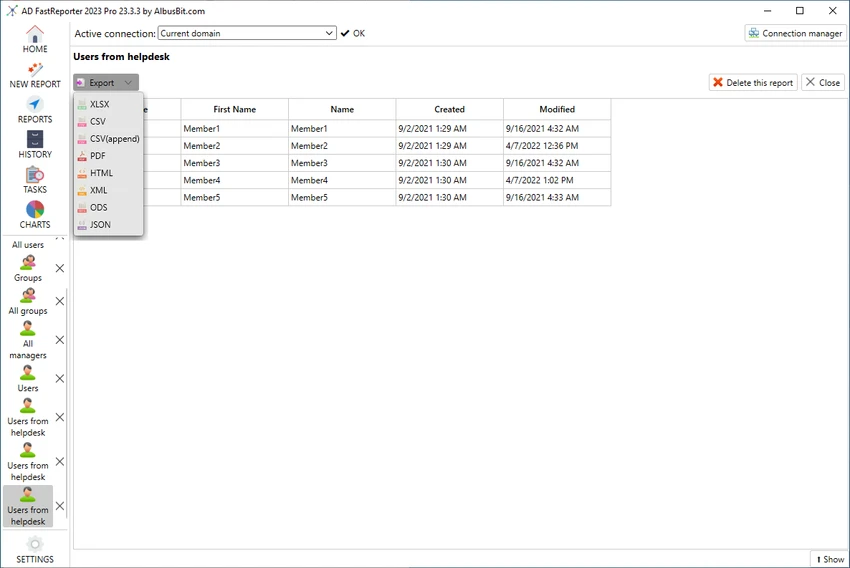
  • Report preview in grid view before exporting or sharing
  • Ability to schedule, store, and distribute reports
  • Automatic conversion of field values into readable formats

Interface and Usability

AD FastReporter is designed with usability in mind, offering a clean and structured interface that reduces the complexity often associated with Active Directory reporting tools. Users can navigate through report templates or build custom reports without needing deep technical knowledge.

The filter manager simplifies data selection by guiding users through available operations for each field, while the grid preview ensures reports can be checked before distribution. The ability to manage multiple AD connections further improves workflow efficiency in enterprise environments.

Who Should Use AD FastReporter?

This software is best suited for IT administrators, system engineers, and enterprise IT teams who manage Active Directory environments. It is particularly useful for organizations that need frequent reporting on users, permissions, and directory structures across multiple domains.

Conclusion

AD FastReporter is a practical and efficient solution for Active Directory reporting, offering a balance between simplicity and advanced reporting capabilities. With its large library of templates, flexible filtering tools, and support for multiple domains, it helps streamline routine IT administrative tasks.

Prós e Contras

✓

Prós

  • 250+ built-in AD report templates
  • Easy-to-use interface suitable for non-experts
  • Supports multiple Active Directory connections
  • Powerful custom report and filter tools
  • Report preview before export or sharing
✕

Contras

  • Limited to Windows 10 and above
  • Focused only on reporting, not full AD management

Perguntas frequentes

What is AD FastReporter used for?

AD FastReporter is used to generate, manage, and share detailed Active Directory reports for users, groups, and other directory objects.

Does AD FastReporter support custom reports?

Yes. Users can create custom report forms or modify existing templates to suit specific reporting needs.

How many built-in reports are included?

The software includes over 250 pre-built report templates covering various Active Directory attributes and objects.

Can AD FastReporter work with multiple domains?

Yes. It supports multiple Active Directory connections, allowing users to switch between domains easily.

Is AD FastReporter suitable for beginners?

Yes. Its intuitive interface and guided filter system make it accessible even for users without advanced IT expertise.

What operating systems does AD FastReporter support?

It supports Windows 10 and newer versions of Windows.

Aplicativos recomendados [Gratuitos]:
  • Training Manager 2026 v4.10.4002 Training Manager logo Monitore o treinamento, a conformidade, as certificações e os cronogramas de aulas dos funcionários com ferramentas centralizadas de gerenciamento de treinamento.
  • Wireless Network Watcher 2.45 Wireless Network Watcher logo Um utilitário leve que escaneia sua rede Wi-Fi e lista os dispositivos conectados.
  • Scriptboxie 2.0.1.4 Scriptboxie logo Automatize tarefas repetitivas do Windows gravando ações e criando scripts sem precisar programar.
  • FanControl v271 FanControl logo Gerencia as ventoinhas da CPU e da GPU com curvas personalizadas, sensores de temperatura, perfis e controles avançados de resfriamento.
  • MultiPack .NET Windows Desktop Installer 2.2 MultiPack .NET Windows Desktop Installer logo Instale várias versões do Microsoft .NET Windows Desktop Runtime em um único pacote para melhorar a compatibilidade e o desempenho dos aplicativos.
  • DXVA Checker 4.8.0 DXVA Checker logo Verifique o suporte a DXVA, a compatibilidade do decodificador, o uso da GPU e os recursos de aceleração de vídeo por hardware para reprodução de mídia no Windows.
Aplicativos recomendados [Shareware]:
  • Bandizip 7.44 Bandizip logo Software de compressão de arquivos rápido e intuitivo, compatível com ZIP, RAR, 7Z e outros formatos, com recursos de arquivamento de alta velocidade.
  • Teorex FolderIco 9.3.1 Teorex FolderIco logo Altere as cores ou ícones das pastas com um clique e organize seus arquivos visualmente para encontrar tudo instantaneamente.
  • Home Manager 2026 v4.10.1002 Home Manager logo Controle o inventário doméstico, armazene detalhes dos itens, gerencie reparos e gere relatórios para a seguradora.
  • Ableton Live 12.4.2 Ableton Live logo Uma DAW profissional para produção musical, edição MIDI, gravação e performance ao vivo.
  • PanoramaStudio 4.2.0 PanoramaStudio logo Crie imagens panorâmicas perfeitas com junção automática de fotos, ferramentas de edição e opções de exportação para web, impressão e apresentações.
  • Cisdem Duplicate Finder 5.0.0 Cisdem Duplicate Finder logo Encontre arquivos duplicados e imagens semelhantes com alta precisão, organize os resultados da verificação e remova com segurança arquivos desnecessários para liberar espaço de armazenamento.