AD FastReporter logo

AD FastReporter 26.7.1

  • Benutzerbewertung:
    ★★★★★
    ★★★★★
    0.0 0Votes
  • Anforderungen:
    Windows
  • Version: 26.7.1
  • Zuletzt aktualisiert: vor 2 Monaten
  • Lizenz: Freemium  
  • Herausgeber: Albus Bit SIA
  • Größe: 16 MB
× app stores

AD FastReporter is a Windows-based reporting tool designed to simplify the process of generating, managing, and sharing Active Directory (AD) reports. It focuses on helping IT administrators quickly access and analyze directory data without requiring advanced technical expertise.

The software provides a structured interface where users can create both built-in and custom reports using a wide range of Active Directory fields and LDAP attributes. With over 250 pre-built report templates, it allows administrators to quickly generate reports for users, groups, permissions, and other AD objects.

In addition to report creation, the tool supports scheduling, exporting, and sharing reports, making it suitable for ongoing IT management tasks. It also supports multiple AD connections, enabling users to work across different domains without needing repeated logins.

Features of AD FastReporter

  • Over 250 built-in Active Directory report templates
  • Custom report creation and editing tools
  • Intuitive UI designed for non-expert users
  • Support for multiple Active Directory connections
  • LDAP attribute-based reporting fields with descriptions
  • Built-in filter manager for advanced data filtering
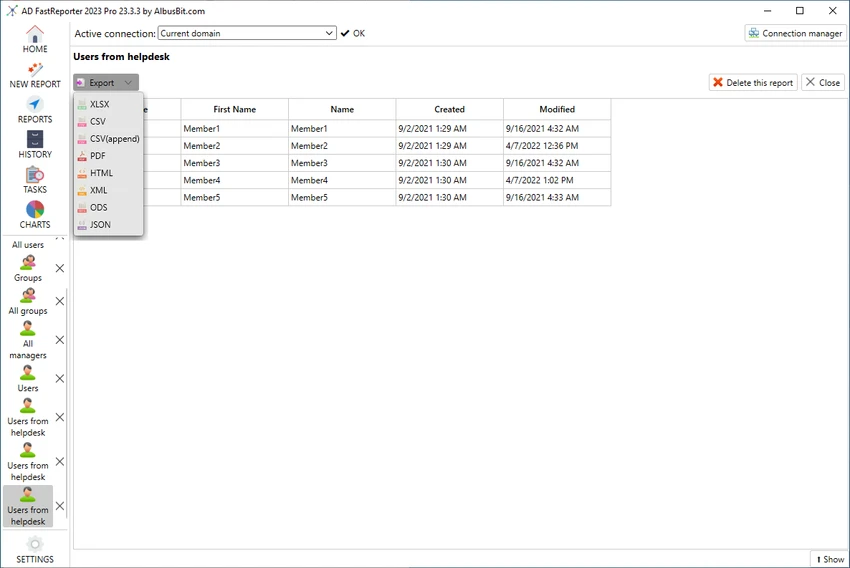
  • Report preview in grid view before exporting or sharing
  • Ability to schedule, store, and distribute reports
  • Automatic conversion of field values into readable formats

Interface and Usability

AD FastReporter is designed with usability in mind, offering a clean and structured interface that reduces the complexity often associated with Active Directory reporting tools. Users can navigate through report templates or build custom reports without needing deep technical knowledge.

The filter manager simplifies data selection by guiding users through available operations for each field, while the grid preview ensures reports can be checked before distribution. The ability to manage multiple AD connections further improves workflow efficiency in enterprise environments.

Who Should Use AD FastReporter?

This software is best suited for IT administrators, system engineers, and enterprise IT teams who manage Active Directory environments. It is particularly useful for organizations that need frequent reporting on users, permissions, and directory structures across multiple domains.

Conclusion

AD FastReporter is a practical and efficient solution for Active Directory reporting, offering a balance between simplicity and advanced reporting capabilities. With its large library of templates, flexible filtering tools, and support for multiple domains, it helps streamline routine IT administrative tasks.

Vorteile & Nachteile

Vorteile

  • 250+ built-in AD report templates
  • Easy-to-use interface suitable for non-experts
  • Supports multiple Active Directory connections
  • Powerful custom report and filter tools
  • Report preview before export or sharing

Nachteile

  • Limited to Windows 10 and above
  • Focused only on reporting, not full AD management

Häufig gestellte Fragen

What is AD FastReporter used for?

AD FastReporter is used to generate, manage, and share detailed Active Directory reports for users, groups, and other directory objects.

Does AD FastReporter support custom reports?

Yes. Users can create custom report forms or modify existing templates to suit specific reporting needs.

How many built-in reports are included?

The software includes over 250 pre-built report templates covering various Active Directory attributes and objects.

Can AD FastReporter work with multiple domains?

Yes. It supports multiple Active Directory connections, allowing users to switch between domains easily.

Is AD FastReporter suitable for beginners?

Yes. Its intuitive interface and guided filter system make it accessible even for users without advanced IT expertise.

What operating systems does AD FastReporter support?

It supports Windows 10 and newer versions of Windows.

Empfohlene Apps [Freeware]:
  • Far Manager 3.0 Build 6699 Far Manager logo Verwalten Sie Dateien effizient mit der schnellen textbasierten Benutzeroberfläche, den Plugins und der Archivunterstützung von Far Manager.
  • Opera GX 133.0.5932.56 Opera GX logo Chromium-basierter Gaming-Browser mit CPU-, RAM- und Netzwerkbegrenzungen, integriertem VPN, Werbeblocker und Gaming-Integrationen.
  • Picture Window Pro 8.0.574 Picture Window Pro logo Fotos bearbeiten und verbessern mit nicht-destruktiven Werkzeugen, Unterstützung für hohe Auflösungen, Mehrkernleistung und flexiblen Arbeitsabläufen.
  • DipTrace 5.3.0.1 DipTrace logo Entwerfen Sie Schaltpläne, erstellen Sie Layouts für mehrlagige Leiterplatten, überprüfen Sie Schaltungen und generieren Sie Fertigungsdateien mit integrierten Designwerkzeugen.
  • StereoPhoto Maker 6.41 StereoPhoto Maker logo Erstellen und bearbeiten Sie 3D-Stereobilder mit Ausrichtungswerkzeugen, Stapelverarbeitung, mehreren Anzeigemodi und umfassender Unterstützung für Bildformate.
  • HDR SDR Brightness 1.1.0 HDR SDR Brightness logo Passen Sie die SDR-Helligkeitswerte auf HDR-fähigen Displays mit einem leichten Tray-Utility für moderne Monitore und Panels an und halten Sie diese konstant.
Empfohlene Apps [Shareware]:
  • VX Search 18.2.34 VX Search logo Ein leistungsstarkes, regelbasiertes Dateisuchtool mit erweiterten Filter-, Berichts- und Netzwerksuchfunktionen.
  • Smart MindMap 11.6.3 Smart MindMap logo KI-gestütztes Windows-Tool zur Erstellung von Mindmaps, UML-Diagrammen, Flussdiagrammen und professionellen Diagrammen
  • Cubase Pro 15.0.30 Cubase Pro logo Eine professionelle DAW für Aufnahme, Komposition, Bearbeitung, Mixing und Musikproduktion
  • GiliSoft Audio Editor 3.2.0 GiliSoft Audio Editor logo Schnelles Trimmen, Zusammenführen, Stapelverarbeiten und Konvertieren von Audiodateien mit einem einfachen, anfängerfreundlichen Editor für alltägliche Audioaufgaben.
  • EaseUS PDF Editor 6.4.1.0 EaseUS PDF Editor logo Bearbeiten, konvertieren, kommentieren und sichern Sie PDF-Dateien mit einem leistungsstarken Windows-Tool, das OCR, Formulare, Signaturen und Dokumentwerkzeuge bietet.
  • Network LookOut Administrator Pro 5.5.5 Network LookOut Administrator Pro logo Netzwerkcomputer aus der Ferne überwachen und verwalten mit Bildschirmanzeige, Administrationsfunktionen und sicheren Zugriffsfunktionen für Windows-Umgebungen.