AD FastReporter logo

AD FastReporter 26.7.1

  • 사용자 평점:
    ★★★★★
    ★★★★★
    0.0 0Votes
  • 시스템 요구사항:
    Windows
  • 버전: 26.7.1
  • 최신 업데이트: 3주 전
  • 라이선스: 프리미엄  
  • 제공자: Albus Bit SIA
  • 크기: 16 MB
× app stores

AD FastReporter is a Windows-based reporting tool designed to simplify the process of generating, managing, and sharing Active Directory (AD) reports. It focuses on helping IT administrators quickly access and analyze directory data without requiring advanced technical expertise.

The software provides a structured interface where users can create both built-in and custom reports using a wide range of Active Directory fields and LDAP attributes. With over 250 pre-built report templates, it allows administrators to quickly generate reports for users, groups, permissions, and other AD objects.

In addition to report creation, the tool supports scheduling, exporting, and sharing reports, making it suitable for ongoing IT management tasks. It also supports multiple AD connections, enabling users to work across different domains without needing repeated logins.

Features of AD FastReporter

  • Over 250 built-in Active Directory report templates
  • Custom report creation and editing tools
  • Intuitive UI designed for non-expert users
  • Support for multiple Active Directory connections
  • LDAP attribute-based reporting fields with descriptions
  • Built-in filter manager for advanced data filtering
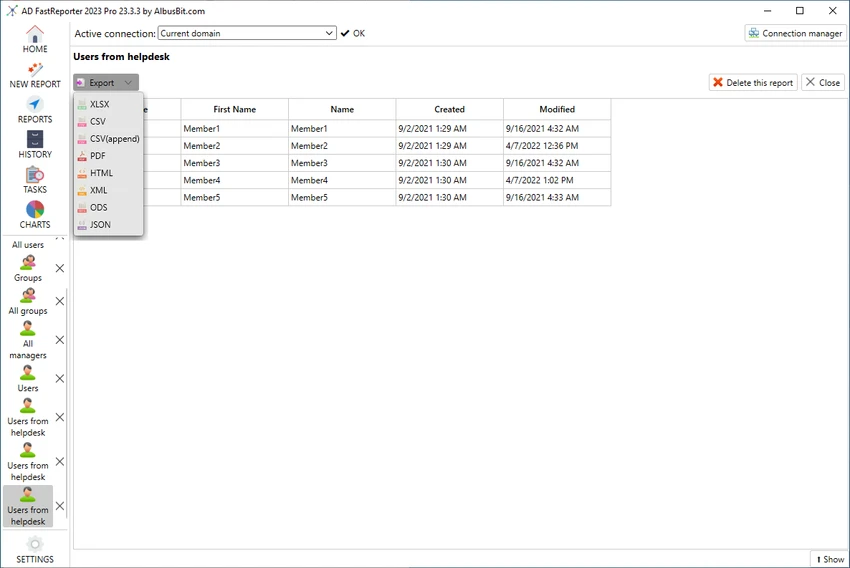
  • Report preview in grid view before exporting or sharing
  • Ability to schedule, store, and distribute reports
  • Automatic conversion of field values into readable formats

Interface and Usability

AD FastReporter is designed with usability in mind, offering a clean and structured interface that reduces the complexity often associated with Active Directory reporting tools. Users can navigate through report templates or build custom reports without needing deep technical knowledge.

The filter manager simplifies data selection by guiding users through available operations for each field, while the grid preview ensures reports can be checked before distribution. The ability to manage multiple AD connections further improves workflow efficiency in enterprise environments.

Who Should Use AD FastReporter?

This software is best suited for IT administrators, system engineers, and enterprise IT teams who manage Active Directory environments. It is particularly useful for organizations that need frequent reporting on users, permissions, and directory structures across multiple domains.

Conclusion

AD FastReporter is a practical and efficient solution for Active Directory reporting, offering a balance between simplicity and advanced reporting capabilities. With its large library of templates, flexible filtering tools, and support for multiple domains, it helps streamline routine IT administrative tasks.

장점 및 단점

장점

  • 250+ built-in AD report templates
  • Easy-to-use interface suitable for non-experts
  • Supports multiple Active Directory connections
  • Powerful custom report and filter tools
  • Report preview before export or sharing

단점

  • Limited to Windows 10 and above
  • Focused only on reporting, not full AD management

자주 묻는 질문

What is AD FastReporter used for?

AD FastReporter is used to generate, manage, and share detailed Active Directory reports for users, groups, and other directory objects.

Does AD FastReporter support custom reports?

Yes. Users can create custom report forms or modify existing templates to suit specific reporting needs.

How many built-in reports are included?

The software includes over 250 pre-built report templates covering various Active Directory attributes and objects.

Can AD FastReporter work with multiple domains?

Yes. It supports multiple Active Directory connections, allowing users to switch between domains easily.

Is AD FastReporter suitable for beginners?

Yes. Its intuitive interface and guided filter system make it accessible even for users without advanced IT expertise.

What operating systems does AD FastReporter support?

It supports Windows 10 and newer versions of Windows.

추천 앱 [무료]:
  • Cyberduck 9.5.2.45323 Cyberduck logo Windows용 Cyberduck을 사용하여 FTP, SFTP 및 Google Drive, Dropbox, Amazon S3와 같은 클라우드 스토리지 서비스를 관리하세요.
  • K-Lite Codec Pack Full 19.8.2 K-Lite Codec Pack Full logo K-Lite Codec Pack Full은 가볍고 안정적인 코덱 패키지로, Windows에서 모든 오디오 및 비디오 형식을 재생할 수 있습니다.
  • MSI Center 2.0.71.0 MSI Center logo MSI 기기의 성능, 게임 모드, 모니터링, RGB 및 하드웨어 최적화 도구를 관리하는 시스템 유틸리티입니다.
  • VirtualBox 7.2.12 VirtualBox logo Windows용 무료 오픈소스 가상화 플랫폼인 VirtualBox를 사용하여 하나의 PC에서 여러 운영 체제를 실행하세요.
  • MKVToolNix 100.0 MKVToolNix logo MKV 파일을 쉽게 분할, 병합, 편집 및 추출할 수 있는 무료 툴킷입니다.
  • SciTE (SCIntilla) 5.6.4 SciTE (SCIntilla) logo 구문 강조 표시, 검색 도구 및 프로그래밍 지원 기능을 갖춘 경량 텍스트 편집기로, 여러 프로그래밍 언어를 사용하는 개발자에게 적합합니다.
추천 앱 [쉐어웨어]:
  • Adobe Acrobat Pro DC 2026 Adobe Acrobat Pro DC logo PDF 파일을 손쉽게 생성, 편집 및 보호하세요. 개인 및 기업을 위한 전문 PDF 솔루션입니다.
  • FileCenter 12.5.36 FileCenter logo 문서를 정리하고, 파일을 스캔하고, PDF를 관리하고, 효율적인 디지털 파일 시스템을 구축하세요.
  • Royal TS 7.4.50622 Royal TS logo 원격 연결, 자격 증명 관리, 자동화 및 안전한 팀 협업을 중앙 집중화합니다.
  • Password Depot 19.2.0 Password Depot logo Windows 사용자를 위한 AES 암호화, 자동 완성 및 클라우드 동기화 지원 기능을 갖춘 안전한 암호 관리자
  • MathType 7.11.1.462 MathType logo Word, LaTeX 등에서 수학 공식을 작성할 수 있는 강력한 수식 편집기입니다.
  • Ultimate Power Assistant 1.1.28.0 Ultimate Power Assistant logo Windows 전원 설정을 관리하고, 작업을 예약하고, 종료 옵션을 자동화합니다.