VeraCrypt logo

VeraCrypt 1.26.29

  • 사용자 평점:
    ★★★★★
    ★★★★★
    0.0 0Votes
  • 시스템 요구사항:
    Windows
  • 버전: 1.26.29
  • 최신 업데이트: 2주 전
  • 라이선스: 무료  
  • 제공자: IDRIX
  • 크기: 19 MB
× app stores

VeraCrypt is a powerful open-source disk encryption solution developed by IDRIX and built upon the legacy of TrueCrypt 7. Designed to protect sensitive information, it enables users to create encrypted volumes, secure disk partitions, and safeguard important files with strong password-based encryption. After exploring its capabilities, I found VeraCrypt particularly suitable for users who prioritize data security without sacrificing flexibility. It offers multiple encryption algorithms, customizable hashing options, and compatibility with existing TrueCrypt volumes, making it an excellent choice for individuals and organizations seeking enhanced protection against unauthorized access and brute-force attacks.

Features of VeraCrypt

  • Open-source disk encryption software
  • Based on the TrueCrypt 7 project
  • Encrypts disk partitions and storage volumes
  • Create password-protected encrypted volumes
  • Choose from multiple encryption algorithms
  • Customizable hashing algorithms
  • Enhanced protection against brute-force attacks
  • Compatible with existing TrueCrypt volumes
  • Convert TrueCrypt containers and non-system partitions to VeraCrypt format
  • Addresses known security vulnerabilities found in TrueCrypt
  • Minimal performance impact during normal use after encrypted volumes are mounted

Interface and Usability

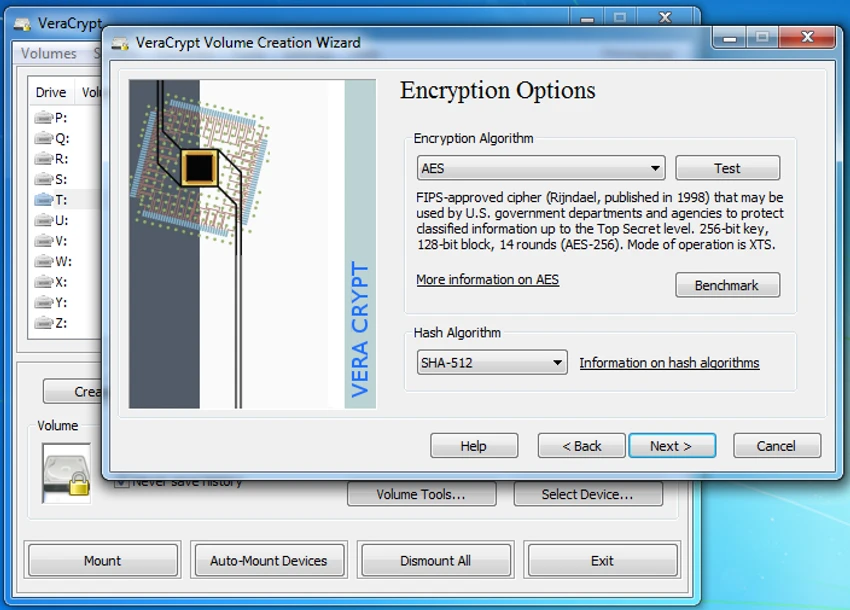
VeraCrypt focuses on functionality and security rather than visual design. The interface is straightforward, guiding users through creating encrypted volumes, selecting encryption and hashing algorithms, and configuring password protection. Although beginners may need some time to understand the available options, the step-by-step workflow makes the encryption process manageable. Once encrypted volumes are mounted, day-to-day access is smooth, with only a slight delay during the mounting process due to the enhanced security measures.

Who Should Use VeraCrypt?

  • Individuals protecting sensitive personal files
  • Professionals handling confidential documents
  • Businesses securing important data on local drives
  • Users looking for an open-source alternative to TrueCrypt
  • Anyone who wants stronger protection against unauthorized access to stored data

Conclusion

VeraCrypt remains one of the most trusted open-source encryption tools for protecting disks, partitions, and sensitive data. Its strengthened security model, support for multiple encryption algorithms, and compatibility with TrueCrypt volumes make it a dependable choice for users who need reliable data protection. If securing confidential information is a priority, VeraCrypt is a highly capable solution worth considering.

장점 및 단점

장점

  • Free and open-source
  • Strong disk and partition encryption
  • Multiple encryption and hashing algorithms
  • Compatible with existing TrueCrypt volumes
  • Improves security beyond the original TrueCrypt implementation
  • Minimal performance impact after encrypted volumes are mounted

단점

  • Interface is designed for functionality rather than simplicity
  • Initial setup may feel complex for first-time users

자주 묻는 질문

How does VeraCrypt protect my data?

VeraCrypt encrypts disks, partitions, or virtual volumes using strong encryption algorithms. Without the correct password, the encrypted data cannot be accessed in a readable form.

Is VeraCrypt based on TrueCrypt?

Yes. VeraCrypt is based on the TrueCrypt 7 codebase and continues its development by improving security and addressing vulnerabilities that were identified in TrueCrypt.

Can VeraCrypt open TrueCrypt volumes?

Yes. VeraCrypt can mount existing TrueCrypt volumes and also provides the ability to convert TrueCrypt containers and non-system partitions into the VeraCrypt format.

Does VeraCrypt slow down my computer?

According to the software's design, the enhanced security mainly adds a small delay when mounting encrypted volumes. Once mounted, normal use typically experiences minimal performance impact.

Can I choose different encryption algorithms?

Yes. VeraCrypt allows users to select from multiple encryption algorithms and customize the hashing algorithm based on their security preferences.

Is VeraCrypt suitable for storing confidential files?

Yes. VeraCrypt is widely used to protect confidential documents, personal information, and sensitive business data by encrypting storage volumes with strong password-based security.

추천 앱 [무료]:
  • Autoruns 14.30 Autoruns logo Windows 시작 관리자는 모든 자동 시작 프로그램, 서비스, 드라이버 및 레지스트리 항목을 표시하고 제어합니다.
  • CCleaner 7.08.1355 CCleaner logo 불필요한 파일을 제거하고, 검색 기록을 지우고, Windows 최적화를 통해 성능을 향상시킵니다.
  • GOM Player 2.3.120 Build 5390 GOM Player logo 다양한 형식, 자막, VR 비디오 및 손상된 파일 재생을 지원하는 무료 Windows 미디어 플레이어
  • LDPlayer 9.5.27.0 LDPlayer logo 키보드 조작으로 모바일 앱과 게임을 실행할 수 있는 Windows용 Android 5.1 에뮬레이터입니다.
  • FreedomGPT 3.0.4 FreedomGPT logo 오프라인 지원, 로컬 개인 정보 보호 옵션 및 최신 AI 모델에 접근할 수 있는 AI 챗봇
  • SecretDNS 3.9.2 SecretDNS logo 암호화된 DNS 요청과 SNI 보호를 통해 온라인 개인정보를 강화하고, 안전한 네트워크 기능을 통해 접속 문제를 줄입니다.
추천 앱 [쉐어웨어]:
  • Lyric Video Studio 1.5.49 Lyric Video Studio logo AI 도구, 자막, 모션 트래킹 및 4K 비디오 편집 기능을 사용하여 가사 비디오를 제작할 수 있는 Windows 앱입니다.
  • R-Studio 9.5 Build 191810 R-Studio logo 삭제, 포맷 또는 손상된 파일을 다양한 파일 시스템에서 복구할 수 있는 강력한 데이터 복구 소프트웨어입니다.
  • F-Rename 3.001 F-Rename logo Windows에서 F-Rename을 사용하여 사용자 지정 패턴, 날짜, 숫자 및 MP3 메타데이터를 활용해 여러 파일의 이름을 몇 초 만에 변경하세요.
  • Soda PDF 15.0.12.24792 Soda PDF logo Windows에서 문서를 편집, 변환, 압축, 보안 및 관리할 수 있는 올인원 PDF 도구입니다.
  • Light Image Resizer 7.6.4.173 Light Image Resizer logo 일괄 처리, 품질 최적화 및 다양한 형식 지원을 통해 이미지 크기 조정, 압축, 변환, 정리 및 워터마크 작업을 신속하게 수행할 수 있습니다.
  • Cisdem Video Compressor 3.0.0 Cisdem Video Compressor logo 사용자 지정 설정, 일괄 처리 및 인기 미디어 형식 지원을 통해 품질 손실 없이 비디오 및 오디오 파일을 압축하세요.