VeraCrypt logo

VeraCrypt 1.26.29

  • Avaliação dos usuários:
    ★★★★★
    ★★★★★
    0.0 0Votes
  • Requisitos:
    Windows
  • Versão: 1.26.29
  • Última atualização: há 2 semanas
  • Licença: Gratuito  
  • Editor: IDRIX
  • Tamanho: 19 MB
× app stores

VeraCrypt is a powerful open-source disk encryption solution developed by IDRIX and built upon the legacy of TrueCrypt 7. Designed to protect sensitive information, it enables users to create encrypted volumes, secure disk partitions, and safeguard important files with strong password-based encryption. After exploring its capabilities, I found VeraCrypt particularly suitable for users who prioritize data security without sacrificing flexibility. It offers multiple encryption algorithms, customizable hashing options, and compatibility with existing TrueCrypt volumes, making it an excellent choice for individuals and organizations seeking enhanced protection against unauthorized access and brute-force attacks.

Features of VeraCrypt

  • Open-source disk encryption software
  • Based on the TrueCrypt 7 project
  • Encrypts disk partitions and storage volumes
  • Create password-protected encrypted volumes
  • Choose from multiple encryption algorithms
  • Customizable hashing algorithms
  • Enhanced protection against brute-force attacks
  • Compatible with existing TrueCrypt volumes
  • Convert TrueCrypt containers and non-system partitions to VeraCrypt format
  • Addresses known security vulnerabilities found in TrueCrypt
  • Minimal performance impact during normal use after encrypted volumes are mounted

Interface and Usability

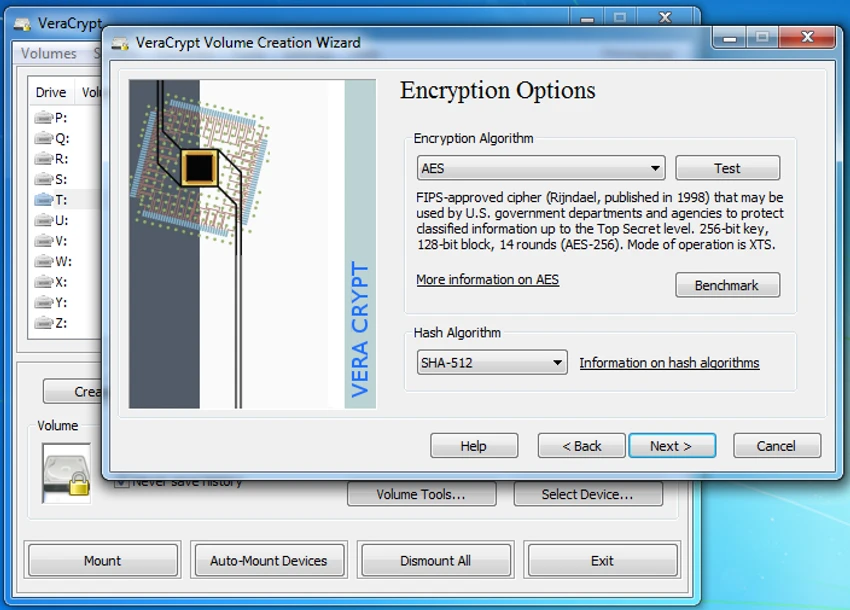
VeraCrypt focuses on functionality and security rather than visual design. The interface is straightforward, guiding users through creating encrypted volumes, selecting encryption and hashing algorithms, and configuring password protection. Although beginners may need some time to understand the available options, the step-by-step workflow makes the encryption process manageable. Once encrypted volumes are mounted, day-to-day access is smooth, with only a slight delay during the mounting process due to the enhanced security measures.

Who Should Use VeraCrypt?

  • Individuals protecting sensitive personal files
  • Professionals handling confidential documents
  • Businesses securing important data on local drives
  • Users looking for an open-source alternative to TrueCrypt
  • Anyone who wants stronger protection against unauthorized access to stored data

Conclusion

VeraCrypt remains one of the most trusted open-source encryption tools for protecting disks, partitions, and sensitive data. Its strengthened security model, support for multiple encryption algorithms, and compatibility with TrueCrypt volumes make it a dependable choice for users who need reliable data protection. If securing confidential information is a priority, VeraCrypt is a highly capable solution worth considering.

Prós e Contras

Prós

  • Free and open-source
  • Strong disk and partition encryption
  • Multiple encryption and hashing algorithms
  • Compatible with existing TrueCrypt volumes
  • Improves security beyond the original TrueCrypt implementation
  • Minimal performance impact after encrypted volumes are mounted

Contras

  • Interface is designed for functionality rather than simplicity
  • Initial setup may feel complex for first-time users

Perguntas frequentes

How does VeraCrypt protect my data?

VeraCrypt encrypts disks, partitions, or virtual volumes using strong encryption algorithms. Without the correct password, the encrypted data cannot be accessed in a readable form.

Is VeraCrypt based on TrueCrypt?

Yes. VeraCrypt is based on the TrueCrypt 7 codebase and continues its development by improving security and addressing vulnerabilities that were identified in TrueCrypt.

Can VeraCrypt open TrueCrypt volumes?

Yes. VeraCrypt can mount existing TrueCrypt volumes and also provides the ability to convert TrueCrypt containers and non-system partitions into the VeraCrypt format.

Does VeraCrypt slow down my computer?

According to the software's design, the enhanced security mainly adds a small delay when mounting encrypted volumes. Once mounted, normal use typically experiences minimal performance impact.

Can I choose different encryption algorithms?

Yes. VeraCrypt allows users to select from multiple encryption algorithms and customize the hashing algorithm based on their security preferences.

Is VeraCrypt suitable for storing confidential files?

Yes. VeraCrypt is widely used to protect confidential documents, personal information, and sensitive business data by encrypting storage volumes with strong password-based security.

Aplicativos recomendados [Gratuitos]:
  • Autoruns 14.30 Autoruns logo Um gerenciador de inicialização do Windows que revela e controla todos os programas, serviços, drivers e entradas de registro que iniciam automaticamente.
  • CCleaner 7.08.1355 CCleaner logo Remove arquivos inúteis, limpa rastros de navegação e ajuda a otimizar o Windows para um melhor desempenho.
  • GOM Player 2.3.120 Build 5390 GOM Player logo Um reprodutor de mídia gratuito para Windows que suporta diversos formatos, legendas, vídeos em realidade virtual e reprodução de arquivos corrompidos.
  • LDPlayer 9.5.27.0 LDPlayer logo Emulador do Android 5.1 para Windows que permite executar aplicativos e jogos para dispositivos móveis com controle por teclado.
  • FreedomGPT 3.0.4 FreedomGPT logo Chatbot de IA com suporte offline, opções de privacidade local e acesso a modelos modernos de IA.
  • SecretDNS 3.9.2 SecretDNS logo Melhore a privacidade online com solicitações DNS criptografadas e proteção SNI, reduzindo problemas de acesso por meio de recursos de rede seguros.
Aplicativos recomendados [Shareware]:
  • Lyric Video Studio 1.5.49 Lyric Video Studio logo Um aplicativo para Windows para criar vídeos com letras de músicas, utilizando ferramentas de IA, legendas, rastreamento de movimento e edição de vídeo em 4K.
  • R-Studio 9.5 Build 191810 R-Studio logo Software poderoso de recuperação de dados para recuperar arquivos apagados, formatados ou danificados em diversos sistemas de arquivos.
  • F-Rename 3.001 F-Rename logo Renomeie vários arquivos em segundos com o F-Rename usando padrões personalizados, datas, números e metadados MP3 no Windows.
  • Soda PDF 15.0.12.24792 Soda PDF logo Ferramenta PDF completa para editar, converter, compactar, proteger e gerenciar documentos no Windows.
  • Light Image Resizer 7.6.4.173 Light Image Resizer logo Redimensione, comprima, converta, organize e adicione marcas d'água a imagens rapidamente com processamento em lote, otimização de qualidade e suporte a formatos.
  • Cisdem Video Compressor 3.0.0 Cisdem Video Compressor logo Comprima arquivos de vídeo e áudio, preservando a qualidade, com configurações personalizáveis, processamento em lote e suporte para formatos de mídia populares.