VeraCrypt logo

VeraCrypt 1.26.29

  • ユーザー評価:
    ★★★★★
    ★★★★★
    0.0 0Votes
  • 動作環境:
    Windows
  • バージョン: 1.26.29
  • 最終更新: 2週間前
  • ライセンス: 無料ソフト  
  • 提供元: IDRIX
  • サイズ: 19 MB
× app stores

VeraCrypt is a powerful open-source disk encryption solution developed by IDRIX and built upon the legacy of TrueCrypt 7. Designed to protect sensitive information, it enables users to create encrypted volumes, secure disk partitions, and safeguard important files with strong password-based encryption. After exploring its capabilities, I found VeraCrypt particularly suitable for users who prioritize data security without sacrificing flexibility. It offers multiple encryption algorithms, customizable hashing options, and compatibility with existing TrueCrypt volumes, making it an excellent choice for individuals and organizations seeking enhanced protection against unauthorized access and brute-force attacks.

Features of VeraCrypt

  • Open-source disk encryption software
  • Based on the TrueCrypt 7 project
  • Encrypts disk partitions and storage volumes
  • Create password-protected encrypted volumes
  • Choose from multiple encryption algorithms
  • Customizable hashing algorithms
  • Enhanced protection against brute-force attacks
  • Compatible with existing TrueCrypt volumes
  • Convert TrueCrypt containers and non-system partitions to VeraCrypt format
  • Addresses known security vulnerabilities found in TrueCrypt
  • Minimal performance impact during normal use after encrypted volumes are mounted

Interface and Usability

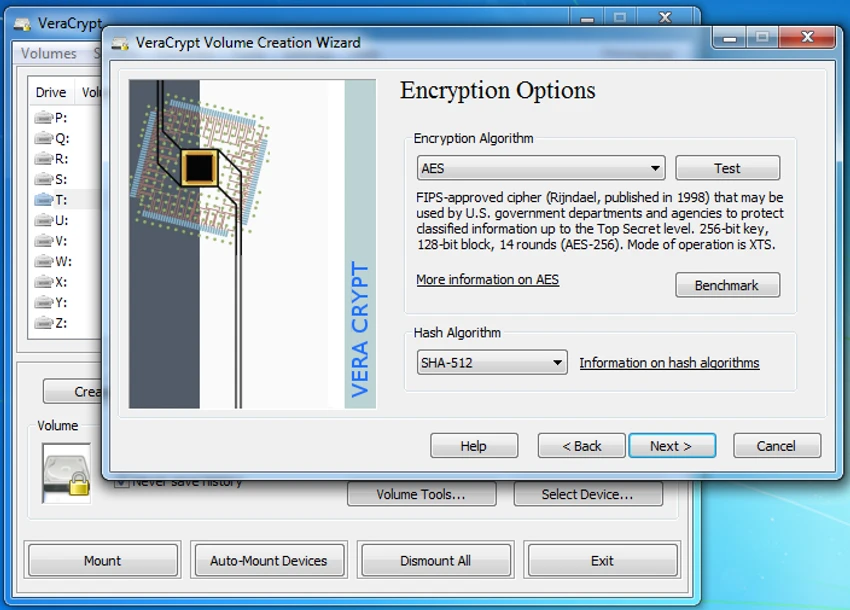
VeraCrypt focuses on functionality and security rather than visual design. The interface is straightforward, guiding users through creating encrypted volumes, selecting encryption and hashing algorithms, and configuring password protection. Although beginners may need some time to understand the available options, the step-by-step workflow makes the encryption process manageable. Once encrypted volumes are mounted, day-to-day access is smooth, with only a slight delay during the mounting process due to the enhanced security measures.

Who Should Use VeraCrypt?

  • Individuals protecting sensitive personal files
  • Professionals handling confidential documents
  • Businesses securing important data on local drives
  • Users looking for an open-source alternative to TrueCrypt
  • Anyone who wants stronger protection against unauthorized access to stored data

Conclusion

VeraCrypt remains one of the most trusted open-source encryption tools for protecting disks, partitions, and sensitive data. Its strengthened security model, support for multiple encryption algorithms, and compatibility with TrueCrypt volumes make it a dependable choice for users who need reliable data protection. If securing confidential information is a priority, VeraCrypt is a highly capable solution worth considering.

メリット・デメリット

メリット

  • Free and open-source
  • Strong disk and partition encryption
  • Multiple encryption and hashing algorithms
  • Compatible with existing TrueCrypt volumes
  • Improves security beyond the original TrueCrypt implementation
  • Minimal performance impact after encrypted volumes are mounted

デメリット

  • Interface is designed for functionality rather than simplicity
  • Initial setup may feel complex for first-time users

よくある質問

How does VeraCrypt protect my data?

VeraCrypt encrypts disks, partitions, or virtual volumes using strong encryption algorithms. Without the correct password, the encrypted data cannot be accessed in a readable form.

Is VeraCrypt based on TrueCrypt?

Yes. VeraCrypt is based on the TrueCrypt 7 codebase and continues its development by improving security and addressing vulnerabilities that were identified in TrueCrypt.

Can VeraCrypt open TrueCrypt volumes?

Yes. VeraCrypt can mount existing TrueCrypt volumes and also provides the ability to convert TrueCrypt containers and non-system partitions into the VeraCrypt format.

Does VeraCrypt slow down my computer?

According to the software's design, the enhanced security mainly adds a small delay when mounting encrypted volumes. Once mounted, normal use typically experiences minimal performance impact.

Can I choose different encryption algorithms?

Yes. VeraCrypt allows users to select from multiple encryption algorithms and customize the hashing algorithm based on their security preferences.

Is VeraCrypt suitable for storing confidential files?

Yes. VeraCrypt is widely used to protect confidential documents, personal information, and sensitive business data by encrypting storage volumes with strong password-based security.

おすすめアプリ [無料]:
  • Autoruns 14.30 Autoruns logo Windowsのスタートアップマネージャーで、すべての自動起動プログラム、サービス、ドライバー、レジストリエントリを表示および制御します。
  • CCleaner 7.08.1355 CCleaner logo 不要ファイルを削除し、閲覧履歴を消去し、Windowsのパフォーマンスを最適化するのに役立ちます。
  • GOM Player 2.3.120 Build 5390 GOM Player logo 多くのフォーマット、字幕、VRビデオ、破損ファイルの再生に対応した無料のWindowsメディアプレーヤー
  • LDPlayer 9.5.27.0 LDPlayer logo Windows 用の Android 5.1 エミュレーター。キーボード操作でモバイルアプリやゲームを実行できます。
  • FreedomGPT 3.0.4 FreedomGPT logo オフラインサポート、ローカルプライバシーオプション、最新のAIモデルへのアクセスを備えたAIチャットボット
  • SecretDNS 3.9.2 SecretDNS logo 暗号化されたDNSリクエストとSNI保護によってオンラインプライバシーを向上させるとともに、セキュアなネットワーク機能によってアクセス上の問題を軽減します。
おすすめアプリ [シェアウェア]:
  • Lyric Video Studio 1.5.49 Lyric Video Studio logo AIツール、字幕、モーショントラッキング、4Kビデオ編集機能を備えた、歌詞ビデオ作成用Windowsアプリ
  • R-Studio 9.5 Build 191810 R-Studio logo 複数のファイルシステムにわたって削除、フォーマット、または破損したファイルを復元するための強力なデータ復元ソフトウェア
  • F-Rename 3.001 F-Rename logo F-Renameを使えば、Windows上でカスタムパターン、日付、数字、MP3メタデータを使用して複数のファイルを数秒で名前変更できます。
  • Soda PDF 15.0.12.24792 Soda PDF logo Windows上でドキュメントの編集、変換、圧縮、保護、管理を行うオールインワンPDFツール
  • Light Image Resizer 7.6.4.173 Light Image Resizer logo バッチ処理、品質最適化、フォーマットサポートにより、画像のサイズ変更、圧縮、変換、整理、透かし挿入を迅速に行えます。
  • Cisdem Video Compressor 3.0.0 Cisdem Video Compressor logo カスタマイズ可能な設定、バッチ処理、主要なメディアフォーマットのサポートにより、品質を維持しながらビデオファイルとオーディオファイルを圧縮します。