VeraCrypt logo

VeraCrypt 1.26.29

  • Évaluation des utilisateurs:
    ★★★★★
    ★★★★★
    0.0 0Votes
  • Exigences:
    Windows
  • Version: 1.26.29
  • Dernière mise à jour: il y a 2 mois
  • Licence: Gratuit  
  • Éditeur: IDRIX
  • Taille: 19 MB
× app stores

VeraCrypt is a powerful open-source disk encryption solution developed by IDRIX and built upon the legacy of TrueCrypt 7. Designed to protect sensitive information, it enables users to create encrypted volumes, secure disk partitions, and safeguard important files with strong password-based encryption. After exploring its capabilities, I found VeraCrypt particularly suitable for users who prioritize data security without sacrificing flexibility. It offers multiple encryption algorithms, customizable hashing options, and compatibility with existing TrueCrypt volumes, making it an excellent choice for individuals and organizations seeking enhanced protection against unauthorized access and brute-force attacks.

Features of VeraCrypt

  • Open-source disk encryption software
  • Based on the TrueCrypt 7 project
  • Encrypts disk partitions and storage volumes
  • Create password-protected encrypted volumes
  • Choose from multiple encryption algorithms
  • Customizable hashing algorithms
  • Enhanced protection against brute-force attacks
  • Compatible with existing TrueCrypt volumes
  • Convert TrueCrypt containers and non-system partitions to VeraCrypt format
  • Addresses known security vulnerabilities found in TrueCrypt
  • Minimal performance impact during normal use after encrypted volumes are mounted

Interface and Usability

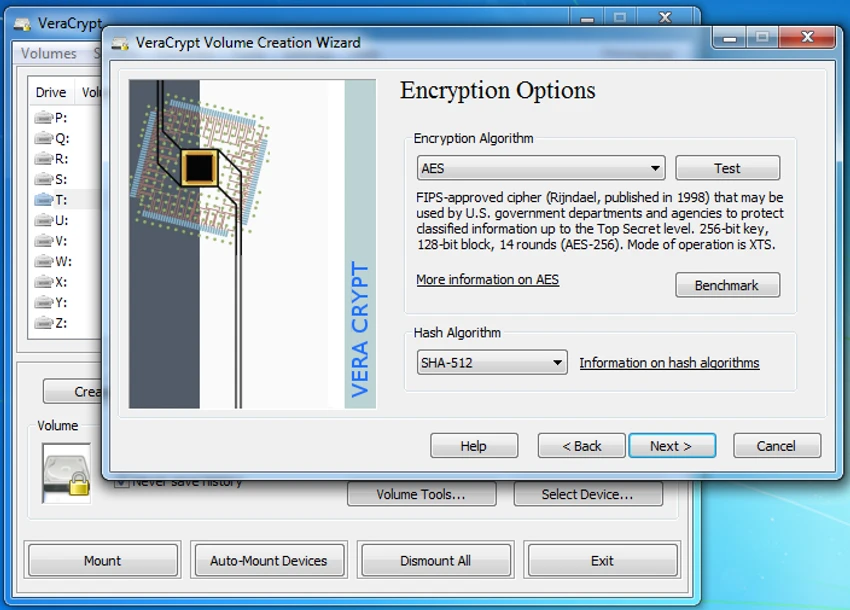
VeraCrypt focuses on functionality and security rather than visual design. The interface is straightforward, guiding users through creating encrypted volumes, selecting encryption and hashing algorithms, and configuring password protection. Although beginners may need some time to understand the available options, the step-by-step workflow makes the encryption process manageable. Once encrypted volumes are mounted, day-to-day access is smooth, with only a slight delay during the mounting process due to the enhanced security measures.

Who Should Use VeraCrypt?

  • Individuals protecting sensitive personal files
  • Professionals handling confidential documents
  • Businesses securing important data on local drives
  • Users looking for an open-source alternative to TrueCrypt
  • Anyone who wants stronger protection against unauthorized access to stored data

Conclusion

VeraCrypt remains one of the most trusted open-source encryption tools for protecting disks, partitions, and sensitive data. Its strengthened security model, support for multiple encryption algorithms, and compatibility with TrueCrypt volumes make it a dependable choice for users who need reliable data protection. If securing confidential information is a priority, VeraCrypt is a highly capable solution worth considering.

Avantages & Inconvénients

Avantages

  • Free and open-source
  • Strong disk and partition encryption
  • Multiple encryption and hashing algorithms
  • Compatible with existing TrueCrypt volumes
  • Improves security beyond the original TrueCrypt implementation
  • Minimal performance impact after encrypted volumes are mounted

Inconvénients

  • Interface is designed for functionality rather than simplicity
  • Initial setup may feel complex for first-time users

Questions fréquentes

How does VeraCrypt protect my data?

VeraCrypt encrypts disks, partitions, or virtual volumes using strong encryption algorithms. Without the correct password, the encrypted data cannot be accessed in a readable form.

Is VeraCrypt based on TrueCrypt?

Yes. VeraCrypt is based on the TrueCrypt 7 codebase and continues its development by improving security and addressing vulnerabilities that were identified in TrueCrypt.

Can VeraCrypt open TrueCrypt volumes?

Yes. VeraCrypt can mount existing TrueCrypt volumes and also provides the ability to convert TrueCrypt containers and non-system partitions into the VeraCrypt format.

Does VeraCrypt slow down my computer?

According to the software's design, the enhanced security mainly adds a small delay when mounting encrypted volumes. Once mounted, normal use typically experiences minimal performance impact.

Can I choose different encryption algorithms?

Yes. VeraCrypt allows users to select from multiple encryption algorithms and customize the hashing algorithm based on their security preferences.

Is VeraCrypt suitable for storing confidential files?

Yes. VeraCrypt is widely used to protect confidential documents, personal information, and sensitive business data by encrypting storage volumes with strong password-based security.

Applications recommandées [Gratuites]:
  • TickTick 8.1.1.0 TickTick logo Organisez vos tâches, gérez vos plannings et restez concentré grâce au calendrier, au minuteur Pomodoro et aux outils de collaboration de TickTick.
  • ToDoList 9.2.6.0 ToDoList logo Gestionnaire de tâches personnalisable pour Windows avec sous-tâches, rappels, notes, suivi et outils de gestion de projet
  • Avast Free Antivirus 26.6.11050 Avast Free Antivirus logo Protection en temps réel contre les logiciels malveillants, défense contre le phishing et détection des arnaques avec un impact minimal sur les performances de Windows
  • FreeFileSync 14.10 FreeFileSync logo Outil open source pour la synchronisation de dossiers, la comparaison de fichiers et les sauvegardes efficaces
  • StaticDesktopRuler 1.04 StaticDesktopRuler logo Utilitaire Windows qui ajoute des règles personnalisables à l'écran pour améliorer l'alignement, la navigation et la productivité sur les grands écrans.
  • SecretDNS 3.9.2 SecretDNS logo Améliorez votre confidentialité en ligne grâce au chiffrement des requêtes DNS et à la protection SNI, tout en réduisant les problèmes d'accès grâce à des fonctionnalités réseau sécurisées.
Applications recommandées [Shareware]:
  • Diffchecker 7.1.5 Diffchecker logo Outil hors ligne pour comparer en toute sécurité du texte, des images, des PDF, des feuilles de calcul et des dossiers sous Windows
  • PDQ Deploy 20.0.20.0 PDQ Deploy logo Déployez des logiciels et des mises à jour Windows sur plusieurs PC avec PDQ Deploy grâce à la planification automatisée et aux installations silencieuses.
  • YoloX 1.11 YoloX logo un outil léger de superposition de réticule pour Windows proposant des designs personnalisés, des animations, des réactions audio et des profils de jeu
  • QILING Disk Master Professional 8.8 QILING Disk Master Professional logo un outil de sauvegarde et de restauration pour Windows offrant la création d'images système, la restauration et la gestion des disques
  • Blue Iris 6.0.8.6 Blue Iris logo Un logiciel de surveillance Windows pour la gestion des caméras IP, des enregistreurs numériques (DVR), la détection de mouvement, l'enregistrement et la surveillance à distance.
  • Argente Malware Cleaner 3.0.8.4 Argente Malware Cleaner logo Détectez et supprimez les logiciels malveillants grâce à des modes d'analyse flexibles, la création de points de restauration et un scanner de sécurité à la demande facile à utiliser.