JWIZARD Cleaner logo

JWIZARD Cleaner 1.11.2.3

  • Évaluation des utilisateurs:
    ★★★★★
    ★★★★★
    0.0 0Votes
  • Exigences:
    Windows
  • Version: 1.11.2.3
  • Dernière mise à jour: il y a 3 semaines
  • Licence: Essai gratuit  
  • Éditeur: JWIZARD
  • Taille: 33 MB
× app stores

JWIZARD Cleaner is a Windows system optimization utility designed to help users remove unnecessary files, reclaim storage space, and keep their computers running efficiently. Instead of manually searching for temporary files and outdated data, the software scans the system to identify clutter that can accumulate over time through software installations, updates, and everyday computer use.

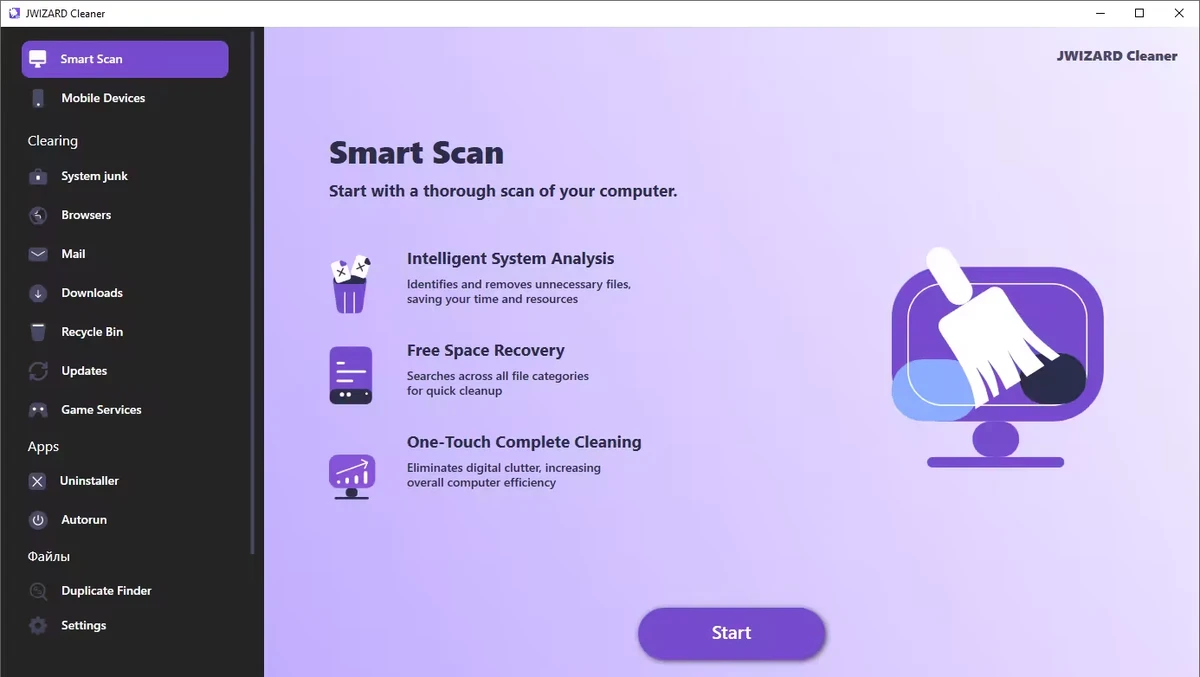
During my evaluation, I found that JWIZARD Cleaner focuses on common maintenance tasks such as deleting temporary files, clearing browser data, cleaning system caches, and organizing unnecessary downloads. It also includes registry optimization tools intended to help improve overall system performance. For users looking for a straightforward way to perform routine Windows maintenance, JWIZARD Cleaner provides several cleaning features within a simple interface.

Features of JWIZARD Cleaner

  • Scan Windows for unnecessary system junk files.
  • Remove temporary files created by Windows and installed applications.
  • Clear system cache to free up storage space.
  • Optimize the Windows registry.
  • Clean browser cache, cookies, and browsing history.
  • Delete downloaded files and unnecessary email attachments.
  • Empty the Recycle Bin.
  • Free up disk space by removing unused files.
  • Help organize your computer with quick cleanup tools.

Interface and Usability

JWIZARD Cleaner is designed to make routine system maintenance accessible without requiring advanced technical knowledge. The workflow is straightforward: scan the computer, review detected items, and remove unwanted files with just a few clicks.

The cleaning categories are organized logically, making it easy to locate browser data, temporary files, downloaded content, and other removable items. This simplicity makes the application suitable for users who want to perform regular maintenance without manually navigating through Windows system folders.

Who Should Use JWIZARD Cleaner?

  • Home Windows users
  • Users looking to free up disk space
  • Anyone who wants to remove temporary and junk files
  • Users who regularly clear browser data
  • People seeking a simple Windows maintenance utility

Conclusion & Recommendation

JWIZARD Cleaner offers a straightforward approach to Windows cleanup by combining junk file removal, browser data cleaning, and basic system optimization tools in a single application. Its simple workflow makes regular maintenance quick and accessible for most users.

Avantages & Inconvénients

Avantages

  • Easy-to-use interface
  • Removes temporary and unnecessary system files
  • Cleans browser cache, cookies, and history
  • Helps free up disk space
  • Includes registry optimization tools
  • Simplifies routine Windows maintenance

Inconvénients

  • Lacks detailed information about recent updates
  • Advanced system optimization features are not highlighted

Questions fréquentes

What is JWIZARD Cleaner used for?

JWIZARD Cleaner is a Windows maintenance tool that helps remove temporary files, system junk, browser data, and other unnecessary files to free up disk space and keep your computer organized.

What types of files can JWIZARD Cleaner remove?

The software can detect and remove temporary system files, cached data, browser cache, cookies, browsing history, downloaded files, email attachments, Recycle Bin contents, and other unused files.

Can JWIZARD Cleaner clean web browser data?

Yes. JWIZARD Cleaner can clear browser cache, cookies, and browsing history, helping free up storage space and remove stored browsing data.

Does JWIZARD Cleaner include registry optimization?

Yes. According to the available information, JWIZARD Cleaner includes registry optimization as one of its system maintenance features.

Will JWIZARD Cleaner help free up disk space?

Yes. By removing temporary files, unnecessary downloads, browser data, and other unused files, JWIZARD Cleaner can help recover storage space on your Windows computer.

What are the system requirements for JWIZARD Cleaner?

According to the available information, JWIZARD Cleaner requires Windows 10 or later.

Applications recommandées [Gratuites]:
  • Vivaldi Browser 8.1.4087.55 Vivaldi Browser logo Un navigateur basé sur Chromium avec messagerie intégrée, calendrier, notes, bloqueur de publicités et fonctionnalités de personnalisation avancées.
  • Markdown Monster 4.4.4 Markdown Monster logo un puissant éditeur Markdown pour Windows avec prévisualisation en direct, exportation HTML/PDF, intégration Git et outils de blog.
  • Urban VPN 5.2.1 Urban VPN logo Outil de réseau privé virtuel conçu pour aider les utilisateurs à protéger leur identité et leur vie privée lorsqu'ils naviguent sur Internet.
  • SoundVolumeView 2.53 SoundVolumeView logo Affiche, gère, enregistre et restaure les paramètres audio de Windows grâce à une prise en charge avancée des profils et de la ligne de commande.
  • TeraCopy 4.0.0.37 TeraCopy logo Outil de transfert de fichiers Windows qui accélère la copie, reprend les transferts et améliore la fiabilité grâce à la récupération d'erreurs.
  • NetworkTrafficView 2.52 NetworkTrafficView logo Surveillez le trafic réseau grâce à un utilitaire léger qui capture les paquets, affiche les statistiques de connexion et analyse l'utilisation des données.
Applications recommandées [Shareware]:
  • DiskGenius 6.2.0.1829 DiskGenius logo Un outil Windows pour la gestion des partitions, la récupération de données, le clonage de disques et la sauvegarde, doté de fonctionnalités avancées.
  • HTML Compiler 2026.7 HTML Compiler logo Convertissez des applications HTML en exécutables Windows sécurisés à l'aide d'un environnement d'exécution basé sur Chromium.
  • Output Messenger 3.0.0 Output Messenger logo Chat d'équipe sécurisé, appels vidéo, partage de fichiers, gestion des tâches et accès au bureau à distance
  • WiFi Explorer Pro 1.2.3.0 WiFi Explorer Pro logo Analysez, dépannez et optimisez les réseaux Wi-Fi avec WiFi Explorer Pro pour Windows, compatible avec les normes Wi-Fi 6, 6E et 7.
  • PanoramaStudio 4.2.0 PanoramaStudio logo Créez des images panoramiques harmonieuses grâce à l'assemblage automatique des photos, aux outils d'édition et aux options d'exportation pour le web, l'impression et les présentations.
  • Gammadyne Mailer 74.0 Gammadyne Mailer logo Automatisez vos campagnes d'emailing, gérez vos listes de diffusion, suivez l'engagement et traitez vos messages grâce à des outils marketing avancés.