JWIZARD Cleaner logo

JWIZARD Cleaner 1.11.2.3

  • 사용자 평점:
    ★★★★★
    ★★★★★
    0.0 0Votes
  • 시스템 요구사항:
    Windows
  • 버전: 1.11.2.3
  • 최신 업데이트: 3주 전
  • 라이선스: 무료 체험  
  • 제공자: JWIZARD
  • 크기: 33 MB
× app stores

JWIZARD Cleaner is a Windows system optimization utility designed to help users remove unnecessary files, reclaim storage space, and keep their computers running efficiently. Instead of manually searching for temporary files and outdated data, the software scans the system to identify clutter that can accumulate over time through software installations, updates, and everyday computer use.

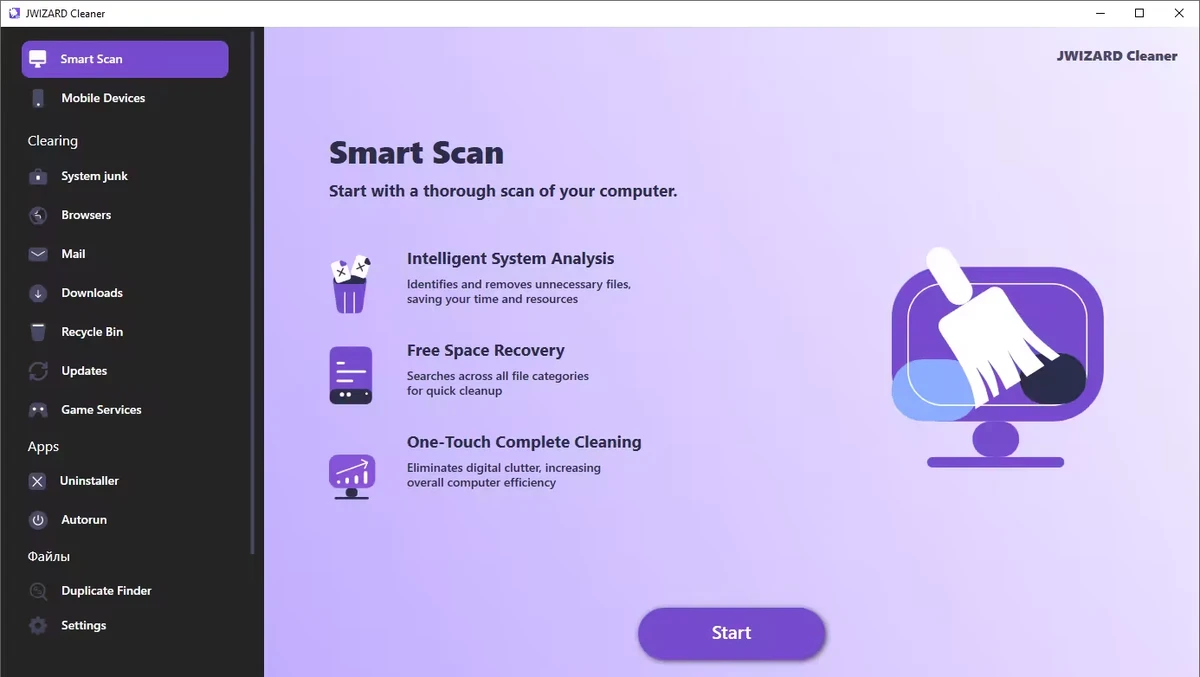
During my evaluation, I found that JWIZARD Cleaner focuses on common maintenance tasks such as deleting temporary files, clearing browser data, cleaning system caches, and organizing unnecessary downloads. It also includes registry optimization tools intended to help improve overall system performance. For users looking for a straightforward way to perform routine Windows maintenance, JWIZARD Cleaner provides several cleaning features within a simple interface.

Features of JWIZARD Cleaner

  • Scan Windows for unnecessary system junk files.
  • Remove temporary files created by Windows and installed applications.
  • Clear system cache to free up storage space.
  • Optimize the Windows registry.
  • Clean browser cache, cookies, and browsing history.
  • Delete downloaded files and unnecessary email attachments.
  • Empty the Recycle Bin.
  • Free up disk space by removing unused files.
  • Help organize your computer with quick cleanup tools.

Interface and Usability

JWIZARD Cleaner is designed to make routine system maintenance accessible without requiring advanced technical knowledge. The workflow is straightforward: scan the computer, review detected items, and remove unwanted files with just a few clicks.

The cleaning categories are organized logically, making it easy to locate browser data, temporary files, downloaded content, and other removable items. This simplicity makes the application suitable for users who want to perform regular maintenance without manually navigating through Windows system folders.

Who Should Use JWIZARD Cleaner?

  • Home Windows users
  • Users looking to free up disk space
  • Anyone who wants to remove temporary and junk files
  • Users who regularly clear browser data
  • People seeking a simple Windows maintenance utility

Conclusion & Recommendation

JWIZARD Cleaner offers a straightforward approach to Windows cleanup by combining junk file removal, browser data cleaning, and basic system optimization tools in a single application. Its simple workflow makes regular maintenance quick and accessible for most users.

장점 및 단점

장점

  • Easy-to-use interface
  • Removes temporary and unnecessary system files
  • Cleans browser cache, cookies, and history
  • Helps free up disk space
  • Includes registry optimization tools
  • Simplifies routine Windows maintenance

단점

  • Lacks detailed information about recent updates
  • Advanced system optimization features are not highlighted

자주 묻는 질문

What is JWIZARD Cleaner used for?

JWIZARD Cleaner is a Windows maintenance tool that helps remove temporary files, system junk, browser data, and other unnecessary files to free up disk space and keep your computer organized.

What types of files can JWIZARD Cleaner remove?

The software can detect and remove temporary system files, cached data, browser cache, cookies, browsing history, downloaded files, email attachments, Recycle Bin contents, and other unused files.

Can JWIZARD Cleaner clean web browser data?

Yes. JWIZARD Cleaner can clear browser cache, cookies, and browsing history, helping free up storage space and remove stored browsing data.

Does JWIZARD Cleaner include registry optimization?

Yes. According to the available information, JWIZARD Cleaner includes registry optimization as one of its system maintenance features.

Will JWIZARD Cleaner help free up disk space?

Yes. By removing temporary files, unnecessary downloads, browser data, and other unused files, JWIZARD Cleaner can help recover storage space on your Windows computer.

What are the system requirements for JWIZARD Cleaner?

According to the available information, JWIZARD Cleaner requires Windows 10 or later.

추천 앱 [무료]:
  • Vivaldi Browser 8.1.4087.55 Vivaldi Browser logo 크롬 기반 브라우저로, 메일, 캘린더, 메모, 광고 차단 기능이 내장되어 있으며 다양한 맞춤 설정 기능을 제공합니다.
  • Markdown Monster 4.4.4 Markdown Monster logo 실시간 미리보기, HTML/PDF 내보내기, Git 통합 및 블로그 도구를 갖춘 강력한 Windows 마크다운 편집기
  • Urban VPN 5.2.1 Urban VPN logo 가상 사설 네트워크(VPN)는 사용자가 인터넷을 검색하는 동안 신원과 개인 정보를 보호하는 데 도움이 되도록 설계된 도구입니다.
  • SoundVolumeView 2.53 SoundVolumeView logo 강력한 프로필 및 명령줄 지원을 통해 Windows 오디오 설정을 표시, 관리, 저장 및 복원합니다.
  • TeraCopy 4.0.0.37 TeraCopy logo 파일 복사 속도를 높이고, 전송을 재개하며, 오류 복구 기능으로 안정성을 향상시키는 Windows용 파일 전송 도구입니다.
  • NetworkTrafficView 2.52 NetworkTrafficView logo 패킷을 캡처하고, 연결 통계를 표시하며, 데이터 사용량을 분석하는 가벼운 유틸리티로 네트워크 트래픽을 모니터링하세요.
추천 앱 [쉐어웨어]:
  • DiskGenius 6.2.0.1829 DiskGenius logo 파티션 관리, 데이터 복구, 디스크 복제 및 백업을 위한 고급 기능을 갖춘 Windows용 도구입니다.
  • HTML Compiler 2026.7 HTML Compiler logo Chromium 기반 런타임을 사용하여 HTML 앱을 안전한 Windows 실행 파일로 변환합니다.
  • Output Messenger 3.0.0 Output Messenger logo 안전한 팀 채팅, 화상 통화, 파일 공유, 작업 관리 및 원격 데스크톱 액세스
  • WiFi Explorer Pro 1.2.3.0 WiFi Explorer Pro logo Wi-Fi 6, 6E 및 7을 지원하는 Windows용 WiFi Explorer Pro를 사용하여 Wi-Fi 네트워크를 분석, 문제 해결 및 최적화하세요.
  • PanoramaStudio 4.2.0 PanoramaStudio logo 자동 사진 합성, 편집 도구 및 웹, 인쇄, 프레젠테이션용 내보내기 옵션을 사용하여 끊김 없는 파노라마 이미지를 만드세요.
  • Gammadyne Mailer 74.0 Gammadyne Mailer logo 고급 마케팅 도구를 사용하여 이메일 캠페인을 자동화하고, 메일링 리스트를 관리하고, 참여도를 추적하고, 메시지를 처리하세요.