JWIZARD Cleaner logo

JWIZARD Cleaner 1.11.2.3

  • Benutzerbewertung:
    ★★★★★
    ★★★★★
    0.0 0Votes
  • Anforderungen:
    Windows
  • Version: 1.11.2.3
  • Zuletzt aktualisiert: vor 3 Wochen
  • Lizenz: Testversion  
  • Herausgeber: JWIZARD
  • Größe: 33 MB
× app stores

JWIZARD Cleaner is a Windows system optimization utility designed to help users remove unnecessary files, reclaim storage space, and keep their computers running efficiently. Instead of manually searching for temporary files and outdated data, the software scans the system to identify clutter that can accumulate over time through software installations, updates, and everyday computer use.

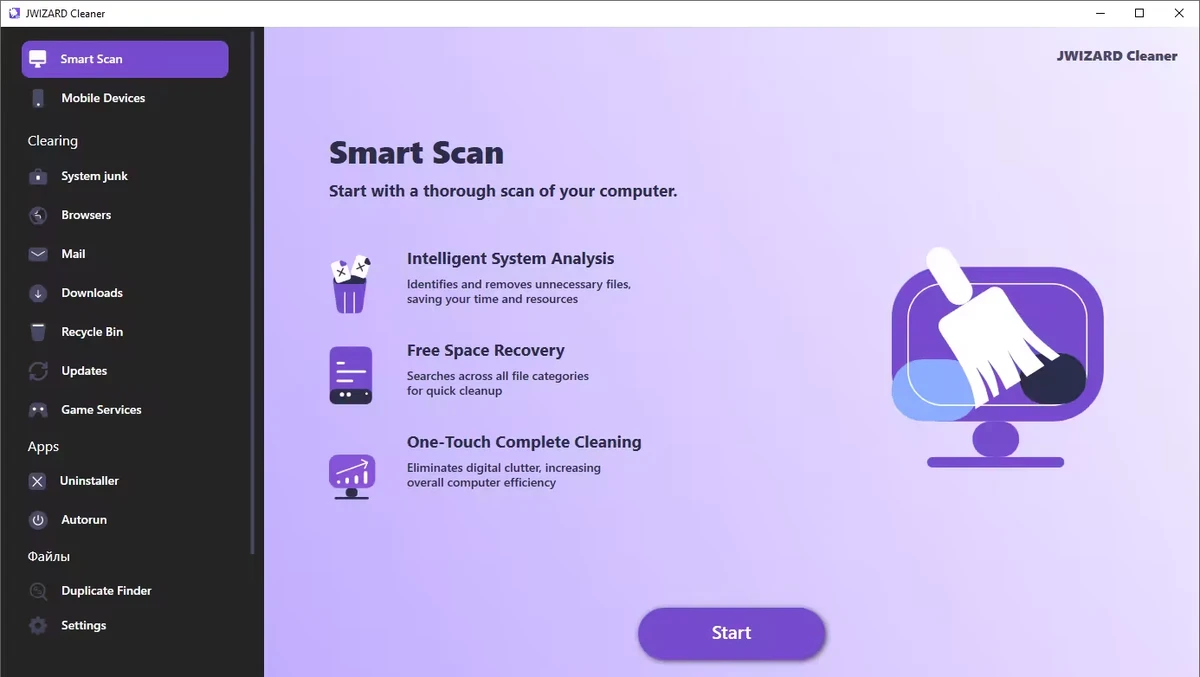
During my evaluation, I found that JWIZARD Cleaner focuses on common maintenance tasks such as deleting temporary files, clearing browser data, cleaning system caches, and organizing unnecessary downloads. It also includes registry optimization tools intended to help improve overall system performance. For users looking for a straightforward way to perform routine Windows maintenance, JWIZARD Cleaner provides several cleaning features within a simple interface.

Features of JWIZARD Cleaner

  • Scan Windows for unnecessary system junk files.
  • Remove temporary files created by Windows and installed applications.
  • Clear system cache to free up storage space.
  • Optimize the Windows registry.
  • Clean browser cache, cookies, and browsing history.
  • Delete downloaded files and unnecessary email attachments.
  • Empty the Recycle Bin.
  • Free up disk space by removing unused files.
  • Help organize your computer with quick cleanup tools.

Interface and Usability

JWIZARD Cleaner is designed to make routine system maintenance accessible without requiring advanced technical knowledge. The workflow is straightforward: scan the computer, review detected items, and remove unwanted files with just a few clicks.

The cleaning categories are organized logically, making it easy to locate browser data, temporary files, downloaded content, and other removable items. This simplicity makes the application suitable for users who want to perform regular maintenance without manually navigating through Windows system folders.

Who Should Use JWIZARD Cleaner?

  • Home Windows users
  • Users looking to free up disk space
  • Anyone who wants to remove temporary and junk files
  • Users who regularly clear browser data
  • People seeking a simple Windows maintenance utility

Conclusion & Recommendation

JWIZARD Cleaner offers a straightforward approach to Windows cleanup by combining junk file removal, browser data cleaning, and basic system optimization tools in a single application. Its simple workflow makes regular maintenance quick and accessible for most users.

Vorteile & Nachteile

Vorteile

  • Easy-to-use interface
  • Removes temporary and unnecessary system files
  • Cleans browser cache, cookies, and history
  • Helps free up disk space
  • Includes registry optimization tools
  • Simplifies routine Windows maintenance

Nachteile

  • Lacks detailed information about recent updates
  • Advanced system optimization features are not highlighted

Häufig gestellte Fragen

What is JWIZARD Cleaner used for?

JWIZARD Cleaner is a Windows maintenance tool that helps remove temporary files, system junk, browser data, and other unnecessary files to free up disk space and keep your computer organized.

What types of files can JWIZARD Cleaner remove?

The software can detect and remove temporary system files, cached data, browser cache, cookies, browsing history, downloaded files, email attachments, Recycle Bin contents, and other unused files.

Can JWIZARD Cleaner clean web browser data?

Yes. JWIZARD Cleaner can clear browser cache, cookies, and browsing history, helping free up storage space and remove stored browsing data.

Does JWIZARD Cleaner include registry optimization?

Yes. According to the available information, JWIZARD Cleaner includes registry optimization as one of its system maintenance features.

Will JWIZARD Cleaner help free up disk space?

Yes. By removing temporary files, unnecessary downloads, browser data, and other unused files, JWIZARD Cleaner can help recover storage space on your Windows computer.

What are the system requirements for JWIZARD Cleaner?

According to the available information, JWIZARD Cleaner requires Windows 10 or later.

Empfohlene Apps [Freeware]:
  • Vivaldi Browser 8.1.4087.55 Vivaldi Browser logo Ein auf Chromium basierender Browser mit integrierten E-Mail-, Kalender-, Notiz-, Werbeblocker- und umfangreichen Anpassungsmöglichkeiten.
  • Markdown Monster 4.4.4 Markdown Monster logo Ein leistungsstarker Windows Markdown-Editor mit Live-Vorschau, HTML/PDF-Export, Git-Integration und Blogging-Tools
  • Urban VPN 5.2.1 Urban VPN logo Virtuelles privates Netzwerk (VPN) – ein Tool, das Nutzern helfen soll, ihre Identität und Privatsphäre beim Surfen im Internet zu schützen.
  • SoundVolumeView 2.53 SoundVolumeView logo Zeigt Windows-Audioeinstellungen an, verwaltet, speichert und stellt sie wieder her – mit leistungsstarker Profil- und Befehlszeilenunterstützung.
  • TeraCopy 4.0.0.37 TeraCopy logo Windows-Dateiübertragungstool, das das Kopieren beschleunigt, Übertragungen fortsetzt und die Zuverlässigkeit durch Fehlerbehebung verbessert
  • NetworkTrafficView 2.52 NetworkTrafficView logo Überwachen Sie den Netzwerkverkehr mit einem leichtgewichtigen Hilfsprogramm, das Pakete erfasst, Verbindungsstatistiken anzeigt und die Datennutzung analysiert.
Empfohlene Apps [Shareware]:
  • DiskGenius 6.2.0.1829 DiskGenius logo Ein Windows-Tool für Partitionsverwaltung, Datenwiederherstellung, Festplattenklonung und Datensicherung mit erweiterten Funktionen.
  • HTML Compiler 2026.7 HTML Compiler logo Konvertieren Sie HTML-Anwendungen mithilfe der Chromium-basierten Laufzeitumgebung in sichere Windows-Programme.
  • Output Messenger 3.0.0 Output Messenger logo sicherer Team-Chat, Videoanrufe, Dateifreigabe, Aufgabenverwaltung und Fernzugriff auf Desktops
  • WiFi Explorer Pro 1.2.3.0 WiFi Explorer Pro logo Analysieren, beheben und optimieren Sie WLAN-Netzwerke mit WiFi Explorer Pro für Windows, das Wi-Fi 6, 6E und 7 unterstützt.
  • PanoramaStudio 4.2.0 PanoramaStudio logo Erstellen Sie nahtlose Panoramabilder mit automatischer Fotostitching-Funktion, Bearbeitungswerkzeugen und Exportoptionen für Web, Druck und Präsentationen.
  • Gammadyne Mailer 74.0 Gammadyne Mailer logo Automatisieren Sie E-Mail-Kampagnen, verwalten Sie Mailinglisten, verfolgen Sie das Engagement und verarbeiten Sie Nachrichten mit fortschrittlichen Marketing-Tools.