JWIZARD Cleaner logo

JWIZARD Cleaner 1.11.2.3

  • ユーザー評価:
    ★★★★★
    ★★★★★
    0.0 0Votes
  • 動作環境:
    Windows
  • バージョン: 1.11.2.3
  • 最終更新: 3週間前
  • ライセンス: 無料体験版  
  • 提供元: JWIZARD
  • サイズ: 33 MB
× app stores

JWIZARD Cleaner is a Windows system optimization utility designed to help users remove unnecessary files, reclaim storage space, and keep their computers running efficiently. Instead of manually searching for temporary files and outdated data, the software scans the system to identify clutter that can accumulate over time through software installations, updates, and everyday computer use.

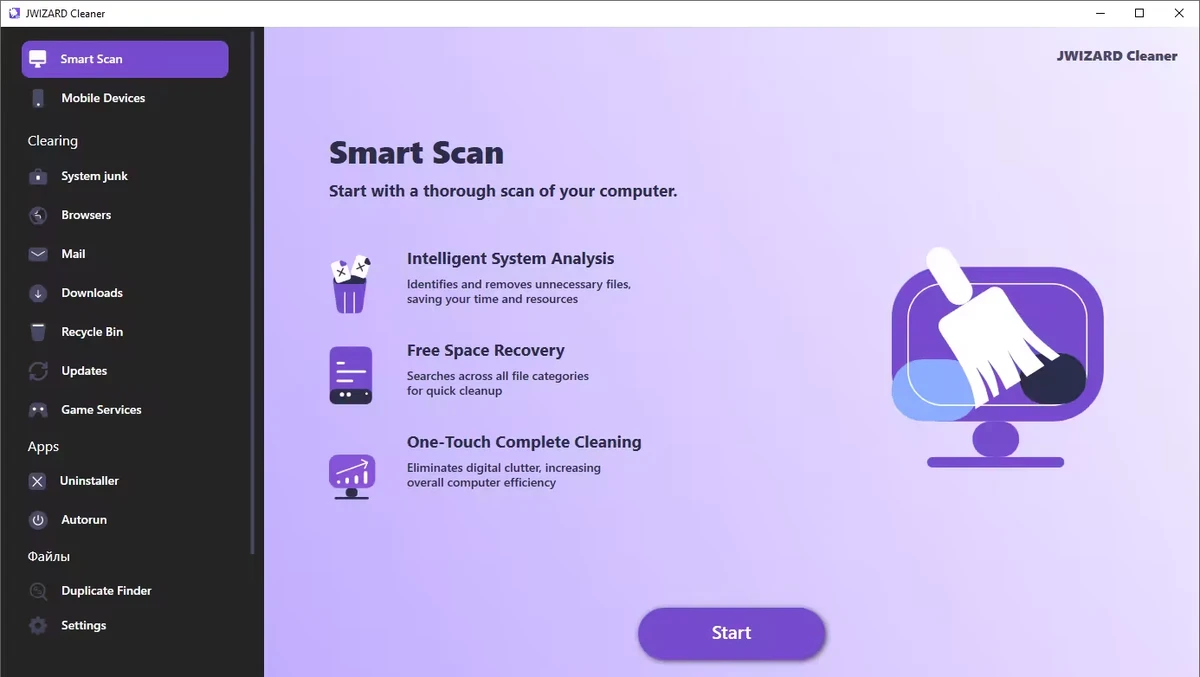
During my evaluation, I found that JWIZARD Cleaner focuses on common maintenance tasks such as deleting temporary files, clearing browser data, cleaning system caches, and organizing unnecessary downloads. It also includes registry optimization tools intended to help improve overall system performance. For users looking for a straightforward way to perform routine Windows maintenance, JWIZARD Cleaner provides several cleaning features within a simple interface.

Features of JWIZARD Cleaner

  • Scan Windows for unnecessary system junk files.
  • Remove temporary files created by Windows and installed applications.
  • Clear system cache to free up storage space.
  • Optimize the Windows registry.
  • Clean browser cache, cookies, and browsing history.
  • Delete downloaded files and unnecessary email attachments.
  • Empty the Recycle Bin.
  • Free up disk space by removing unused files.
  • Help organize your computer with quick cleanup tools.

Interface and Usability

JWIZARD Cleaner is designed to make routine system maintenance accessible without requiring advanced technical knowledge. The workflow is straightforward: scan the computer, review detected items, and remove unwanted files with just a few clicks.

The cleaning categories are organized logically, making it easy to locate browser data, temporary files, downloaded content, and other removable items. This simplicity makes the application suitable for users who want to perform regular maintenance without manually navigating through Windows system folders.

Who Should Use JWIZARD Cleaner?

  • Home Windows users
  • Users looking to free up disk space
  • Anyone who wants to remove temporary and junk files
  • Users who regularly clear browser data
  • People seeking a simple Windows maintenance utility

Conclusion & Recommendation

JWIZARD Cleaner offers a straightforward approach to Windows cleanup by combining junk file removal, browser data cleaning, and basic system optimization tools in a single application. Its simple workflow makes regular maintenance quick and accessible for most users.

メリット・デメリット

メリット

  • Easy-to-use interface
  • Removes temporary and unnecessary system files
  • Cleans browser cache, cookies, and history
  • Helps free up disk space
  • Includes registry optimization tools
  • Simplifies routine Windows maintenance

デメリット

  • Lacks detailed information about recent updates
  • Advanced system optimization features are not highlighted

よくある質問

What is JWIZARD Cleaner used for?

JWIZARD Cleaner is a Windows maintenance tool that helps remove temporary files, system junk, browser data, and other unnecessary files to free up disk space and keep your computer organized.

What types of files can JWIZARD Cleaner remove?

The software can detect and remove temporary system files, cached data, browser cache, cookies, browsing history, downloaded files, email attachments, Recycle Bin contents, and other unused files.

Can JWIZARD Cleaner clean web browser data?

Yes. JWIZARD Cleaner can clear browser cache, cookies, and browsing history, helping free up storage space and remove stored browsing data.

Does JWIZARD Cleaner include registry optimization?

Yes. According to the available information, JWIZARD Cleaner includes registry optimization as one of its system maintenance features.

Will JWIZARD Cleaner help free up disk space?

Yes. By removing temporary files, unnecessary downloads, browser data, and other unused files, JWIZARD Cleaner can help recover storage space on your Windows computer.

What are the system requirements for JWIZARD Cleaner?

According to the available information, JWIZARD Cleaner requires Windows 10 or later.

おすすめアプリ [無料]:
  • Vivaldi Browser 8.1.4087.55 Vivaldi Browser logo Chromiumベースのブラウザで、メール、カレンダー、メモ、広告ブロッカー、そして高度なカスタマイズ機能が内蔵されています。
  • Markdown Monster 4.4.4 Markdown Monster logo ライブプレビュー、HTML/PDFエクスポート、Git統合、ブログツールを備えた強力なWindows Markdownエディタ
  • Urban VPN 5.2.1 Urban VPN logo インターネット閲覧中にユーザーの身元とプライバシーを保護するために設計された仮想プライベートネットワークツール
  • SoundVolumeView 2.53 SoundVolumeView logo 強力なプロファイルおよびコマンドラインサポートにより、Windowsのオーディオ設定を表示、管理、保存、復元します。
  • TeraCopy 4.0.0.37 TeraCopy logo Windowsファイル転送ツール。コピー速度の向上、転送の再開、エラー回復による信頼性の向上を実現します。
  • NetworkTrafficView 2.52 NetworkTrafficView logo パケットをキャプチャし、接続統計を表示し、データ使用量を分析する軽量ユーティリティを使用して、ネットワークトラフィックを監視します。
おすすめアプリ [シェアウェア]:
  • DiskGenius 6.2.0.1829 DiskGenius logo パーティション管理、データ復旧、ディスククローン作成、バックアップのための高度な機能を備えたWindowsツール。
  • HTML Compiler 2026.7 HTML Compiler logo Chromiumベースのランタイムを使用して、HTMLアプリを安全なWindows実行ファイルに変換する
  • Output Messenger 3.0.0 Output Messenger logo 安全なチームチャット、ビデオ通話、ファイル共有、タスク管理、リモートデスクトップアクセス
  • WiFi Explorer Pro 1.2.3.0 WiFi Explorer Pro logo Wi-Fi 6、6E、および7をサポートするWindows版WiFi Explorer Proを使用して、Wi-Fiネットワークを分析、トラブルシューティング、および最適化します。
  • PanoramaStudio 4.2.0 PanoramaStudio logo 自動写真合成機能、編集ツール、Web、印刷、プレゼンテーション向けの書き出しオプションを使用して、継ぎ目のないパノラマ画像を作成できます。
  • Gammadyne Mailer 74.0 Gammadyne Mailer logo 高度なマーケティングツールを使用して、メールキャンペーンの自動化、メーリングリストの管理、エンゲージメントの追跡、メッセージの処理を行います。