Glary Malware Hunter logo

Glary Malware Hunter 1.218.0.860

  • Benutzerbewertung:
    ★★★★★
    ★★★★★
    0.0 0Votes
  • Anforderungen:
    Windows
  • Version: 1.218.0.860
  • Zuletzt aktualisiert: vor 2 Monaten
  • Lizenz: Testversion  
  • Herausgeber: Glarysoft
  • Größe: 64 MB
× app stores

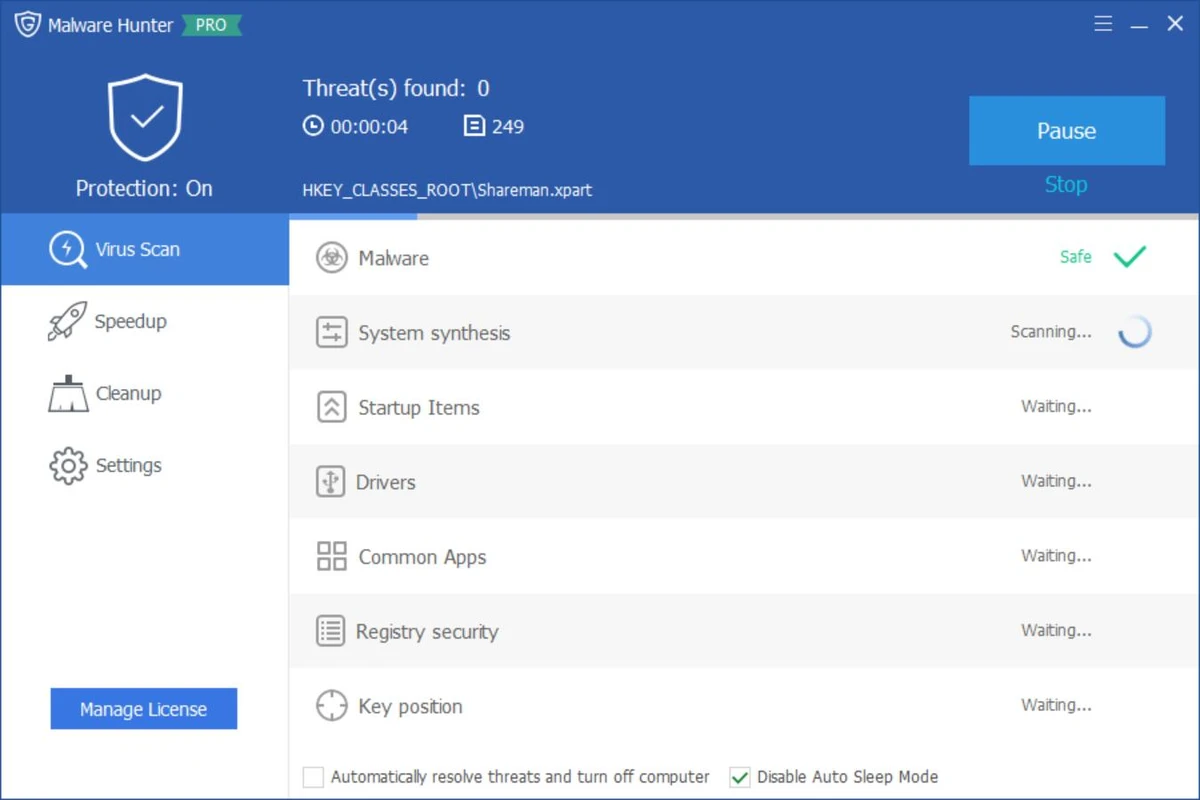
Glary Malware Hunter is a Windows security utility designed to detect and remove malicious files and components from a system. It provides on-demand scanning capabilities to help users identify threats such as viruses, trojans, spyware, worms, and other potentially harmful software. In addition to malware detection, the tool also includes basic system optimization features such as disk cleanup and performance improvements, making it a hybrid security and maintenance utility for Windows users.

Features of Glary Malware Hunter

  • On-demand malware scanning for system files and folders
  • Detects and removes malicious software including:
    • Viruses
    • Trojans
    • Worms
    • Spyware
    • Other online threats
  • Quick and deep scan modes for flexible analysis
  • Scheduled scanning support
  • Process protection against malicious activity
  • Disk cleanup functionality to remove temporary and unnecessary files
  • System optimization tools to improve performance
  • Helps free up disk space by removing junk files
  • Lightweight interface designed for ease of use

User Experience

Glary Malware Hunter provides a straightforward and accessible interface focused on quick malware scanning and removal. Users can initiate system-wide scans or target specific files and directories, making it suitable for both general maintenance and focused threat detection. The scanning process is designed to be relatively fast while still covering critical areas of the system where malware commonly resides. Scheduled scanning helps automate protection, reducing the need for manual intervention.

Beyond security, the tool also includes performance-oriented features such as disk cleanup and system optimization. These tools help remove unnecessary files and improve system responsiveness, though they are secondary to its core malware protection functionality. Process protection adds an additional layer of defense by monitoring and safeguarding the system against potentially harmful activities during runtime. Overall, the experience is simple and functional, making it suitable for users who want a lightweight security tool without complex configuration.

Who Should Use Glary Malware Hunter?

  • Users looking for a secondary malware scanning tool
  • Windows users wanting on-demand virus removal
  • People needing a lightweight security utility
  • Users who want basic system cleanup alongside malware scanning
  • Those seeking an easy-to-use alternative security tool

Conclusion

Glary Malware Hunter offers a simple yet effective approach to malware detection and system cleanup. With its focus on on-demand scanning, scheduled protection, and basic optimization features, it serves as a useful companion tool alongside a primary antivirus solution.

Vorteile & Nachteile

Vorteile

  • Easy-to-use malware scanning interface
  • Detects a wide range of threats
  • Supports scheduled scans
  • Includes system cleanup tools
  • Lightweight and beginner-friendly
  • Combines security and optimization features

Nachteile

  • Not a full replacement for advanced antivirus suites
  • Limited advanced configuration options
  • Optimization tools are basic compared to dedicated system utilities
  • Primarily focused on on-demand scanning rather than real-time protection

Häufig gestellte Fragen

What is Glary Malware Hunter used for?

It is used to detect and remove malware such as viruses, trojans, spyware, and other malicious files from Windows systems.

Does Glary Malware Hunter provide real-time protection?

It focuses mainly on on-demand scanning, with limited protective features compared to full antivirus suites.

Can it improve PC performance?

Yes. It includes basic system optimization and disk cleanup tools to help improve performance.

Is Glary Malware Hunter a full antivirus?

No. It is best used as a supplementary tool alongside a full antivirus program.

Does it support scheduled scans?

Yes. Users can schedule scans to run automatically at set intervals.

Empfohlene Apps [Freeware]:
  • Easy System Utility 1.1.67 Easy System Utility logo Bereinigen von Junk-Dateien, Reparaturtools, Passwörtern und Systemoptimierung.
  • QuadSpinner Gaea 2.3.0.1 QuadSpinner Gaea logo Ein prozedurales Geländedesign-Tool zur Erstellung realistischer Landschaften mit fortschrittlichen Erosionswerkzeugen.
  • Clean Space 2026 v724 Clean Space logo Ein Windows-Dienstprogramm zum Entfernen von Systemmülldateien, Cache und Protokollen sowie zur Verbesserung des Online-Datenschutzes.
  • DiskMax 7.33 DiskMax logo Bereinigt unnötige Dateien, optimiert den Windows-Speicher und trägt mit automatisierten Wartungstools zur Verbesserung der PC-Leistung bei.
  • PDF Shaper 15.6 PDF Shaper logo Windows-PDF-Dienstprogramm zum Teilen, Zusammenführen, Konvertieren, Verschlüsseln und Bearbeiten von PDF-Dokumenten mit leistungsstarken Werkzeugen
  • MediaCoder 0.8.68 MediaCoder logo Konvertieren Sie Audio- und Videodateien mit einem vielseitigen Transcoder, der mehrere Formate, erweiterte Steuerungsmöglichkeiten und eine leistungsstarke Verarbeitung unterstützt.
Empfohlene Apps [Shareware]:
  • TubeDownload Pro 7.5.7 TubeDownload Pro logo Ein Windows-Video-Downloader, der HD-Downloads, Wiedergabelisten, Geschwindigkeitssteigerungen und Formatkonvertierung unterstützt.
  • Allavsoft 3.29.4.9686 Allavsoft logo Video-Downloader und -Konverter für Stapel-Downloads, HD-Qualität und Audioextraktion unter Windows.
  • ON1 Effects 2026.4 ON1 Effects logo KI-gestützte Fotoeffekte, kreative Filter, Voreinstellungen, LUTs und Maskierungswerkzeuge für atemberaubende Bildverbesserungen
  • MediaHuman YouTube Downloader 3.9.22 MediaHuman YouTube Downloader logo Videos, Playlists und Kanäle in HD, 4K und 8K mit Audiounterstützung und MP3-Extraktion herunterladen.
  • 4K YouTube to MP3 26.2.0 4K YouTube to MP3 logo Ein einfaches Tool zum Extrahieren von Audio von YouTube, Vimeo und anderen Plattformen in die Formate MP3, M4A oder OGG.
  • ManyCam 9.3.0.11 ManyCam logo Verbessern Sie Videoanrufe und Live-Streams mit Webcam-Effekten, Bildschirmaufzeichnung, Stimmverzerrung und plattformübergreifenden Übertragungstools.