OpenVPN logo

OpenVPN 2.7.5-I001

  • Benutzerbewertung:
    ★★★★★
    ★★★★★
    0.0 0Votes
  • Anforderungen:
    Windows
  • Version: 2.7.5-I001
  • Zuletzt aktualisiert: vor 3 Wochen
  • Lizenz: Freeware  
  • Herausgeber: OpenVPN
  • Größe: 6 MB
× app stores

OpenVPN is a full-featured, open-source VPN solution that enables secure communication across public and private networks using the industry-standard SSL/TLS protocol. It is designed to support a wide variety of deployment scenarios, including remote access VPNs, site-to-site connections, Wi-Fi security, and enterprise-scale virtual private networks.

Rather than functioning as a browser-based proxy, OpenVPN creates secure network tunnels at the operating system level, allowing applications and devices to communicate over encrypted connections. With support for flexible authentication methods, strong encryption provided by the OpenSSL library, and extensive networking capabilities, OpenVPN is suitable for both individual users and organizations requiring secure remote connectivity.

Features of OpenVPN

  • Create secure SSL/TLS-based VPN connections.
  • Supports remote access VPN deployments.
  • Supports site-to-site VPN configurations.
  • Secures Wi-Fi network connections.
  • Designed for enterprise-scale VPN environments.
  • Supports load-balanced VPN server deployments.
  • Tunnels IP subnetworks or virtual Ethernet adapters through a single UDP or TCP port.
  • Uses OpenSSL encryption, authentication, and certificate features.
  • Supports multiple encryption algorithms, key sizes, and HMAC digests available through OpenSSL.
  • Supports:
    • Certificate-based authentication
    • Smart card authentication
    • Two-factor authentication
  • Allows user- and group-specific access control through firewall rules.
  • Supports static pre-shared keys.
  • Supports TLS-based dynamic key exchange.
  • Supports adaptive link compression and traffic shaping.
  • Works with networks using dynamic public IP addresses.
  • Operates through NAT environments.
  • Can establish secure Ethernet bridges using virtual TAP devices.
  • Includes graphical user interface support on Windows and macOS.

Interface and Usability

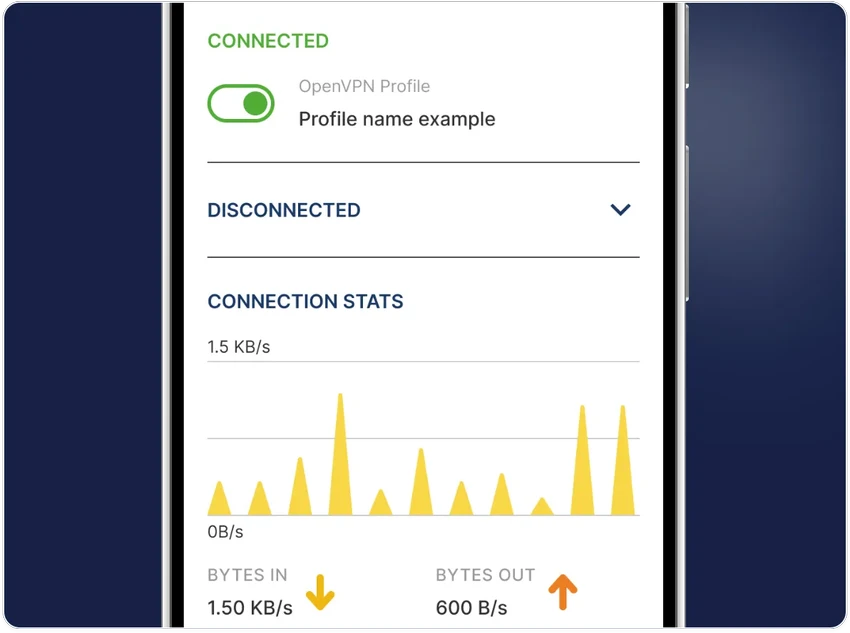
OpenVPN is designed primarily as a networking tool rather than a consumer-focused VPN application, so the experience depends on how it is configured. Once installed, the graphical interface on Windows simplifies connecting to existing VPN profiles and managing connections. For users deploying their own VPN infrastructure, configuration requires networking knowledge, particularly when setting up certificates, routing, or server environments. However, the software's flexibility makes it suitable for a broad range of networking scenarios, from small remote-access deployments to larger enterprise implementations.

Who Should Use OpenVPN?

  • Individuals who want secure remote access to private networks.
  • Businesses deploying remote workforce VPN solutions.
  • Organizations implementing site-to-site VPN connections.
  • IT administrators managing enterprise VPN infrastructure.
  • Users who require flexible authentication options, including certificates or two-factor authentication.
  • Anyone seeking an open-source VPN platform for secure networking.

Conclusion & Recommendation

OpenVPN is a powerful and highly flexible VPN platform that supports everything from secure personal remote access to enterprise-grade networking deployments. Its use of SSL/TLS encryption, broad authentication options, and compatibility with diverse network environments make it a trusted choice for secure communications.

Vorteile & Nachteile

Vorteile

  • Open-source VPN solution.
  • Uses industry-standard SSL/TLS encryption.
  • Supports remote access and site-to-site VPNs.
  • Flexible authentication methods, including certificates, smart cards, and two-factor authentication.
  • Compatible with UDP and TCP connections.
  • Supports NAT traversal and dynamic IP environments.
  • Suitable for enterprise-scale deployments.
  • GUI available for Windows and macOS.

Nachteile

  • Initial configuration can be complex for beginners.
  • Advanced deployment requires networking knowledge.
  • Does not function as a browser-based web proxy.

Häufig gestellte Fragen

What is OpenVPN used for?

OpenVPN is used to create secure, encrypted VPN connections between devices and networks. It supports remote access, site-to-site VPNs, and secure communication over public networks using SSL/TLS encryption.

Is OpenVPN a web browser VPN?

No. OpenVPN is not a browser-based VPN or web proxy. It operates at the operating system level by creating encrypted network tunnels that applications can use.

What authentication methods does OpenVPN support?

OpenVPN supports several authentication methods, including digital certificates, smart cards, pre-shared keys, and two-factor authentication, depending on how the VPN server is configured.

Can OpenVPN work behind NAT and firewalls?

Yes. OpenVPN is designed to operate through NAT environments and can tunnel traffic through connection-oriented stateful firewalls without requiring explicit firewall rules in many deployment scenarios.

Does OpenVPN support both UDP and TCP?

Yes. OpenVPN can tunnel network traffic over either UDP or TCP, allowing administrators to choose the protocol that best fits their network environment and performance requirements.

Which Windows versions are supported?

According to the provided information, OpenVPN supports Windows 11, Windows 10, Windows 8, and Windows 7.

Empfohlene Apps [Freeware]:
  • Simple IP Config 2.9.7 Simple IP Config logo Ein leichtes, portables Tool zum schnellen Ändern von Windows-IP-, DNS- und Netzwerkeinstellungen
  • FlowHeater 4.5.6 FlowHeater logo Datenintegrationstool zur Verbindung von Dateien und Datenbanken wie Excel, Access, SQL Server und MySQL
  • BitComet 2.21 BitComet logo BitTorrent-Download-Manager mit Unterstützung für Torrents, HTTP und FTP sowie erweiterten Tools zur Geschwindigkeits- und Festplattenoptimierung
  • KMPlayer 2026.6.26.11 KMPlayer logo Hochleistungsfähiger 4K/8K-Mediaplayer mit werbefreier Benutzeroberfläche, Codec-Unterstützung und YouTube-Wiedergabetools
  • Avast Clear 26.6.11052 Avast Clear logo Entfernen Sie Avast Antivirus vollständig mit Avast Clear, dem offiziellen Deinstallationsprogramm, das verbliebene Dateien und Registry-Einträge löscht.
  • MKVToolNix 100.0 MKVToolNix logo Kostenloses MKV-Toolkit zum einfachen Teilen, Zusammenfügen, Bearbeiten und Extrahieren von Video- und Audiostreams.
Empfohlene Apps [Shareware]:
  • iToolab WatsGo 9.1.0 iToolab WatsGo logo WhatsApp-Daten zwischen Android- und iPhone-Geräten einfach übertragen, sichern und wiederherstellen
  • NovaBench 6.1.2 NovaBench logo Testen Sie CPU, GPU, RAM und Speicher mit NovaBench, um die PC-Leistung zu messen und die Ergebnisse online zu vergleichen.
  • JP Software TCC 36.50.70 JP Software TCC logo Erweiterte Windows CMD-Ersatzshell mit Skripting-, Debugging- und erweiterten Befehlszeilenfunktionen
  • Catalyst Production Suite 2026.1.1 Catalyst Production Suite logo Ein professionelles Medientool zum Durchsuchen, Vorbereiten, Transkodieren und Verwalten von Pro-Videoformaten.
  • Ref-n-write 7.2 Ref-n-write logo Ein Microsoft Word-Add-In, das durch Paraphrasierungs- und Formulierungsvorschläge die akademischen Texte verbessert.
  • Wise Care 365 8.0.4.732 Wise Care 365 logo Optimieren Sie die Windows-Leistung mit Systembereinigungs-, Registry-Tools, Datenschutz- und Hardwareüberwachungsfunktionen.