OpenVPN logo

OpenVPN 2.7.5-I001

  • ユーザー評価:
    ★★★★★
    ★★★★★
    0.0 0Votes
  • 動作環境:
    Windows
  • バージョン: 2.7.5-I001
  • 最終更新: 3週間前
  • ライセンス: 無料ソフト  
  • 提供元: OpenVPN
  • サイズ: 6 MB
× app stores

OpenVPN is a full-featured, open-source VPN solution that enables secure communication across public and private networks using the industry-standard SSL/TLS protocol. It is designed to support a wide variety of deployment scenarios, including remote access VPNs, site-to-site connections, Wi-Fi security, and enterprise-scale virtual private networks.

Rather than functioning as a browser-based proxy, OpenVPN creates secure network tunnels at the operating system level, allowing applications and devices to communicate over encrypted connections. With support for flexible authentication methods, strong encryption provided by the OpenSSL library, and extensive networking capabilities, OpenVPN is suitable for both individual users and organizations requiring secure remote connectivity.

Features of OpenVPN

  • Create secure SSL/TLS-based VPN connections.
  • Supports remote access VPN deployments.
  • Supports site-to-site VPN configurations.
  • Secures Wi-Fi network connections.
  • Designed for enterprise-scale VPN environments.
  • Supports load-balanced VPN server deployments.
  • Tunnels IP subnetworks or virtual Ethernet adapters through a single UDP or TCP port.
  • Uses OpenSSL encryption, authentication, and certificate features.
  • Supports multiple encryption algorithms, key sizes, and HMAC digests available through OpenSSL.
  • Supports:
    • Certificate-based authentication
    • Smart card authentication
    • Two-factor authentication
  • Allows user- and group-specific access control through firewall rules.
  • Supports static pre-shared keys.
  • Supports TLS-based dynamic key exchange.
  • Supports adaptive link compression and traffic shaping.
  • Works with networks using dynamic public IP addresses.
  • Operates through NAT environments.
  • Can establish secure Ethernet bridges using virtual TAP devices.
  • Includes graphical user interface support on Windows and macOS.

Interface and Usability

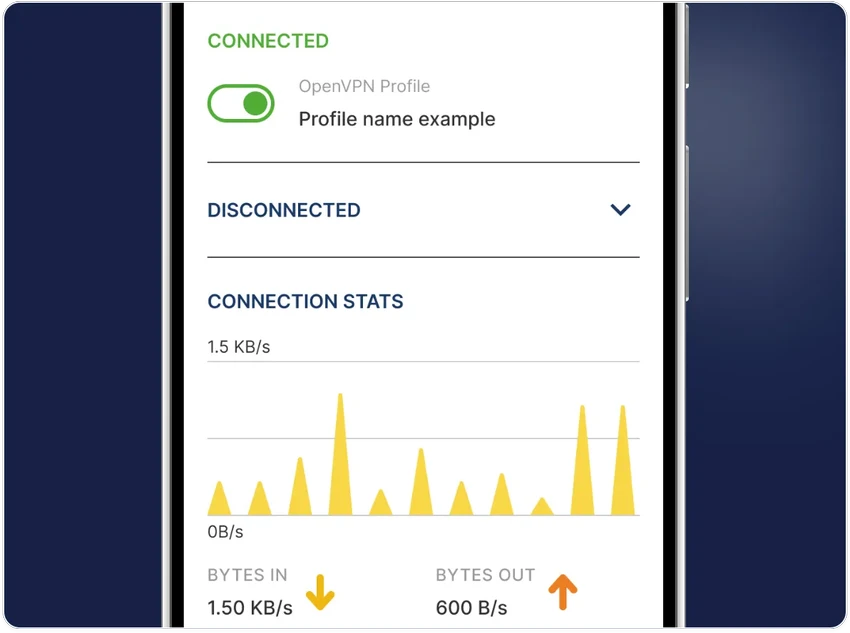
OpenVPN is designed primarily as a networking tool rather than a consumer-focused VPN application, so the experience depends on how it is configured. Once installed, the graphical interface on Windows simplifies connecting to existing VPN profiles and managing connections. For users deploying their own VPN infrastructure, configuration requires networking knowledge, particularly when setting up certificates, routing, or server environments. However, the software's flexibility makes it suitable for a broad range of networking scenarios, from small remote-access deployments to larger enterprise implementations.

Who Should Use OpenVPN?

  • Individuals who want secure remote access to private networks.
  • Businesses deploying remote workforce VPN solutions.
  • Organizations implementing site-to-site VPN connections.
  • IT administrators managing enterprise VPN infrastructure.
  • Users who require flexible authentication options, including certificates or two-factor authentication.
  • Anyone seeking an open-source VPN platform for secure networking.

Conclusion & Recommendation

OpenVPN is a powerful and highly flexible VPN platform that supports everything from secure personal remote access to enterprise-grade networking deployments. Its use of SSL/TLS encryption, broad authentication options, and compatibility with diverse network environments make it a trusted choice for secure communications.

メリット・デメリット

メリット

  • Open-source VPN solution.
  • Uses industry-standard SSL/TLS encryption.
  • Supports remote access and site-to-site VPNs.
  • Flexible authentication methods, including certificates, smart cards, and two-factor authentication.
  • Compatible with UDP and TCP connections.
  • Supports NAT traversal and dynamic IP environments.
  • Suitable for enterprise-scale deployments.
  • GUI available for Windows and macOS.

デメリット

  • Initial configuration can be complex for beginners.
  • Advanced deployment requires networking knowledge.
  • Does not function as a browser-based web proxy.

よくある質問

What is OpenVPN used for?

OpenVPN is used to create secure, encrypted VPN connections between devices and networks. It supports remote access, site-to-site VPNs, and secure communication over public networks using SSL/TLS encryption.

Is OpenVPN a web browser VPN?

No. OpenVPN is not a browser-based VPN or web proxy. It operates at the operating system level by creating encrypted network tunnels that applications can use.

What authentication methods does OpenVPN support?

OpenVPN supports several authentication methods, including digital certificates, smart cards, pre-shared keys, and two-factor authentication, depending on how the VPN server is configured.

Can OpenVPN work behind NAT and firewalls?

Yes. OpenVPN is designed to operate through NAT environments and can tunnel traffic through connection-oriented stateful firewalls without requiring explicit firewall rules in many deployment scenarios.

Does OpenVPN support both UDP and TCP?

Yes. OpenVPN can tunnel network traffic over either UDP or TCP, allowing administrators to choose the protocol that best fits their network environment and performance requirements.

Which Windows versions are supported?

According to the provided information, OpenVPN supports Windows 11, Windows 10, Windows 8, and Windows 7.

おすすめアプリ [無料]:
  • Simple IP Config 2.9.7 Simple IP Config logo WindowsのIPアドレス、DNS、ネットワーク設定を素早く変更できる軽量で持ち運び可能なツール
  • FlowHeater 4.5.6 FlowHeater logo Excel、Access、SQL Server、MySQLなどのファイルとデータベースを接続するデータ統合ツール
  • BitComet 2.21 BitComet logo BitTorrentダウンロードマネージャーは、高度な速度最適化ツールとディスク最適化ツールを備え、トレント、HTTP、FTPをサポートしています。
  • KMPlayer 2026.6.26.11 KMPlayer logo 広告なしのUI、コーデックサポート、YouTube再生ツールを備えた高性能4K/8Kメディアプレーヤー
  • Avast Clear 26.6.11052 Avast Clear logo Avast Clearを使用してAvastアンチウイルスを完全に削除してください。Avast Clearは、残存ファイルとレジストリエントリをクリーンアップする公式アンインストールユーティリティです。
  • MKVToolNix 100.0 MKVToolNix logo 動画や音声ストリームの分割、結合、編集、抽出を簡単に行える無料のMKVツールキット
おすすめアプリ [シェアウェア]:
  • iToolab WatsGo 9.1.0 iToolab WatsGo logo Android端末とiPhone端末間でWhatsAppデータを簡単に転送、バックアップ、復元できます。
  • NovaBench 6.1.2 NovaBench logo NovaBenchを使用してCPU、GPU、RAM、ストレージのベンチマークを行い、PCのパフォーマンスを測定し、オンラインで結果を比較しましょう。
  • JP Software TCC 36.50.70 JP Software TCC logo スクリプト作成、デバッグ、および強化されたコマンドライン機能を備えた、高度なWindows CMD代替シェル
  • Catalyst Production Suite 2026.1.1 Catalyst Production Suite logo プロ仕様のビデオフォーマットの閲覧、準備、トランスコード、管理を行うためのプロフェッショナル向けメディアツール。
  • Ref-n-write 7.2 Ref-n-write logo 言い換えやフレーズの提案によって学術論文の書き方を改善するのに役立つMicrosoft Wordのアドイン
  • Wise Care 365 8.0.4.732 Wise Care 365 logo システムクリーンアップ、レジストリツール、プライバシー保護、ハードウェア監視機能などを活用して、Windowsのパフォーマンスを最適化します。