SynthFont2 logo

SynthFont2 2.9.2.1

  • Avaliação dos usuários:
    ★★★★★
    ★★★★★
    0.0 0Votes
  • Requisitos:
    Windows
  • Versão: 2.9.2.1
  • Última atualização: há 2 meses
  • Licença: Teste gratuito  
  • Editor: Kenneth Rundt
  • Tamanho: 26 MB
× app stores

SynthFont2 is a specialized MIDI editing and playback application designed for users who work with MIDI composition, sound design, and audio rendering. Unlike traditional audio files such as MP3 or WAV, MIDI files contain musical instructions rather than recorded sound. SynthFont2 bridges this gap by combining MIDI data with SoundFonts, SFZ files, or VST instruments to generate fully rendered audio output.

SynthFont2 stands out as a powerful tool for musicians and producers who want detailed control over MIDI playback and sound generation. It supports a wide range of sound sources and provides advanced editing tools for shaping musical output with precision. The software is particularly useful for users who want to convert MIDI compositions into high-quality audio files or experiment with different instrument configurations.

Features of SynthFont2

  • MIDI playback and editing with multiple time signature support.
  • Rendering MIDI files using SoundFonts, SFZ, and GigaSampler files.
  • Support for VST instruments as sound sources.
  • Export audio in compressed formats such as M4A (AAC-based).
  • Variable Bit Rate (VBR) encoding support.
  • Multi-core CPU processing for improved performance.
  • Pianoroll with smooth playback scrolling.
  • SoundFont Override and Bank Manager for flexible instrument assignment.
  • Support for SoundFont modulators.
  • VU meters for MIDI channel monitoring.
  • Ability to handle very large MIDI files.
  • Unlimited voice polyphony support.
  • Loudness analysis tools for audio balancing.
  • Save MIDI data within arrangement files.
  • Visual styling and UI customization options.
  • Compatibility improvements for modern Windows versions.

Interface and Usability

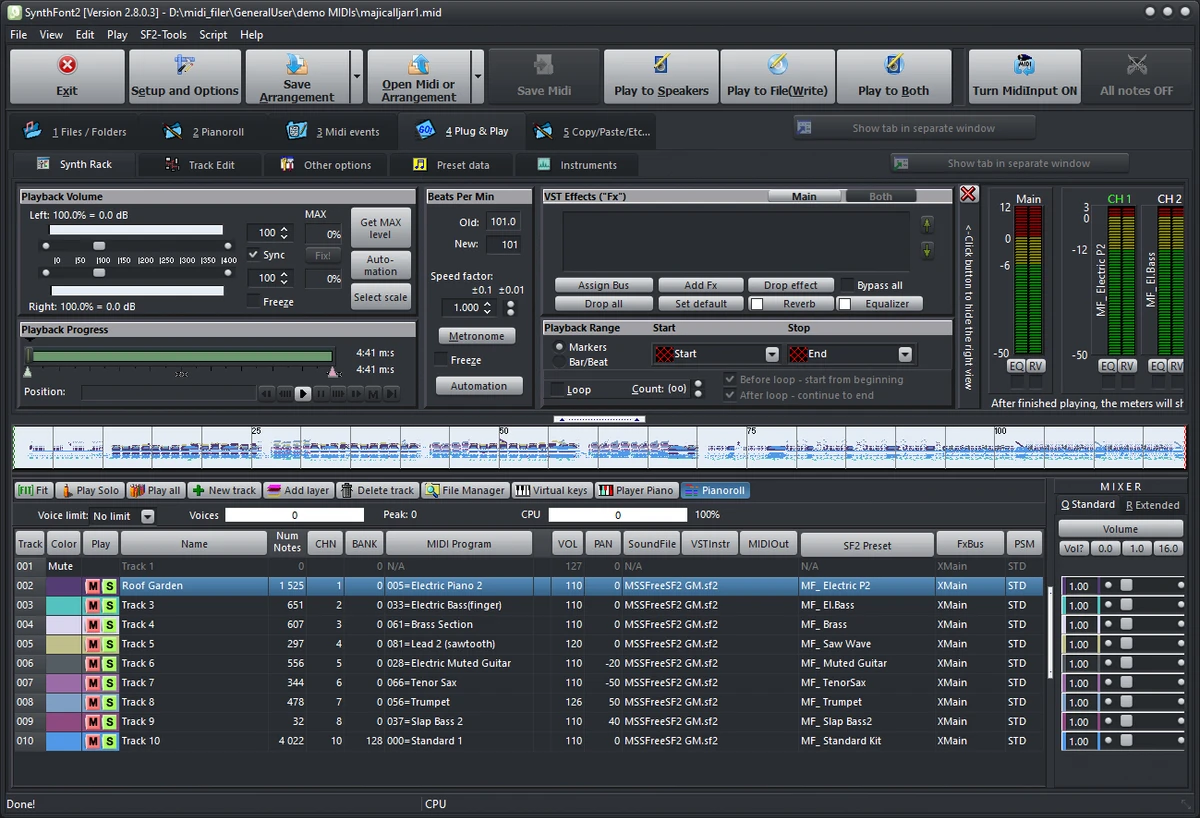
SynthFont2 presents a functional, workflow-oriented interface designed for MIDI editing and audio rendering tasks. From my perspective, it is tailored more toward experienced users familiar with MIDI sequencing and sound libraries.

The pianoroll editor provides visual control over note placement and timing, while the SoundFont and VST management system allows users to experiment with different instrument sounds. Although the interface is dense with controls, it reflects the software’s professional focus on precision rather than simplicity. Once configured, the playback and rendering process is efficient, especially when working with multi-core systems and large MIDI projects.

Who Should Use SynthFont2?

  • Music producers working with MIDI compositions.
  • Sound designers experimenting with instrument libraries.
  • Composers converting MIDI into audio formats.
  • Users working with SoundFonts or SFZ instruments.
  • Hobbyists exploring MIDI playback and arrangement.
  • Professionals needing advanced MIDI rendering tools.

System Requirements

  • Windows Vista and later

Conclusion

SynthFont2 is a professional-grade MIDI editor and rendering tool designed for users who want deep control over how MIDI files are played and converted into audio. With support for SoundFonts, VST instruments, and advanced rendering options, it provides a highly flexible environment for music production and experimentation.

Prós e Contras

Prós

  • Powerful MIDI rendering with SoundFont and VST support
  • High-quality audio export (M4A/AAC, VBR)
  • Supports large and complex MIDI files
  • Multi-core processing improves performance
  • Flexible instrument and bank management system
  • Detailed pianoroll editing tools

Contras

  • Steep learning curve for beginners
  • Interface may feel complex for casual users
  • Requires understanding of MIDI and sound libraries

Perguntas frequentes

What is SynthFont2 used for?

SynthFont2 is used to edit and play MIDI files by rendering them into audio using SoundFonts, VST instruments, or SFZ files.

Does SynthFont2 support VST plugins?

Yes. It supports VST instruments as sound sources for MIDI playback and rendering.

Can SynthFont2 convert MIDI to audio files?

Yes. It can render MIDI files into audio formats such as M4A using AAC encoding.

Does SynthFont2 support large MIDI files?

Yes. It is designed to handle very large and complex MIDI files with unlimited voice support.

Is SynthFont2 suitable for beginners?

It is more suitable for intermediate or advanced users due to its technical MIDI workflow and detailed configuration options.

What makes SynthFont2 different from a normal audio player?

Unlike standard audio players, SynthFont2 generates audio from MIDI instructions using sound libraries rather than playing pre-recorded audio files.

Aplicativos recomendados [Gratuitos]:
  • HWMonitor 1.65 HWMonitor logo Uma ferramenta de sistema gratuita que monitora CPU, GPU, voltagens, temperaturas e velocidades das ventoinhas em tempo real.
  • NirLauncher Package 1.30.24 NirLauncher Package logo Um pacote de utilitários portáteis para Windows com mais de 180 ferramentas NirSoft para tarefas de sistema, rede e recuperação.
  • Adobe DNG Converter 18.4 Adobe DNG Converter logo Converta arquivos RAW específicos da câmera para o formato Adobe DNG para obter maior compatibilidade e fluxos de trabalho fotográficos mais flexíveis.
  • Drupal 11.4.2 Drupal logo CMS de código aberto e framework de desenvolvimento web que impulsiona sites corporativos, plataformas digitais e aplicações web escaláveis.
  • Picture Window Pro 8.0.574 Picture Window Pro logo Edite e aprimore fotos com ferramentas não destrutivas, suporte a alta resolução, desempenho multi-core e fluxos de trabalho flexíveis.
  • HWdetails 2.0 HWdetails logo Visualize informações detalhadas sobre hardware, Windows, rede e sistema do seu PC com ferramentas de monitoramento e relatórios exportáveis.
Aplicativos recomendados [Shareware]:
  • iPubsoft Android Desktop Manager 3.7.22 iPubsoft Android Desktop Manager logo Transfira arquivos, gerencie dados do Android, faça backup e restaure dispositivos e organize contatos e SMS a partir do seu PC.
  • HWMonitor Pro 1.58 HWMonitor Pro logo Amplia o HWMonitor com monitoramento remoto, gráficos de registro e ferramentas aprimoradas de interface de sensores.
  • Gilisoft Screen Recorder Pro 13.1 Gilisoft Screen Recorder Pro logo Uma ferramenta para Windows que permite capturar tela, webcam e áudio, com recursos de edição, aceleração por GPU e suporte a múltiplos formatos.
  • WinCatalog 2026.2.0.629 WinCatalog logo Uma ferramenta de catalogação de discos e arquivos para Windows que indexa arquivos para busca e organização rápidas.
  • Actual Window Menu 8.15.4 Actual Window Menu logo Adiciona comandos avançados como transparência, sempre visível, minimizar para a bandeja do sistema e opções de redimensionamento ao menu do sistema Windows.
  • Gilisoft Video UniReel 19.0.0 Gilisoft Video UniReel logo Edite, corte, una, divida, recorte e aprimore vídeos com efeitos, legendas, marcas d'água, música e ferramentas de edição em lote.