priPrinter Server logo

priPrinter Server 7.0.1.2625

  • Évaluation des utilisateurs:
    ★★★★★
    ★★★★★
    0.0 0Votes
  • Exigences:
    Windows
  • Version: 7.0.1.2625
  • Dernière mise à jour: il y a 4 semaines
  • Licence: Essai gratuit  
  • Éditeur: Pelikan Software
  • Taille: 6.3 MB
× app stores

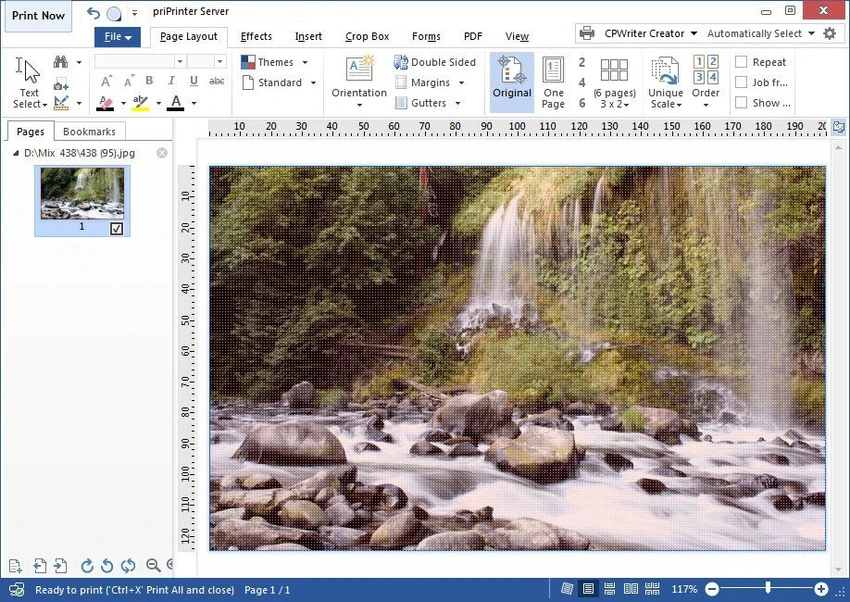
priPrinter Server is a virtual printer and print preview application that gives users complete control over print jobs before they reach a physical printer. Instead of printing documents immediately, the software opens an interactive preview where pages can be rearranged, edited, resized, or enhanced before final output. In addition to print optimization, priPrinter Server supports exporting documents to PDF and image formats, making it a flexible solution for document preparation, review, and print management.

Features of priPrinter Server

  • Virtual printer driver for Windows
  • Interactive print preview before printing
  • Rearrange, delete, and organize pages
  • Adjust page margins and layout
  • Place multiple pages on a single sheet
  • Edit or redact text before printing
  • Apply custom watermarks
  • Create booklets and posters
  • Print in single-sided or duplex mode
  • Export print jobs to PDF
  • Save output as image files
  • Print history with search functionality
  • Reprint previously processed documents
  • Search print history by words or phrases
  • Drag-and-drop margin adjustment
  • Precise manual margin input
  • Save layouts and settings as reusable profiles
  • Multiple preview modes, including 3D page viewing

User Experience

priPrinter Server integrates into Windows as a standard printer, allowing users to select it from virtually any application. Once a document is sent to print, it opens inside an interactive preview environment where adjustments can be made before final output. The editing tools are intuitive and designed to minimize wasted paper and unnecessary reprints. Users can reposition pages, combine multiple pages onto a single sheet, adjust margins, and apply watermarks without modifying the original document.

One particularly useful feature is the searchable print history, which makes it easy to locate and reprint previous documents without repeating the entire workflow. Support for reusable profiles also helps streamline recurring print tasks by preserving preferred layouts and settings. The inclusion of PDF and image export further expands its usefulness beyond physical printing, making it suitable for digital archiving and document sharing. Overall, the software offers a comprehensive printing workflow while maintaining a clean and efficient user experience.

Who Should Use priPrinter Server?

  • Business and office environments
  • Users who frequently print reports or technical documents
  • Graphic designers preparing printed materials
  • Organizations needing reusable print workflows
  • Users who regularly export documents to PDF
  • Anyone wanting greater control over print layout and formatting

Conclusion

priPrinter Server transforms standard printing into a far more efficient and flexible process. By allowing users to preview, modify, and optimize documents before printing, it helps reduce wasted paper while improving the quality and consistency of printed output.

Avantages & Inconvénients

Avantages

  • Comprehensive print preview and editing tools
  • Supports PDF and image export
  • Rearrange, crop, and optimize pages before printing
  • Booklet and poster printing
  • Watermark and text redaction features
  • Searchable print history
  • Reusable print profiles
  • Multiple preview modes, including 3D

Inconvénients

  • Requires printing through the virtual printer workflow
  • Advanced features may exceed the needs of casual users
  • Primarily focused on print preparation rather than document editing

Questions fréquentes

What is priPrinter Server?

priPrinter Server is a virtual printer driver that allows users to preview, edit, and optimize print jobs before sending them to a physical printer or exporting them.

Can priPrinter Server save documents as PDF?

Yes. It supports exporting print jobs to PDF as well as various image formats.

Does priPrinter Server support booklet printing?

Yes. It includes built-in booklet and poster printing features.

Can I search previously printed documents?

Yes. The software maintains a searchable print history that allows users to locate and reprint earlier jobs.

Does priPrinter Server support duplex printing?

Yes. Documents can be printed in both single-sided and double-sided (duplex) modes.

Applications recommandées [Gratuites]:
  • Google Chrome 150.0.7871.125 Google Chrome logo Navigateur web rapide, sécurisé et stable avec sandbox, isolation des onglets et une interface minimaliste pour les applications web modernes
  • Ultimaker Cura 5.13.0 Ultimaker Cura logo Préparez, découpez et gérez vos impressions 3D avec Ultimaker Cura, un logiciel libre pour débutants et professionnels.
  • Howard Email Notifier 2.17 Howard Email Notifier logo Notifications de bureau simples pour plusieurs services de messagerie avec accès rapide à la boîte de réception.
  • Cryptomator 1.19.3 Cryptomator logo Outil de chiffrement open source côté client qui sécurise les fichiers cloud avec le chiffrement AES tout en restant compatible avec n'importe quel fournisseur de cloud.
  • Argente System Repair 1.0.8.2 Argente System Repair logo Analyse et corrige les erreurs Windows pour améliorer les performances grâce à des modes simple, recommandé et personnalisé.
  • NetworkTrafficView 2.52 NetworkTrafficView logo Surveillez le trafic réseau grâce à un utilitaire léger qui capture les paquets, affiche les statistiques de connexion et analyse l'utilisation des données.
Applications recommandées [Shareware]:
  • EF Commander 26.06 EF Commander logo un gestionnaire de fichiers Windows riche en fonctionnalités avec FTP, outils multimédias, archivage et contrôle avancé des fichiers
  • VovSoft Tree Notes 3.3 VovSoft Tree Notes logo Organisez vos notes grâce à une structure hiérarchique, un éditeur de texte enrichi et un stockage dans un seul fichier.
  • 4DDiG File Repair 4.4.2.9 4DDiG File Repair logo un outil Windows pour réparer par lots les photos et vidéos endommagées grâce à un flux de travail simple et automatisé
  • Net Monitor for Employees Professional 6.6.6 Net Monitor for Employees Professional logo Suivre l'activité, l'utilisation et la productivité de l'écran en environnement professionnel.
  • R-Studio 9.5 Build 191810 R-Studio logo Logiciel puissant de récupération de données pour récupérer des fichiers supprimés, formatés ou endommagés sur plusieurs systèmes de fichiers
  • PTE AV Studio 12.0 Build 2 PTE AV Studio logo crée des diaporamas photo professionnels avec animations, clips vidéo, montage musical et sortie 4K