FoneTool logo

FoneTool 3.8.0

  • Benutzerbewertung:
    ★★★★★
    ★★★★★
    0.0 0Votes
  • Anforderungen:
    Windows
  • Version: 3.8.0
  • Zuletzt aktualisiert: vor 1 Monat
  • Lizenz: Freemium  
  • Herausgeber: AOMEI
  • Größe: 0.2 MB
× app stores

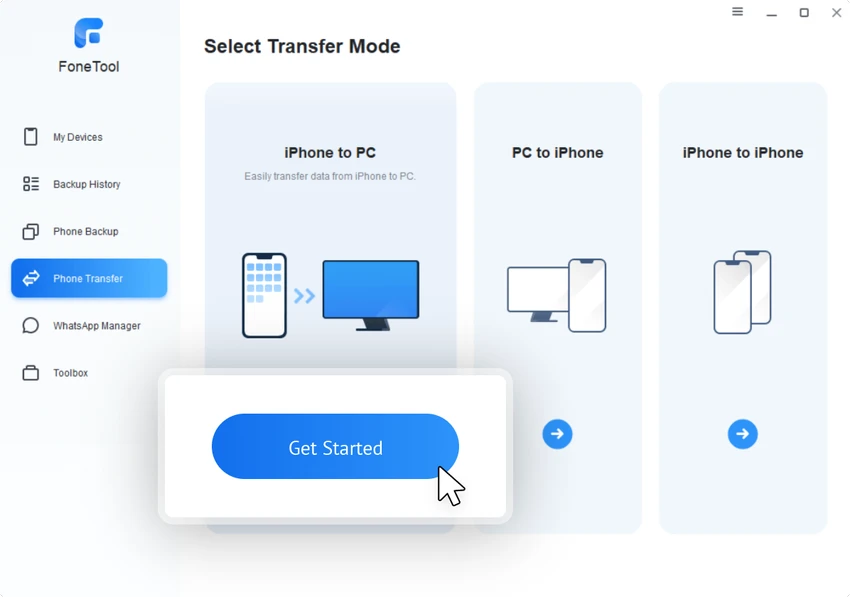
FoneTool is a Windows-based device management application designed to help users back up, transfer, and organize data from iPhone, iPad, and iPod Touch devices. It provides tools for moving files between devices, creating backups, managing media, converting images, and protecting personal data. After using FoneTool, I found that the software focuses on making iOS device management easier from a Windows PC. Its interface guides users through common tasks such as creating backups, transferring files, and checking stored backup history without requiring advanced technical knowledge. In addition to iOS management, FoneTool supports wireless data transfers between Android and iPhone devices, making it useful for users switching between mobile platforms.

Features of FoneTool

  • Back up iPhone, iPad, and iPod Touch data to a Windows PC.
  • Transfer files between iPhone and PC.
  • Transfer data between Android and iPhone devices wirelessly.
  • Move content to a new iPhone.
  • Backup and transfer WhatsApp data.
  • Manage media, documents, and other device files.
  • Recover lost or deleted data on iPhone.
  • Erase all iPhone data securely.
  • Erase private data from devices.
  • Find and delete duplicate photos.
  • Convert HEIC images to JPG, JPEG, or PNG formats.
  • Manage and sync iCloud data.
  • Create iPhone and PC ringtones.
  • Provide additional device tools through the Toolbox section.

User Experience

FoneTool offers a straightforward experience for users who want to manage iPhone data from a Windows computer. The process begins by connecting an Apple device and allowing the application to recognize it. From there, users can choose whether they want to create a backup, review backup history, transfer files, or access other available tools. The interface is designed with simplicity in mind. The backup and conversion processes provide step-by-step guidance, making the software approachable even for users who do not regularly work with device management tools.

The file transfer features are especially useful for organizing content without relying entirely on cloud services. The ability to transfer data between Android and iPhone devices also makes switching platforms more convenient.

Backup and Data Management Performance

FoneTool provides a collection of tools focused on protecting and organizing personal data. The backup system helps users store important files safely, while features such as duplicate photo detection and HEIC conversion can help optimize device storage and improve file compatibility. The secure erase function is another useful addition for users preparing to sell or give away an iPhone. It helps remove stored information from the device before it changes ownership.

Free vs Pro Version

FoneTool Free Limitations

The free version includes several useful features but applies daily restrictions:

  • Up to 30 daily file transfers between iPhone and PC.
  • Up to 30 duplicate photo removals per day.
  • iCloud management and synchronization.
  • HEIC converter.
  • Full iPhone data erase.
  • WhatsApp backup.
  • Ringtone maker.

FoneTool Pro Features

The Pro version removes daily limitations and adds additional capabilities:

  • One-click iPhone-to-iPhone data transfer.
  • WhatsApp message transfer to a new iPhone.
  • iOS system issue fixes.
  • iOS/iPadOS upgrade and downgrade tools.
  • Private data erasing.
  • Universal restore.
  • Business use support.
  • Faster task execution.

Who Should Use FoneTool?

  • iPhone users who manage their devices from Windows PCs.
  • Users who want local backups instead of relying only on cloud storage.
  • People transferring data to a new iPhone.
  • Users switching between Android and iPhone.
  • Anyone needing additional tools for iOS file management.

Conclusion

FoneTool provides a convenient collection of tools for Windows users who need better control over their iPhone data. Its combination of backup, transfer, conversion, synchronization, and security features makes it a versatile iOS management solution.

Vorteile & Nachteile

Vorteile

  • Wide range of iPhone management tools.
  • Simple backup and transfer workflow.
  • Supports iPhone, iPad, and iPod Touch devices.
  • Includes Android-to-iPhone wireless transfer.
  • Provides HEIC image conversion.
  • Includes duplicate photo management.
  • Offers secure data wiping features.
  • Modern and user-friendly interface.

Nachteile

  • Free version has daily usage limits.
  • Some advanced features require the Pro version.
  • Upgrade reminder appears when exiting the application.

Häufig gestellte Fragen

What is FoneTool?

FoneTool is a Windows application that helps users back up, transfer, and manage data from iPhone, iPad, and iPod Touch devices.

Can FoneTool transfer data between Android and iPhone?

Yes. FoneTool supports wireless data transfer between Android devices and iPhones.

Does FoneTool support iPhone backups?

Yes. Users can create backups of iPhone data and review backup history through the application.

Can FoneTool convert HEIC images?

Yes. FoneTool can convert HEIC files into more common formats such as JPG, JPEG, and PNG.

Does FoneTool erase iPhone data?

Yes. FoneTool includes a feature for securely erasing all data from an iPhone.

What are the differences between FoneTool Free and Pro?

The Free version includes several tools with daily limits, while the Pro version removes restrictions and adds advanced features such as iPhone-to-iPhone transfers, system fixes, and additional data management options.

Empfohlene Apps [Freeware]:
  • CS Easy Unlocker 1.1.6.0 CS Easy Unlocker logo Entsperren Sie gesperrte Ordner und beheben Sie „Zugriff verweigert“-Fehler mit einem einfachen Ein-Klick-Tool.
  • Donemax Video Downloader 3.0 Donemax Video Downloader logo Laden Sie Videos und Audiodateien von über 1.200 Websites herunter, um sie offline anzusehen und wiederzugeben.
  • Power-user 1.7.85.410 Power-user logo Office-Add-In mit Vorlagen, Symbolen, Diagrammen, Karten und Grafiken zur Steigerung der Produktivität in PowerPoint, Excel und Word
  • WinDirStat 2.7.0 WinDirStat logo Analysieren Sie den Speicherplatz visuell mit WinDirStat, einem kostenlosen Windows-Tool, das Ihnen hilft, große Dateien schnell zu identifizieren und zu bereinigen.
  • Driver Magician Lite 5.82 Driver Magician Lite logo Sichern, wiederherstellen, aktualisieren und verwalten Sie Windows-Gerätetreiber mit einem Dienstprogramm, das für die Hardwarewartung und Systemwiederherstellung entwickelt wurde.
  • Broot 1.58.0 Broot logo Navigieren Sie schneller durch Verzeichnisse, suchen Sie Dateien und verwalten Sie Ihr Dateisystem mit einem schlanken Kommandozeilen-Dateimanager mit Live-Baumansicht.
Empfohlene Apps [Shareware]:
  • Topaz Photo 1.6.1 Topaz Photo logo fortschrittliche KI zum Schärfen von Fotos, Entfernen von Rauschen und Verbessern der Bildqualität mit Leichtigkeit
  • Classroom Spy Pro 5.6.6 Classroom Spy Pro logo Überwachen, steuern und verwalten Sie Schülercomputer aus der Ferne mit Classroom Spy Pro für Windows-Klassenzimmer.
  • R-Studio 9.5 Build 191810 R-Studio logo Leistungsstarke Datenwiederherstellungssoftware zur Wiederherstellung gelöschter, formatierter oder beschädigter Dateien über mehrere Dateisysteme hinweg.
  • Actual Title Buttons 8.15.4 Actual Title Buttons logo Fügt zusätzliche Fenstersteuerungsfunktionen wie Transparenz, Immer im Vordergrund, Minimieren in die Taskleiste und erweiterte Fensterverwaltungsfunktionen hinzu.
  • ButterScroll 1.5.5 ButterScroll logo Verbessern Sie das Scrollen unter Windows mit ButterScroll. Genießen Sie flüssige Animationen, anpassbare Geschwindigkeit und präzises Maus-Scrollen.
  • MassTube 22.1.0.216 MassTube logo Laden Sie Online-Videos herunter und konvertieren Sie Audiodateien in verschiedene Formate mit einem benutzerfreundlichen Tool, das für schnelles Offline-Ansehen und -Anhören entwickelt wurde.